How to Add X402 Pay-Per-Call Payments to the Ace Data Cloud SDK
If you are building a CLI, agent, or developer tool, prepaid API tokens are not always the cleanest fit: sometimes you want the caller to pay for exactly the request they make, without your backend holding their platform token.
What you can do
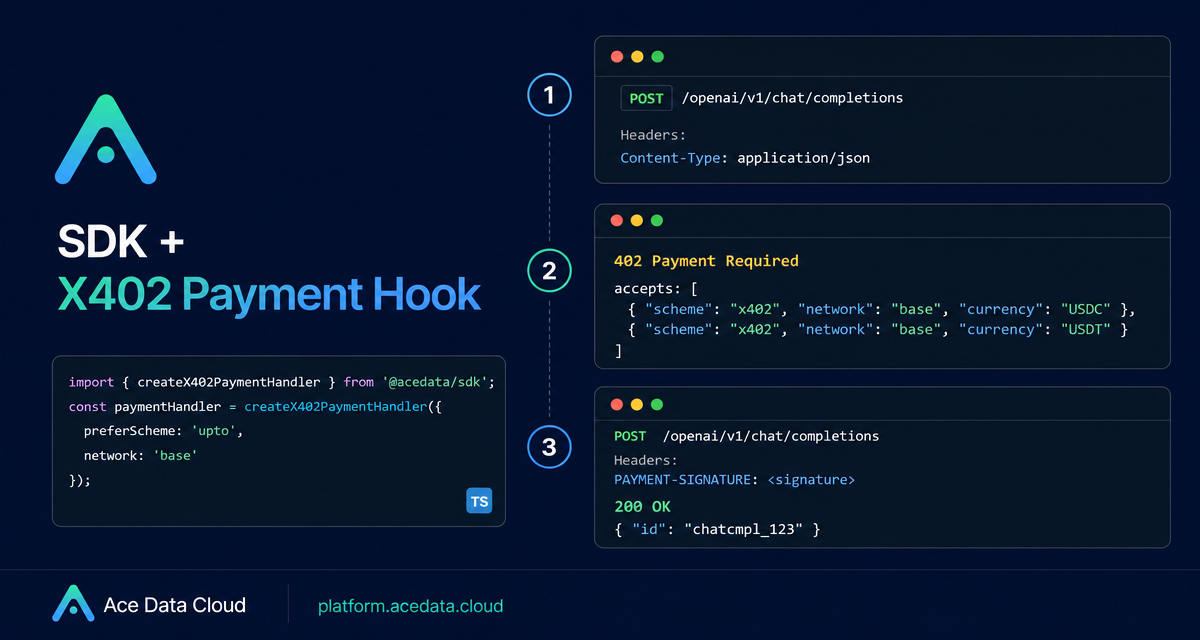
The SDK + X402 Payment Hook flow lets an Ace Data Cloud SDK client make a normal SDK call, receive a 402 Payment Required challenge, sign a payment envelope locally, and retry the same request with a PAYMENT-SIGNATURE header. The business code still calls client.openai.chat.completions.create(...); the payment path sits underneath the SDK through a paymentHandler.
This is useful when you want to build:
- agent tools that can pay per call from a wallet,
- CLI utilities where the operator owns the payment key,
- browser flows where a connected wallet signs the request,
- backend jobs that should avoid storing an Ace Data Cloud API token.
The documented SDK path supports TypeScript through @acedatacloud/sdk and @acedatacloud/x402-client, and Python through acedatacloud and acedatacloud-x402.
How it works
A successful X402 SDK call has three HTTP round trips from the SDK point of view:
- The SDK calls
/openai/v1/chat/completionswithoutAuthorization. - The server returns
402 Payment Requiredwith anacceptsarray describing acceptable payment options, such asscheme,network, andmaxAmountRequired. - The SDK calls your
paymentHandler, injects the returnedPAYMENT-SIGNATUREheader, retries the original request, and receives the normal business response.
1. SDK -> /openai/v1/chat/completions
   <- 402 Payment Required { accepts: [...] }

2. SDK -> paymentHandler({ url, method, body, accepts })
   <- { headers: { "PAYMENT-SIGNATURE": "..." } }

3. SDK -> /openai/v1/chat/completions
   <- 200 + model response
The payment envelope is base64-encoded JSON. In the documented structure, the top level includes x402Version: 2, an accepted object with scheme and network, and a payload containing the chain-specific authorization and signature.
Choosing exact or upto
The two schemes in the document solve different billing shapes. Use exact for fixed-price calls, where the signed amount equals the amount required by the server. Use upto for metered APIs such as chat completions, where the signature authorizes an upper bound and the actual settlement is based on usage.
For chat completions, the guide explicitly recommends setting preferScheme: 'upto' in TypeScript or prefer_scheme="upto" in Python. If the server exposes only exact, the preference is ignored; if upto is requested but unavailable, the client falls back to the first matching option.
TypeScript: browser wallet flow
Install the SDK and X402 helper package:
npm install @acedatacloud/sdk @acedatacloud/x402-clientThen create a client without apiToken. That absence is intentional: it lets the SDK follow the 402 payment path.
import { AceDataCloud } from '@acedatacloud/sdk';
import { createX402PaymentHandler } from '@acedatacloud/x402-client';

const accounts: string[] = await (window as any).ethereum.request({
  method: 'eth_requestAccounts'
});
const userAddress = accounts[0];

await (window as any).ethereum.request({
  method: 'wallet_switchEthereumChain',
  params: [{ chainId: '0x2105' }] // 8453 = Base
});

const client = new AceDataCloud({
  paymentHandler: createX402PaymentHandler({
    network: 'base',
    evmProvider: (window as any).ethereum,
    evmAddress: userAddress,
    preferScheme: 'upto'
  })
});

const res: any = await client.openai.chat.completions.create({
  model: 'gpt-4o-mini',
  messages: [{ role: 'user', content: 'hi' }],
  max_tokens: 20
});

console.log(res.choices[0].message.content);
On EVM Base, the first call requires two approvals in the browser: a one-time USDC Permit2 approval and an EIP-712 signature for the X402 envelope. Later calls only need the envelope signature. Solana is different: the document notes that Solana currently exposes only exact, so preferScheme does not apply there.
Python: server-side private key flow
For backend jobs and task executors, the Python package signs directly with a private key:
pip install acedatacloud acedatacloud-x402import os
from acedatacloud import AceDataCloud
from acedatacloud_x402 import (
create_x402_payment_handler,
EVMAccountSigner,
)
signer = EVMAccountSigner.from_private_key(os.environ["EVM_PRIVATE_KEY"])
client = AceDataCloud(
payment_handler=create_x402_payment_handler(
network="base",
evm_signer=signer,
prefer_scheme="upto",
)
)
res = client.openai.chat.completions.create(
model="gpt-4o-mini",
messages=[{"role": "user", "content": "hi"}],
max_tokens=20,
)
print(res["choices"][0]["message"]["content"])If you use EVM Base for the first time, the documented Python helper also provides approve_permit2 for the one-time Permit2 approval:
from acedatacloud_x402 import approve_permit2

tx_hash = approve_permit2(
    evm_signer=signer,
    rpc_url=os.environ["BASE_RPC_URL"],
)
print("permit2_approve_tx", tx_hash)
Practical checks before using it in production
- Do not pass a raw private key to the TypeScript
createX402PaymentHandler; the TS helper expects an EIP-1193 provider forbaseorskale. - For chat-style metered calls, prefer
uptoso the request can settle based on actual usage instead of a fixed maximum. - Treat
402and signing failures separately from ordinary business API errors such as401,422, or5xx. - Keep separate SDK clients if your application needs both token mode and X402 mode in the same process.
Wrapping up
The nice part of this integration is that your application code remains boring: call the SDK method, pass the model request, read the response. The payment-specific work is isolated in the paymentHandler, which makes it easier to offer wallet-based usage without rewriting each API call.
Read the full Ace Data Cloud guide here: SDK + X402 Payment Hook.


Comments
Post a Comment