How to Generate and Edit Images with the Nano Banana Images API
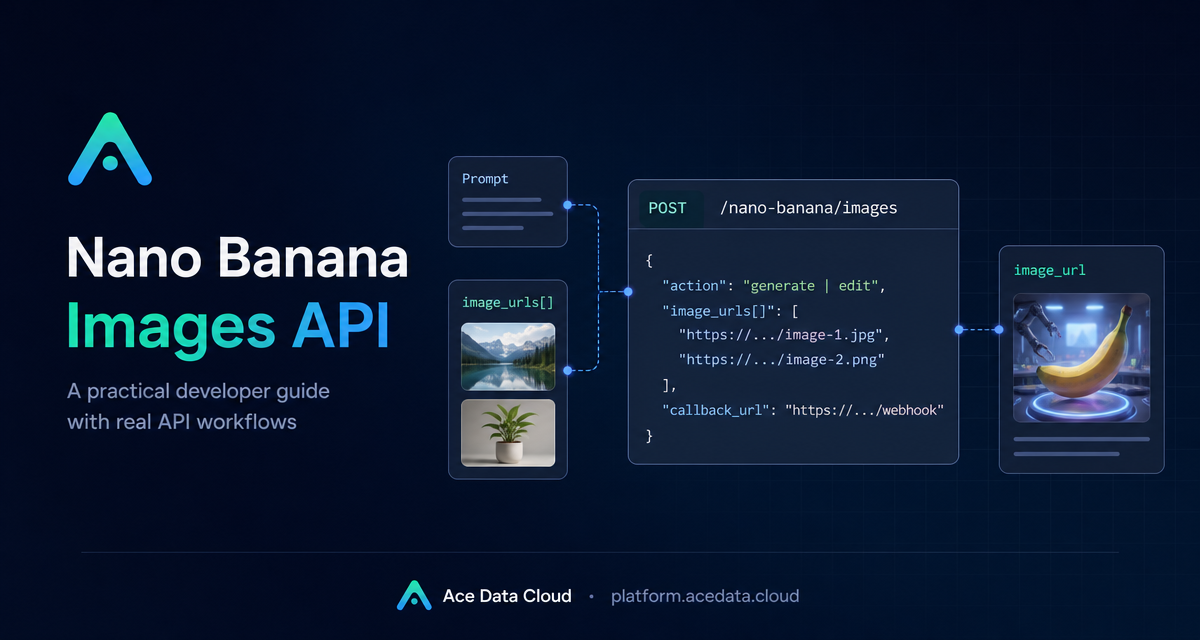
When you build image features, the hard part is not only asking a model for a picture. It is turning prompts, reference images, callbacks, task IDs, and failures into a workflow your app can trust.
This guide shows how to use the Nano Banana Images API from Ace Data Cloud for two practical jobs: generating an image from text and editing existing images with one or more visual references.
What you can do
The API has one endpoint:
POST https://api.acedata.cloud/nano-banana/imagesThe request body uses action. Set it to generate to create an image from a prompt, or edit to transform existing images supplied through image_urls. A successful response includes success, task_id, trace_id, and a data array with returned image_url values.
How it works
Requests go to https://api.acedata.cloud. Send JSON and include a bearer token in the request header. The documented request headers are accept: application/json and content-type: application/json.
The minimum generation request requires action and prompt. Editing also requires image_urls, which should contain publicly accessible HTTP or HTTPS image links. The documentation also supports Base64 data URLs for image input.
The optional model field supports nano-banana by default, plus nano-banana-2-lite, nano-banana-2, nano-banana-pro, and matching :official channel variants. You can also use aspect_ratio, such as 1:1 or 16:9, and resolution, such as 1K, 2K, or 4K. One documented limit is that nano-banana-2-lite supports only 1K.
Generate an image from a prompt
Use action: "generate", a clear prompt, and optionally model and count. The count field supports 1 to 4 images and defaults to 1. Each image is handled as an independent generation call, so one rejected or failed image does not necessarily block other successful outputs.
curl -X POST 'https://api.acedata.cloud/nano-banana/images' \
  -H 'authorization: Bearer {token}' \
  -H 'accept: application/json' \
  -H 'content-type: application/json' \
  -d '{
    "action": "generate",
    "model": "nano-banana-pro",
    "prompt": "A clean developer desk with an API console and a generated product mockup preview on screen.",
    "count": 1
  }'
A successful response follows this shape:
{
  "success": true,
  "task_id": "70e6931b-6e34-43db-9e36-8765e2809d04",
  "trace_id": "60df8d38-f265-4986-aec7-75c9220bced2",
  "data": [
    {
      "prompt": "A clean developer desk with an API console...",
      "image_url": "https://cdn.acedata.cloud/assets/examples/nanobanana/example.png"
    }
  ]
}
In production, store both task_id and trace_id. The task ID connects the API result to your own job record, while the trace ID helps when troubleshooting.
Edit one or more images
Editing uses the same endpoint, but sets action to edit. Add image_urls and describe the target edit in prompt. This is useful for product mockups, logo placement, virtual try-on prototypes, or reference-based visual transformations.
{
  "action": "edit",
  "prompt": "Place the logo from the second image onto the laptop in the first image, keeping the scene realistic.",
  "image_urls": [
    "https://cdn.acedata.cloud/v8073y.png",
    "https://cdn.acedata.cloud/44xlah.png"
  ],
  "count": 1
}
The key rule is that image_urls must be reachable by the API. If your users upload images, store them first at direct public links, then pass those links into the request.
Use callbacks for longer jobs
Generation or editing may take time. To avoid holding a connection open, add callback_url. The callback endpoint must be publicly accessible and accept POST JSON.
{
  "action": "generate",
  "prompt": "a white siamese cat",
  "callback_url": "https://example.com/webhooks/nano-banana",
  "count": 1
}
The API can return a task_id immediately. When the task completes, Ace Data Cloud posts a result payload to callback_url using the same general success structure, including success, task_id, trace_id, and data.
Error handling patterns worth adding
Failed calls use a standard error object:
{
  "success": false,
  "error": {
    "code": "api_error",
    "message": "Internal server error."
  },
  "trace_id": "2cf86e86-22a4-46e1-ac2f-032c0f2a4e89"
}
Handle documented codes directly. 401 invalid_token means the token is missing or invalid. 403 forbidden can mean the provider safety policy rejected the request or result. 429 too_many_requests calls for backoff. 500 api_error indicates a server-side exception.
Putting it together
A reliable integration validates the prompt, stores user images at accessible URLs, creates a job record, calls POST /nano-banana/images, saves task_id and trace_id, then updates the job when the response or callback arrives.
For the full request schema and official examples, read the Nano Banana Images API integration guide.


Comments
Post a Comment