How to Poll Asynchronous Image Tasks with the Ace Data Cloud OpenAI Tasks API
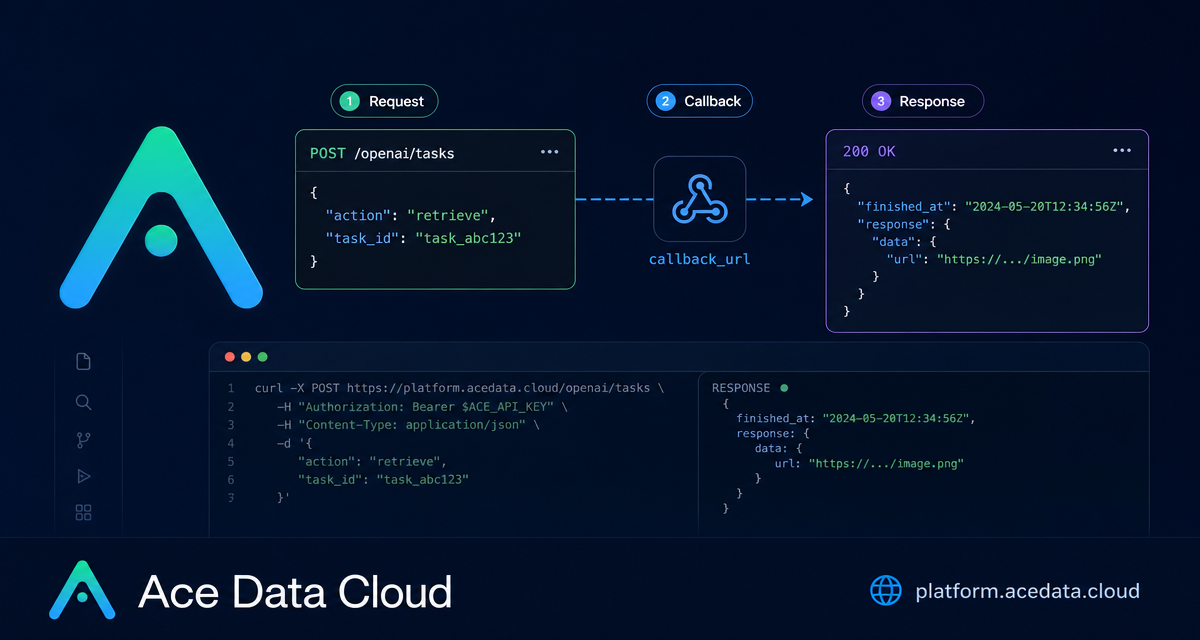
When an image generation request may take longer than your frontend, worker, or webhook consumer wants to wait, the practical problem is not generation itself — it is knowing where the result landed and when it is safe to read it.
The Ace Data Cloud OpenAI Tasks API gives you a small polling surface for image jobs submitted in callback mode. Instead of keeping an HTTP request open, you submit the image request with a callback_url, receive a task_id, and later retrieve the stored task record from POST https://api.acedata.cloud/openai/tasks.
What you can do
The Tasks API is intentionally narrow. It is used to query task results that were previously submitted to the OpenAI image interface in callback mode. That makes it useful for builder workflows such as:
- checking whether an async image generation has completed;
- recovering the final
response.data.urlif your webhook handler missed a delivery; - looking up a task by the platform-generated
idor by your owntrace_id; - batch-querying tasks by
ids,trace_ids,application_id,user_id, tasktype, or a Unix timestamp window.
There are two supported actions: retrieve for a single task, and retrieve_batch for a paginated list. The endpoint is the same for both actions:
POST https://api.acedata.cloud/openai/tasksHow it works
The key detail is persistence. Task records are only written when the original image request includes a callback_url. If you make a synchronous, non-callback image request, it will not be stored as a queryable task record.
In callback mode, the original image interface accepts the request and immediately returns a task_id. In most applications, that generated task ID is enough; you do not need to invent a trace_id unless you want to associate the task with your own business identifier, such as an internal job number, user action, or asset pipeline run.
Every Tasks API call should send JSON and authenticate with your Ace Data Cloud token:
accept: application/jsonauthorization: Bearer {token}content-type: application/json
Retrieve one task by task_id
For the common case, store the task_id returned by the image submission response. Later, query it with action: retrieve and id. At least one of id or trace_id must be provided.
curl -X POST 'https://api.acedata.cloud/openai/tasks' \
  -H 'accept: application/json' \
  -H 'authorization: Bearer {token}' \
  -H 'content-type: application/json' \
  -d '{
    "action": "retrieve",
    "id": "7489df4c-ef03-4de0-b598-e9a590793434"
  }'
A completed task can include fields such as id, trace_id, type, application_id, user_id, credential_id, created_at, started_at, finished_at, elapsed, the original request, and the final response. For image workflows, the response can contain generated asset URLs under response.data.
If no task matches, the API returns an empty object. Treat that differently from “still running”: an empty object means your identifier did not match a stored record, the original request may not have included callback_url, or the record may no longer be available.
Batch query when you operate a queue
Once you have more than a few async jobs, single-task polling is not always the cleanest approach. The retrieve_batch action supports list-style queries:
curl -X POST 'https://api.acedata.cloud/openai/tasks' \
  -H 'authorization: Bearer {token}' \
  -H 'content-type: application/json' \
  -d '{
    "action": "retrieve_batch",
    "trace_ids": ["my-trace-001", "my-trace-002"]
  }'
Batch results are returned as an object with items and count. The request can also include offset and limit; the default offset is 0, and the default limit is 12. If you want a time-bounded worker sweep, use created_at_min and created_at_max as Unix seconds.
A minimal submit-and-poll loop in Python
The following pattern is useful for backend workers. It submits an image generation request in callback mode, keeps the returned task_id, and polls until the task has a final response.
import os
import time
import requests

API = "https://api.acedata.cloud"
HEADERS = {
    "authorization": f"Bearer {os.environ['ACEDATA_API_KEY']}",
    "content-type": "application/json",
}

submit = requests.post(
    f"{API}/openai/images/generations",
    headers=HEADERS,
    json={
        "model": "gpt-image-1",
        "prompt": "A watercolor style cat sitting on a table",
        "callback_url": "https://webhook.site/your-uuid",
    },
).json()

print("submitted:", submit)
task_id = submit["task_id"]

while True:
    task = requests.post(
        f"{API}/openai/tasks",
        headers=HEADERS,
        json={"action": "retrieve", "id": task_id},
    ).json()

    if task and task.get("response"):
        print("finished:", task["response"])
        break

    time.sleep(3)
In production, I would add a maximum retry count, structured logging for elapsed, and a clear branch for an empty object. But the core loop stays small: submit with callback_url, store task_id, call retrieve, and read response when it appears.
Practical notes
- The Tasks interface itself does not incur charges; charges apply to the original image generation or editing request.
- Use
trace_idwhen you need your own business identifier, not as a replacement for storingtask_id. - Use
typefilters such asimages,images_generations, andimages_editswhen batch-querying mixed image workloads. - Remember that task records beyond the platform retention period may be cleared.
If you are building an image pipeline, the Tasks API is a simple recovery and orchestration layer: it lets your app move async work out of the request path without losing track of the generated result. The full reference is available in the OpenAI Tasks API Integration Guide.


Comments
Post a Comment