How to Generate and Edit Images with the Nano Banana Images API
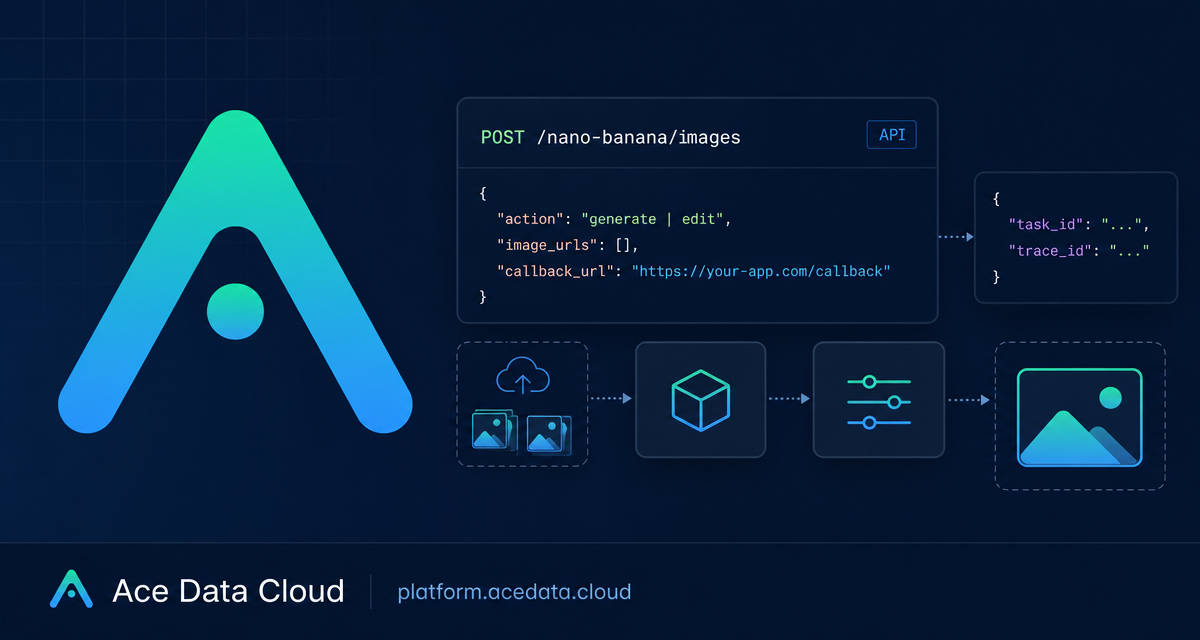
Image generation integrations can become difficult when an API must support both prompt-based generation, image editing, asynchronous delivery, and partial failures across multiple requested images.
What you can do
The Nano Banana Images API is available from the Ace Data Cloud API base URL:
https://api.acedata.cloudUse the following endpoint to generate new images or edit existing ones:
POST /nano-banana/imagesThe API accepts two actions:
generatecreates images from a prompt.editmodifies one or more supplied source images using a prompt.
Every request requires action and prompt. Editing requests additionally require image_urls, an array containing at least one image. Each image URL can be a publicly accessible direct HTTP or HTTPS link, or a Base64 data image.
An application token is obtained from the Ace Data Cloud Console. One API token can call platform services. Send that token in the authorization header as a Bearer token.
How it works
Send a JSON request to https://api.acedata.cloud/nano-banana/images with the required headers:
authorization: Bearer {token}accept: application/jsoncontent-type: application/json
The optional model field defaults to nano-banana. Available model values are nano-banana, nano-banana-2-lite, nano-banana-2, and nano-banana-pro, plus their corresponding :official versions. The nano-banana-2-lite model supports 1K resolution only.
You can also send count from 1 through 4, with a default of 1. Use aspect_ratio for values such as 1:1 or 16:9, and resolution for values such as 1K, 2K, or 4K.
A successful response includes success, task_id, trace_id, and a data array. Each data item includes the prompt and an image_url.
Generate images from a prompt
This curl request generates one image with the default model. The request explicitly sets a square aspect ratio and 1K resolution.
curl -X POST "https://api.acedata.cloud/nano-banana/images" \
  -H "authorization: Bearer {token}" \
  -H "accept: application/json" \
  -H "content-type: application/json" \
  -d '{
    "action": "generate",
    "prompt": "A detailed illustration of a mountain landscape at sunrise",
    "count": 1,
    "aspect_ratio": "1:1",
    "resolution": "1K"
  }'
If you need multiple outputs, set count to a value from 1 to 4. Each requested image is an independent generation call. This matters when a provider safety policy rejects one image: other requested images can still succeed, and billing is based on actual successful images.
A success payload has this structure:
{
  "success": true,
  "task_id": "...",
  "trace_id": "...",
  "data": [{"prompt": "A detailed illustration of a mountain landscape at sunrise", "image_url": "..."}]
}
Edit an existing image
For edit, include image_urls with at least one source image. The URLs must be publicly accessible direct HTTP or HTTPS image links, unless you provide the source as a Base64 data image.
{
  "action": "edit",
  "prompt": "Add a sunset sky while preserving the main subject",
  "image_urls": ["https://example.com/source-image.png"],
  "model": "nano-banana-pro",
  "count": 1,
  "aspect_ratio": "16:9",
  "resolution": "2K"
}
The same optional generation controls apply to editing. Select an appropriate model with model, request up to four images through count, and set the desired aspect ratio and resolution when needed. If using nano-banana-2-lite, use only 1K resolution.
Use callbacks for asynchronous completion
Add an optional callback_url when your application needs completion results delivered to a server endpoint. With a callback URL, the API immediately returns a task_id and basic results. When processing completes, it POSTs the full JSON result to the callback URL.
{
  "action": "generate",
  "prompt": "A minimal product illustration",
  "model": "nano-banana-2",
  "count": 2,
  "callback_url": "https://your-service.example/image-callback"
}
The callback payload uses the same response structure, so the receiving service should handle success, task_id, trace_id, and data. Store both task_id and trace_id in your application logs or job records for troubleshooting.
Handle API errors and partial results
Error responses return success as false, an error object containing code and message, plus a trace_id.
{"success": false, "error": {"code": "invalid_token", "message": "..."}, "trace_id": "..."}400 token_mismatchedindicates a token mismatch.400 api_not_implementedindicates the API is not implemented.401 invalid_tokenindicates an invalid token.403 forbiddenmeans a provider safety policy rejected the request. Rejected calls are not billed.429 too_many_requestsindicates too many requests.500 api_errorindicates an API error.
For multi-image requests, do not assume a single safety rejection means every image failed. Review the returned results, retain the task and trace identifiers, and account for successful images individually. For the complete integration reference, see the Nano Banana Images API documentation.


Comments
Post a Comment