How to Build a Voice-Cloned Music Workflow with the Suno Voices API
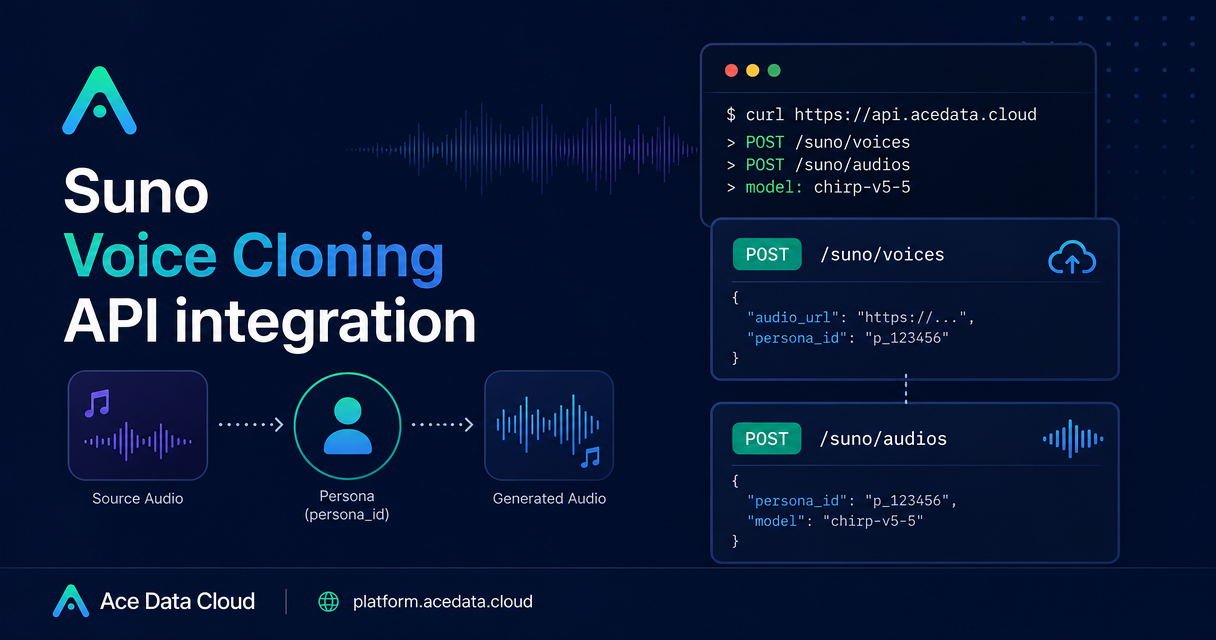
If you are building a music tool, the hard part is rarely just generating a track; it is keeping a recognizable vocal identity across generations without turning your app into a manual production workflow.
The Suno voice cloning flow in Ace Data Cloud gives you a simple two-step pattern: upload a clean vocal sample as a private voice persona, then pass the returned persona_id into a music generation request. This guide walks through that workflow as an implementation pattern, with the practical details that matter when you wire it into a real product.
What you can do
The Voice Cloning API lets you create custom voice personas from your own audio file. Unlike persona flows based on a Suno-generated audio_id, this endpoint accepts a publicly accessible audio_url pointing to your own vocal recording.
- Create a private voice persona from an MP3 or WAV file.
- Reference that persona later with the returned
persona_id. - Generate a new song using the cloned voice by calling the Suno Audios API.
- Use
persona_idwith thecoveraction when you want a cover workflow.
For builders, this is useful when you need repeatable vocal identity: demo-song generators, creator tools, internal music prototyping systems, or automated workflows where the voice choice should be part of the API state rather than a manual UI setting.
How it works
The integration has two API calls:
- Call
POST https://api.acedata.cloud/suno/voiceswith anaudio_url, plus optionalnameanddescription. - Take
data.persona_idfrom the response and pass it toPOST https://api.acedata.cloud/suno/audioswithactionset togenerate.
The voice persona created from uploaded audio is private. It does not support reuse across accounts, and the returned name is automatically generated by the system, so your application should store and reference persona_id as the durable identifier.
Prepare the vocal input
The quality of the voice persona depends heavily on the source audio. The documented requirements are specific:
- Format must be
WAVorMP3. - Duration must be between
10and240seconds. - A clean solo dry vocal sample of
30to60seconds is recommended. - The audio should contain clear, identifiable speech or singing from a single person.
- Avoid background noise, accompaniment, echo, and reverb.
- Do not include multiple speakers or multiple vocal layers.
In practice, treat this like a validation step in your product. Before you submit the API request, make sure the uploaded asset is publicly reachable and that your UI explains why clean solo vocals matter. Complete songs with accompaniment usually cannot pass voiceprint verification.
Create a voice persona
The persona creation request has one required field, audio_url. The optional name and description fields are useful for your own bookkeeping, but the response name is generated by the system, so do not rely on it as your primary key.
curl -X POST 'https://api.acedata.cloud/suno/voices'   -H 'accept: application/json'   -H 'authorization: Bearer {token}'   -H 'content-type: application/json'   -d '{
    "audio_url": "https://cdn.acedata.cloud/suno_demo.mp3",
    "name": "My Voice",
    "description": "single-person clean vocal sample"
  }'
A successful response includes success, task_id, and a data object. The important application field is data.persona_id.
{
  "success": true,
  "task_id": "0fa609a6-c8d9-4bb5-8574-e4c93bb55d02",
  "data": {
    "persona_id": "1ab79a71-a229-4350-8f02-402ff02eac16",
    "name": "VOICE_20260803037676",
    "is_public": false
  }
}
Notice that is_public is false. Voice personas created by uploading audio are private resources. The documentation also recommends using the persona as soon as possible after creation, because it may become invalid or unavailable if left unused for a long time.
Generate music with the cloned voice
Once you have a persona_id, call the Suno Audios endpoint. Set action to generate, choose a supported model, provide a prompt, and include the persona ID.
Voice cloning supports only chirp-v4-5 and higher models, such as chirp-v4-5, chirp-v5, and chirp-v5-5. It does not support chirp-v4.
curl -X POST 'https://api.acedata.cloud/suno/audios'   -H 'accept: application/json'   -H 'authorization: Bearer {token}'   -H 'content-type: application/json'   -d '{
    "action": "generate",
    "model": "chirp-v5-5",
    "prompt": "A warm synth-pop song about city nights",
    "persona_id": "1ab79a71-a229-4350-8f02-402ff02eac16"
  }'
The response returns a data array containing generated audio metadata such as id, title, audio_url, image_url, model, state, prompt, and duration.
{
  "success": true,
  "task_id": "53d8a334-a972-43c5-895e-60c4454e88d5",
  "data": [
    {
      "id": "16463960-077c-4700-bbb3-3c7897b943d3",
      "title": "Soft Neon on My Skin",
      "audio_url": "https://cdn.acedata.cloud/assets/examples/fish/5ade0339-5f11-487e-aacc-06a908271706-8e3fcb0e5547.mp3",
      "image_url": "https://cdn.acedata.cloud/e724d7f13d.png",
      "model": "chirp-v5-5",
      "state": "succeeded",
      "prompt": "A warm synth-pop song about city nights",
      "duration": 156.28
    }
  ]
}
Handle failures like a builder
Voice cloning is computationally intensive, and the documentation calls out occasional failures even when the material is compliant. One common response is voices_sound_different, meaning voiceprint verification failed. These failures can be unrelated to audio quality, and retrying with the same material will usually succeed.
A practical implementation is to add one or two automatic retries for failed cloning attempts, then surface a clear message if the request still fails. The documentation also notes that failed requests are not charged.
Where this fits in an app
The cleanest product architecture is to treat voice cloning as a separate setup step. Store persona_id with the user, project, or brand profile in your own database. Later, your generation endpoint can accept a music prompt and look up the persona ID server-side, avoiding repeated uploads and keeping the user experience simple.
That separation also makes debugging easier: if persona creation succeeds but generation fails, you can inspect the /suno/audios request independently. If persona creation fails, you can focus on the source audio requirements instead of the music prompt.
For the complete source reference, including the documented sample assets and response shape, see the Suno Voice Cloning API integration guide.


Comments
Post a Comment