How to Build Image Generation and Editing Workflows with the Nano Banana Images API
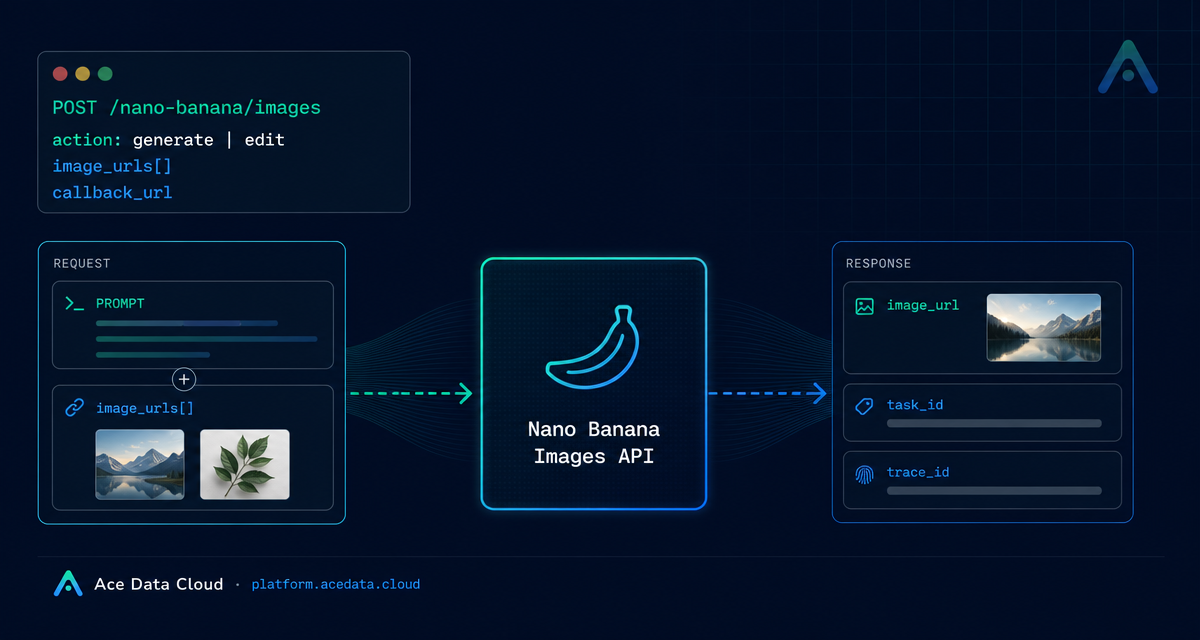
If your product needs both prompt-based image generation and practical image editing, the awkward part is often not the model call itself—it is designing a request shape that works for both fresh images and edits based on existing assets.
What you can do
The Nano Banana Images API exposes a single image endpoint for two related workflows: generating images from text and editing images from supplied image URLs. The base URL is https://api.acedata.cloud, and the endpoint is POST /nano-banana/images. Requests use JSON and authenticate with an authorization: Bearer {token} header.
The key switch is action:
generate: create an image from a textprompt.edit: transform one or more existing images usingimage_urlsplus aprompt.
That makes the API useful for builder workflows such as product mockups, image variations, campaign assets, visual QA tools, internal creative dashboards, or any app where users move between “make something” and “change this specific thing.”
How it works
Every request goes to POST /nano-banana/images with accept: application/json and content-type: application/json. The minimum required parameters are action and prompt. For editing, you also provide image_urls, an array with at least one publicly accessible HTTP or HTTPS image URL. The documentation also notes that Base64 image data can be used in the image list.
The API returns a JSON response with a success flag, a task_id, a trace_id, and a data array. Each successful item in data includes the echoed prompt and an image_url for the generated or edited result. In practice, you should persist both task_id and trace_id so you can connect user-facing results to logs, retries, and support tickets.
Choosing an action
Use generate when the user starts from an idea. For example, a design tool might accept a short natural-language description and return a candidate image. Use edit when the user starts from existing material: a portrait, a product photo, a reference style, or multiple source images that should be combined into one output.
The edit mode is especially useful because image_urls can contain multiple images. The documentation’s example passes a portrait photo and a clothing photo together, then uses the prompt to describe the target transformation. Your application can use the same pattern for “apply this item to this person,” “blend these references,” or “revise this asset while keeping the subject recognizable.”
Models, count, and output planning
The optional model field lets you choose among nano-banana, nano-banana-2-lite, nano-banana-2, nano-banana-pro, and corresponding :official variants. If you omit model, the default is nano-banana. The optional count field requests 1 to 4 images, with a default of 1.
There are a few implementation details worth designing for early. First, each image in a multi-image request is completed by an independent generation call. Ordinary technical failures or provider safety rejections can affect one result without preventing other successful images from being returned. Second, data contains only successfully generated images. Third, if all calls are rejected by the provider’s native safety policy, the API may return 403 forbidden.
A practical cURL request
Here is a minimal editing example based on the documented request shape. The first image could be the user’s product photo; the second could be a reference image. The prompt tells the model what transformation to perform.
curl -X POST 'https://api.acedata.cloud/nano-banana/images' \
  -H 'authorization: Bearer {token}' \
  -H 'accept: application/json' \
  -H 'content-type: application/json' \
  -d '{
    "action": "edit",
    "model": "nano-banana-pro",
    "prompt": "Place the product from the second image into the scene from the first image while keeping the lighting natural.",
    "image_urls": [
      "https://cdn.acedata.cloud/v8073y.png",
      "https://cdn.acedata.cloud/44xlah.png"
    ],
    "count": 1
  }'
A successful response follows this structure:
{
  "success": true,
  "task_id": "93f11baf-347b-4bb4-9520-8653cb46d6a3",
  "trace_id": "a9063166-26ed-4451-85b5-54e896817c69",
  "data": [
    {
      "prompt": "let this man wear on this T-shirt",
      "image_url": "https://platform.cdn.acedata.cloud/nanobanana/8e9e0253-26f4-45b9-b3f8-ac1aed1c284b.png"
    }
  ]
}
Using callbacks for production flows
For production apps, avoid tying up a client request while image work is running. The API supports an optional callback_url. Add it to the request body, point it at a publicly accessible endpoint that accepts POST JSON, and store the returned task_id. When the task completes, the platform sends a JSON payload with the same response structure to your callback URL.
This pattern works well for queues, dashboards, and user notifications. Your backend can mark a job as pending, accept the callback, validate the task_id, save each returned image_url, and then update the UI.
Error handling checklist
400 token_mismatched: check request parameters.401 invalid_token: the token is missing or invalid.403 forbidden: the provider safety policy rejected the request or result.429 too_many_requests: slow down or queue requests.500 api_error: treat it as a server-side exception and retain thetrace_id.
The most robust integration is simple: validate inputs, keep source images publicly reachable, save task_id and trace_id, and design your UI around asynchronous completion. For the full parameter reference, see the Nano Banana Images API documentation.


Comments
Post a Comment