How to Add Google Search MCP to Claude Code
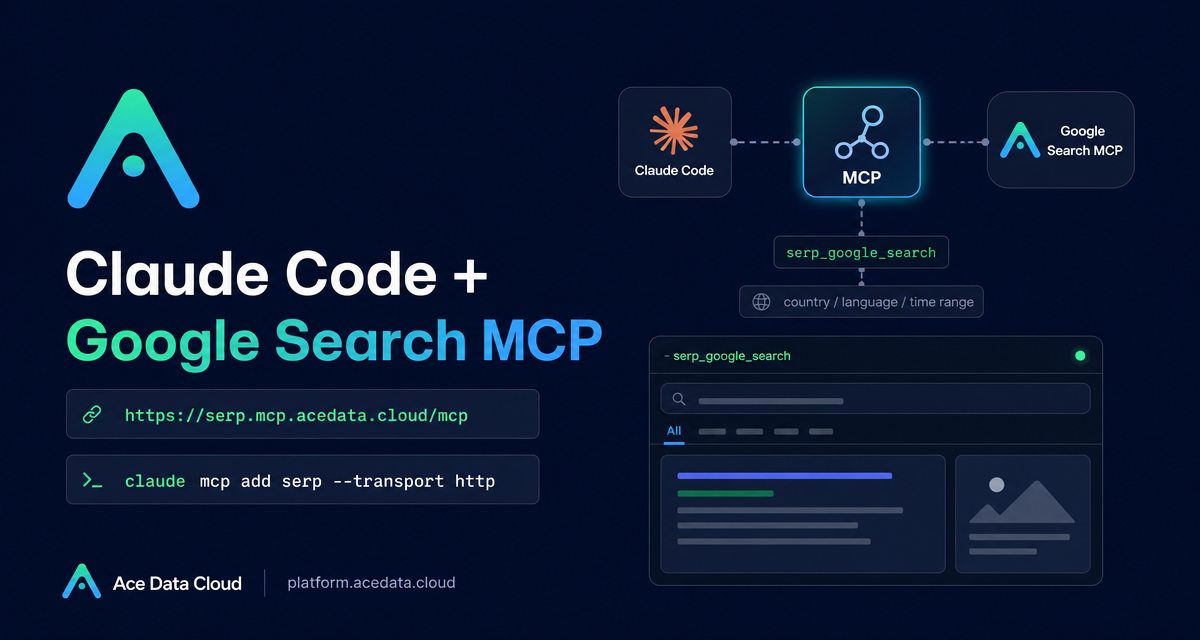
When you are debugging from a terminal, the slowest step is often not reading code: it is leaving the flow, opening a browser, searching for the unfamiliar error, and then translating that context back into your shell. Google Search MCP for Claude Code is a practical way to keep that research loop inside the command line.
What you can do
The Serp MCP Server lets Claude Code call Google Search from inside a Claude Code session. The source document describes a focused set of tools:
serp_google_searchfor Google web search, with support for country, language, and time range.serp_google_imagesfor image search.serp_google_newsfor news search.serp_google_videosfor video search.serp_google_mapsandserp_google_placesfor maps and local business search.
That sounds simple, but it changes the ergonomics of daily engineering work. Instead of asking Claude Code to reason from memory, you can ask it to look up a recent framework change, compare current options, or check official documentation while it still has your local project context.
How it works
Claude Code connects to an HTTP MCP endpoint. For the Google Search MCP server, the endpoint in the documentation is:
https://serp.mcp.acedata.cloud/mcpThe connection is added with claude mcp add, using an uppercase -H flag to pass an authorization header. The documentation calls out this detail because lowercase -h means --help, not header configuration.
You also choose a scope with -s. The documented scopes are local, user, and project. They answer three different questions: is this only for my current directory, for every Claude Code project on this machine, or shared as project configuration?
Start with a local configuration
For the first run, I would start with local. It is the least surprising option: Claude Code writes the MCP server record into the local ~/.claude.json together with the current project path. Replace the masked token below with your own Ace Data Cloud API Token.
claude mcp add serp --transport http https://serp.mcp.acedata.cloud/mcp \
  -H "Authorization: Bearer 3b78cc40dd3b43db806a4300...." \
  -s local
After adding it, verify the connection:
claude mcp listThe expected successful shape in the documentation is:
serp: https://serp.mcp.acedata.cloud/mcp (HTTP) - ✓ ConnectedIf you are testing project-level configuration, be aware of another documented state: Pending approval. That is normal when Claude Code first reads a project-level MCP configuration and asks you to trust it from inside the Claude Code session.
Choose the right scope
The three scopes are worth choosing intentionally:
local: good for trying the server in one project without changing the rest of your environment.user: useful when you want Google Search MCP available across multiple projects after Claude Code opens.project: useful for teams, because the configuration is written to.mcp.jsonin the project root.
For project, do not commit a real token to a public repository. The source documentation recommends using an environment variable placeholder or asking each person to add credentials locally. That small bit of discipline prevents accidental token leakage in screenshots, issues, and repository history.
Use it for debugging without breaking terminal flow
The most natural use case is production debugging. Suppose you are in an SSH session, reading logs, and you hit an unfamiliar Nginx error. Instead of copying the text to a browser, you can ask Claude Code:
Search nginx error 502 bad gateway upstream sent too big header how to solveThe useful part is not only that search happens. It is that the search result can be interpreted next to the files, configuration, and commands already visible in your Claude Code workflow.
Use it for current technical research
Search is also valuable when the answer depends on time. The documentation gives a prompt style for comparing recent technology choices:
Search for the performance comparison of Python asynchronous ORM in 2025, SQLAlchemy 2.0 async vs Tortoise ORMThis is the kind of question where stale model memory is risky. A web search with a time range is a better input to an engineering decision than a confident answer based only on older training data.
Use it to check official documentation
A third useful pattern is to ask Claude Code to find official docs before explaining an API or configuration field. The source document uses Kubernetes CronJob behavior as an example:
Search for the official documentation of Kubernetes CronJob concurrencyPolicy, the difference between Forbid and ReplaceThis is a small but important builder habit: when a field has production consequences, let the agent search for the official source first, then summarize the result in the context of your actual change.
A practical workflow
- Add the server with
claude mcp add serp --transport httpand the documented MCP endpoint. - Use
-s localfirst, then move touserif it becomes part of your everyday setup. - Run
claude mcp listand confirm the server is connected. - In Claude Code, ask for searches in plain language, especially for errors, official docs, and time-sensitive comparisons.
- Keep tokens masked in examples and private in your real configuration.
Google Search MCP is not a replacement for engineering judgment. It is a way to keep current information closer to the place where you make changes: your terminal. If you want the original configuration examples and tool list, read the Claude Code with Google Search MCP documentation.


Comments
Post a Comment