How to Build Image Generation and Editing Workflows with the Nano Banana Images API
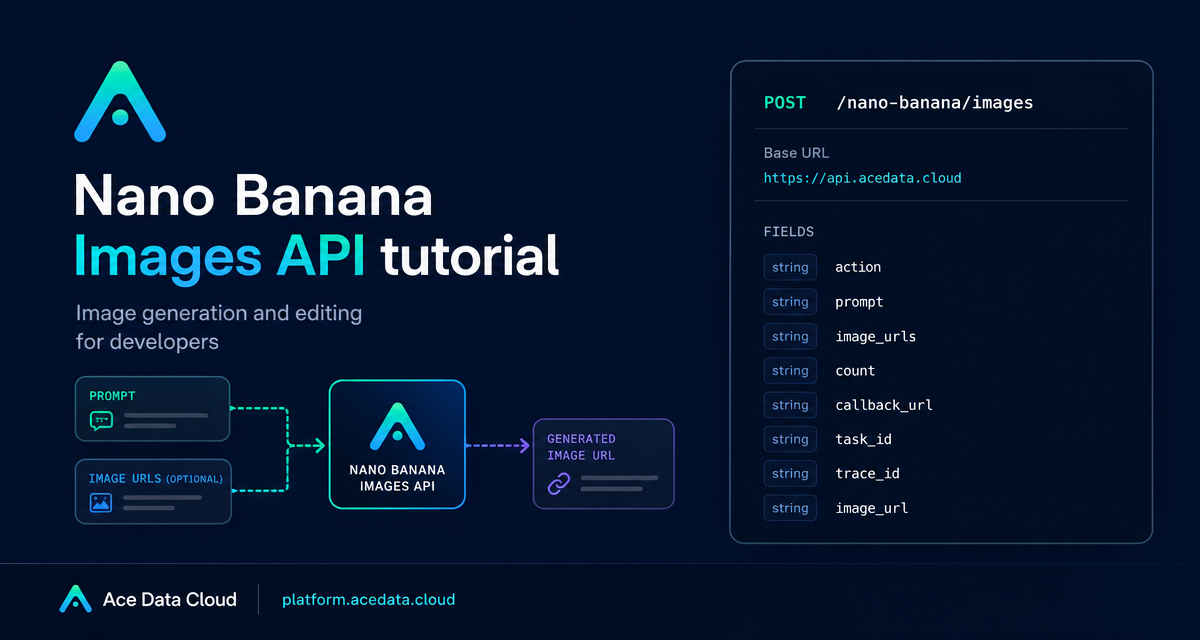
If your app needs both prompt-to-image creation and reference-image editing, you do not have to build a large media pipeline first. A small API layer can take a prompt, optionally take image URLs, return task identifiers, and give you a final image URL to store or render.
What you can do
The Nano Banana Images API uses one documented endpoint for two jobs: text-to-image creation and image editing. The endpoint is POST /nano-banana/images and the base URL is https://api.acedata.cloud. Requests are JSON and use the HTTP header authorization: Bearer {token}.
The core switch is action. Set it to generate when you want to create an image from a prompt. Set it to edit when you want to send image_urls plus a prompt that describes the target edit.
generate: create images from text prompts.edit: edit or combine one or more supplied images.count: request 1 to 4 images; the default is 1.callback_url: receive completion data by webhook when you prefer async handling.
How it works
For generation, the minimum required fields are action and prompt. For editing, the request also needs image_urls, an array with at least one publicly accessible image. The documentation says these image values can be HTTP or HTTPS URLs, or base64 image strings such as data:image/png;base64,.... In a production app, direct HTTPS image URLs are usually the simplest shape to validate and log.
The optional model field supports nano-banana, nano-banana-2-lite, nano-banana-2, nano-banana-pro, and the corresponding :official variants. If you omit model, the default is nano-banana. The documented resolution examples include 1K, 2K, and 4K, while nano-banana-2-lite supports only 1K. The aspect_ratio field can describe ratios such as 1:1 or 16:9.
Generate an image from a prompt
Start with a single image request. This makes product behavior easier to reason about before you add multi-result galleries or webhook queues.
curl -X POST 'https://api.acedata.cloud/nano-banana/images' \
  -H 'authorization: Bearer {token}' \
  -H 'accept: application/json' \
  -H 'content-type: application/json' \
  -d '{
    "action": "generate",
    "model": "nano-banana-pro",
    "prompt": "A clean product mockup of a developer dashboard on a laptop, soft studio lighting, realistic screen reflections, modern SaaS visual style.",
    "count": 1
  }'
A successful response includes success, task_id, trace_id, and data. Each item in data contains the echoed prompt and an image_url.
{
  "success": true,
  "task_id": "70e6931b-6e34-43db-9e36-8765e2809d04",
  "trace_id": "60df8d38-f265-4986-aec7-75c9220bced2",
  "data": [
    {
      "prompt": "A clean product mockup of a developer dashboard on a laptop, soft studio lighting, realistic screen reflections, modern SaaS visual style.",
      "image_url": "https://platform2.cdn.acedata.cloud/nanobanana/1d0160b4-93f9-4229-8926-ea9ef0bed336.png"
    }
  ]
}
Edit an existing image
Editing uses the same endpoint. The main difference is that you include image_urls. If you send multiple images, describe their roles in the prompt: for example, the first image is the subject and the second is the clothing, object, or style reference.
import requests

url = "https://api.acedata.cloud/nano-banana/images"
headers = {
    "authorization": "Bearer {token}",
    "accept": "application/json",
    "content-type": "application/json",
}
payload = {
    "action": "edit",
    "prompt": "Place the person into a clean developer office scene while preserving the face and natural lighting.",
    "image_urls": ["https://cdn.acedata.cloud/v8073y.png"],
    "count": 1
}

resp = requests.post(url, json=payload, headers=headers)
print(resp.json())
Use callbacks for longer jobs
Image jobs can take time, so the API supports callback_url. The callback URL must be publicly accessible and support POST JSON. With this pattern, your app can create a pending record, save the returned task_id, and later update the record when the callback delivers image_url.
{
  "action": "generate",
  "prompt": "A white siamese cat",
  "count": 1,
  "callback_url": "https://example.com/webhooks/nano-banana"
}
The callback payload uses the same successful response shape: success, task_id, trace_id, and data.
Handle partial results and errors
When count requests more than one image, the documentation notes that ordinary technical failures or provider security refusals may affect a single call while other images still return successfully. Render whatever appears in data and avoid assuming that the number of returned images always equals the requested count.
For failures, the documented response includes success: false, an error object, and trace_id. Common codes include token_mismatched, api_not_implemented, invalid_token, forbidden, too_many_requests, and api_error. Treat invalid_token as an auth issue, too_many_requests as a retry/backoff issue, and forbidden as a provider safety refusal. Always keep trace_id in your logs.
Putting it together
The builder-friendly shape is simple: send action, prompt, optional image_urls, and optional async routing with callback_url. Store task_id and trace_id, then render the returned image_url. Start with count: 1, then add higher counts and callbacks once your product flow is stable.
For the complete parameter list and original examples, read the Nano Banana Images API documentation.


Comments
Post a Comment