A Practical Guide to Image Generation and Editing with the Nano Banana API
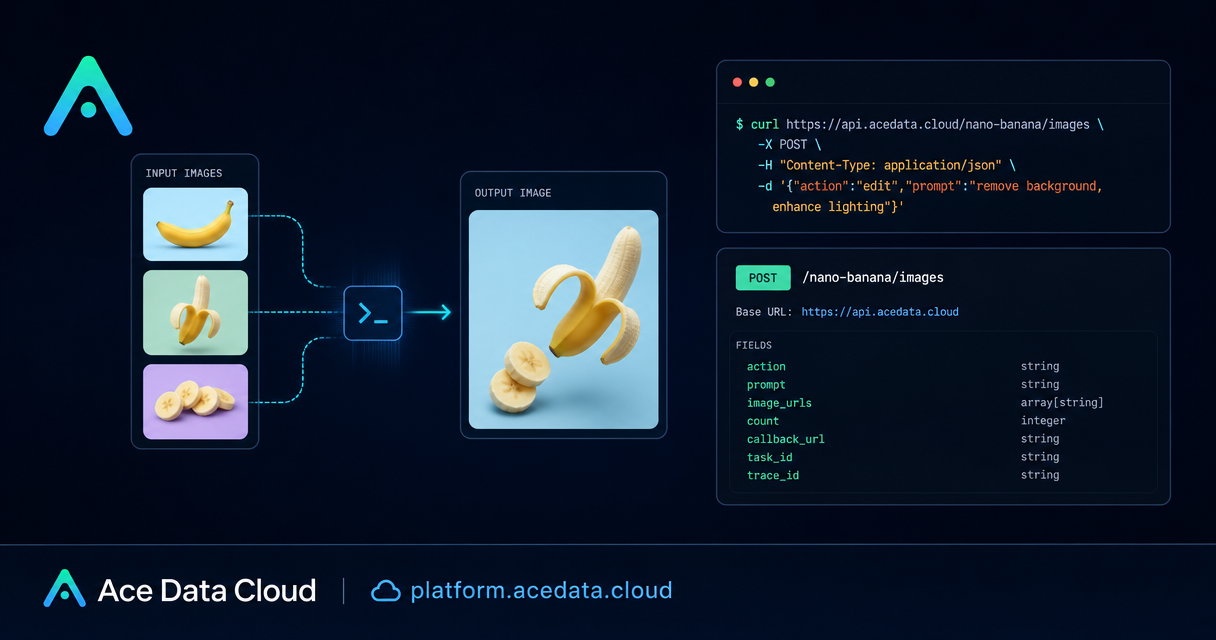
If you are building a tool that needs to create images from prompts or modify existing assets, the hard part is usually not the model itself. It is designing a reliable request shape, tracking outputs, handling partial failures, and keeping enough metadata to debug what happened later.
The Nano Banana Images API on Ace Data Cloud gives you one endpoint for both text-to-image generation and image editing: POST /nano-banana/images. This guide walks through the practical pieces a builder needs: request structure, edit workflows, callbacks, response handling, and error cases.
What you can do
The API supports two image workflows through the same endpoint:
action: "generate"creates an image from a textprompt.action: "edit"edits one or more existing images passed throughimage_urls.
The base URL is https://api.acedata.cloud, and the endpoint is POST /nano-banana/images. Requests use JSON, and authentication is sent with authorization: Bearer {token}. The recommended request headers are accept: application/json and content-type: application/json.
For model selection, model is optional. The default is nano-banana. The documented options also include nano-banana-2-lite, nano-banana-2, nano-banana-pro, and the corresponding official-channel variants such as nano-banana-pro:official.
How it works
The minimum generation request only needs action and prompt. Editing adds image_urls, an array containing at least one publicly accessible image link. Those links can be HTTP or HTTPS URLs; the documentation recommends HTTPS. The API can also accept Base64-encoded image data in the same field format, such as a data:image/png;base64,... value.
Every successful call returns a JSON object containing success, task_id, trace_id, and a data array. Each item in data contains the prompt used and an image_url for the generated result. Keep both task_id and trace_id; they are useful for associating user actions with outputs and for troubleshooting failed calls.
You can ask for multiple images with count. The supported range is 1–4, and the default is 1. Each image is handled as an independent generation call. If one image fails because of a technical issue or provider safety rejection, other successful images can still be returned in data.
Use case 1: generate a product or hero image
For a simple generation workflow, send action: "generate", choose a model if needed, and write a concrete prompt. A good prompt should describe subject, composition, lighting, material, and orientation. You can also include documented options like aspect_ratio or resolution; for example, aspect ratios such as 1:1 or 16:9, and resolutions such as 1K, 2K, or 4K. Note that nano-banana-2-lite supports only 1K.
import requests

url = "https://api.acedata.cloud/nano-banana/images"
headers = {
    "authorization": "Bearer {token}",
    "accept": "application/json",
    "content-type": "application/json",
}

payload = {
    "action": "generate",
    "model": "nano-banana-pro",
    "prompt": (
        "A clean product hero image for a compact mechanical keyboard on a dark desk, "
        "soft side lighting, subtle reflections, realistic materials, 16:9 aspect ratio."
    ),
    "count": 1,
}

response = requests.post(url, headers=headers, json=payload)
result = response.json()
print(result)

if result.get("success"):
    print(result["data"][0]["image_url"])
else:
    print(result.get("error"), result.get("trace_id"))
In an app, you would usually store the original prompt, selected model, returned task_id, returned trace_id, and final image_url. That gives you a clean audit trail without having to infer later which request produced which asset.
Use case 2: edit with one or more reference images
Editing is where the API becomes especially useful for builder workflows. Instead of asking a model to imagine everything from scratch, you can pass existing assets through image_urls and use the prompt to describe the transformation.
For example, you might provide a product cutout and a lifestyle background, then ask the API to place the product naturally into the scene. Or you might provide a portrait and a clothing reference, then describe the target outfit change. The documented request shape is the same: action: "edit", a prompt, and an image_urls array.
curl -X POST 'https://api.acedata.cloud/nano-banana/images' \
  -H 'authorization: Bearer {token}' \
  -H 'accept: application/json' \
  -H 'content-type: application/json' \
  -d '{
    "action": "edit",
    "model": "nano-banana-pro",
    "prompt": "Place the product from the first image into the desk setup from the second image. Keep the lighting natural and preserve the product shape.",
    "image_urls": [
      "https://example.com/product.png",
      "https://example.com/desk-setup.png"
    ],
    "count": 1,
    "callback_url": "https://example.com/webhooks/nano-banana"
  }'
In production, validate the URLs before sending the request. The images must be publicly accessible direct links. If the model cannot fetch your asset, the issue will look like a generation problem even though the root cause is storage or permissions.
Use callbacks for longer-running jobs
Image generation and editing may take time, so the API supports an optional callback_url. When provided, the API can return quickly with task information, then send the complete result to your server by POST when the job finishes. Your callback endpoint must be publicly accessible and able to receive JSON.
The callback payload follows the same general shape as a successful synchronous response:
{
  "success": true,
  "task_id": "93f11baf-347b-4bb4-9520-8653cb46d6a3",
  "trace_id": "a9063166-26ed-4451-85b5-54e896817c69",
  "data": [
    {
      "prompt": "let this man wear on this T-shirt",
      "image_url": "https://platform.cdn.acedata.cloud/nanobanana/8e9e0253-26f4-45b9-b3f8-ac1aed1c284b.png"
    }
  ]
}
A simple implementation pattern is to create a database row before the request, store the returned task_id, and mark the row complete when your webhook receives the matching result. This avoids keeping client connections open and makes retries easier to reason about.
Handle errors and partial success deliberately
The API returns a standard error shape when a request fails. The documented fields include success: false, an error object with code and message, and a trace_id.
{
  "success": false,
  "error": {
    "code": "api_error",
    "message": "Internal server error."
  },
  "trace_id": "2cf86e86-22a4-46e1-ac2f-032c0f2a4e89"
}
Common documented errors include 400 token_mismatched for invalid requests or parameter errors, 401 invalid_token for missing or failed authentication, 403 forbidden when the provider's native safety policy rejects a request or result, 429 too_many_requests for rate limiting, and 500 api_error for server-side exceptions.
For multi-image requests, do not assume that one failure means the whole job produced nothing. The data array contains successfully generated images, and provider safety rejection of one image does not necessarily affect other successful calls. Design your UI to show partial results and store the returned trace_id for anything that needs investigation.
A small production checklist
- Use
POST https://api.acedata.cloud/nano-banana/imagesfor both generation and editing. - Send
authorization: Bearer {token},accept: application/json, andcontent-type: application/json. - For generation, provide
actionandprompt. - For editing, also provide
image_urlswith at least one publicly accessible image. - Use
countbetween 1 and 4 when you need variations. - Use
callback_urlfor async-style workflows that should not hold open a client request. - Persist
task_id,trace_id, and the returnedimage_url.
Wrapping up
The cleanest way to use image models in real products is to treat them like any other asynchronous media pipeline: validate inputs, keep request metadata, handle partial success, and make failures observable. Nano Banana's single endpoint keeps the integration small while still covering both prompt-based generation and reference-image editing.
For the full parameter reference and examples, read the Nano Banana Images API documentation.


Comments
Post a Comment