A Practical Guide to Adding Remote MCP Tools to Claude Code
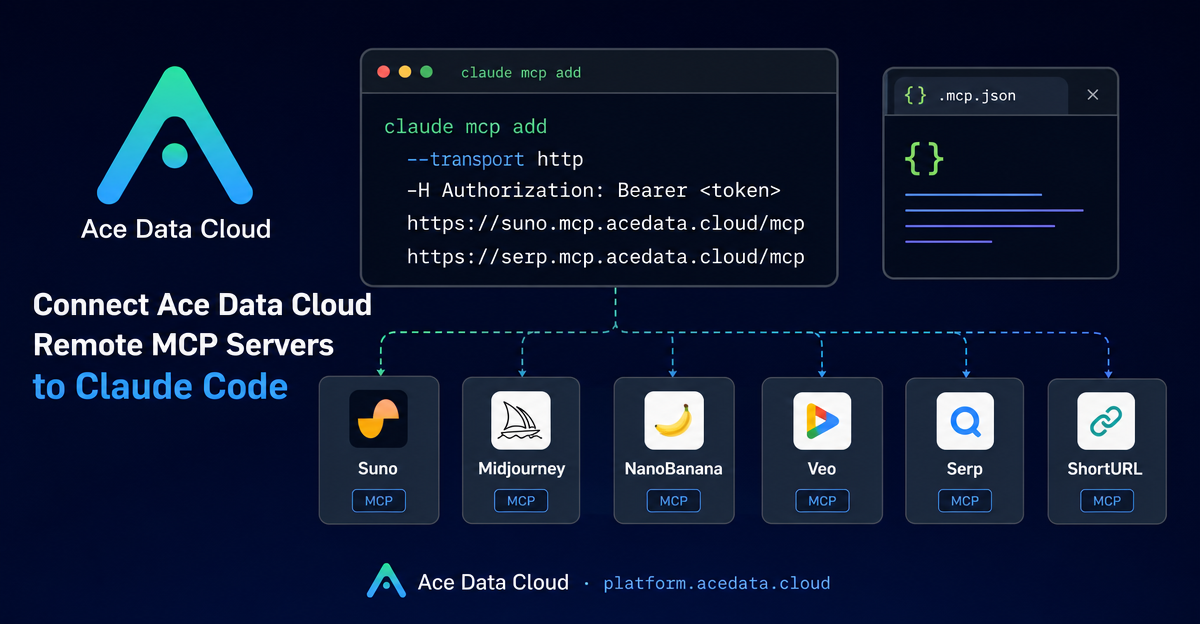
When you are already using Claude Code for everyday engineering work, the next bottleneck is often not reasoning—it is context switching. You ask the agent to update a README, then leave the terminal to search the web, generate a cover image, make demo assets, or shorten links for release notes. Model Context Protocol (MCP) is a practical way to keep those actions inside the coding workflow.
This guide walks through one concrete setup: connecting Ace Data Cloud remote MCP servers to Claude Code using HTTP transport and an authorization header. The goal is not to install another dashboard. It is to make your terminal agent able to call focused tools—search, image generation, music generation, video generation, and link shortening—while it is already helping you build.
What you can do
The source documentation describes managed remote MCP servers for several tool categories. The useful mental model is simple: each server is a remote tool surface, and Claude Code can call it when your prompt requires that capability.
- Music workflows: the
SunoMCP server is described for text-to-song, lyrics, covers, continuation, vocal separation, and Persona workflows. - Image workflows:
Midjourney,Flux,Seedream, andNanoBananacover image generation and editing style use cases such as product backgrounds or prompt-driven visuals. - Video workflows:
Luma,Veo, andSeedanceare documented for video generation patterns such as start/end frame control, native audio, motion generation, or dubbing. - Research and utility workflows:
Serpprovides search, andShortURLhandles long-link shortening and batch link work.
For a builder, the interesting part is composition. You can ask Claude Code to research a topic, outline a technical blog post, create a visual, and prepare shareable links without leaving the terminal session where the code already lives.
How it works
Claude Code accepts MCP server registrations. In this documentation, each Ace Data Cloud server is exposed as an HTTP endpoint such as https://suno.mcp.acedata.cloud/mcp or https://serp.mcp.acedata.cloud/mcp. Authentication is passed with an HTTP header:
-H "Authorization: Bearer <your-token>"The command-line pattern is:
claude mcp add <name> --transport http <remote-mcp-url> -H "Authorization: Bearer <your-token>"The documentation also calls out a small but important CLI detail: -H must be uppercase because lowercase -h is interpreted as help. It also notes that without -s, the default scope is local to the current directory. If you want the configuration available across projects, use -s user; if you want a project-level configuration, use the project approach below.
Add a focused subset first
You do not need to add every server on day one. Start with the smallest group that matches your daily workflow. For example, a technical content workflow might need only search, image generation, and link shortening:
# Search from Claude Code
claude mcp add serp --transport http https://serp.mcp.acedata.cloud/mcp   -H "Authorization: Bearer <your-token>"

# Image generation or editing workflows
claude mcp add nanobanana --transport http https://nanobanana.mcp.acedata.cloud/mcp   -H "Authorization: Bearer <your-token>"

# Short links for release notes or references
claude mcp add shorturl --transport http https://shorturl.mcp.acedata.cloud/mcp   -H "Authorization: Bearer <your-token>"
After adding servers, verify what Claude Code sees:
claude mcp listIf you only registered three servers, you should expect to see that subset as HTTP MCP servers. Keeping the initial surface area small makes it easier to debug prompts and understand which tool Claude Code is calling.
Use a project-level .mcp.json when the workflow belongs to the repo
For a repository-specific workflow, the documentation shows a .mcp.json file in the project root. This is useful when a project has a stable set of tools: for example, a documentation repo might always use search and image tooling, while a media automation repo might include music and video servers.
{
  "mcpServers": {
    "serp": {
      "type": "http",
      "url": "https://serp.mcp.acedata.cloud/mcp",
      "headers": { "Authorization": "Bearer <your-token>" }
    },
    "shorturl": {
      "type": "http",
      "url": "https://shorturl.mcp.acedata.cloud/mcp",
      "headers": { "Authorization": "Bearer <your-token>" }
    }
  }
}
Be careful with credentials. The source documentation explicitly warns against committing real tokens to public repositories and recommends either adding .mcp.json to .gitignore or using environment-variable placeholders with each team member supplying their own token.
A practical builder workflow
Here is a realistic prompt you could give Claude Code after registering serp, an image MCP server, and shorturl:
Help me prepare a technical blog draft for this repository:
1. Use search to find recent discussion around terminal AI coding workflows.
2. Read the current README and propose a short tutorial outline.
3. Generate one clean developer-tool cover image for the article.
4. Shorten the final documentation link for the release note.
The important part is not that every step is magical. It is that Claude Code can decide when a task needs an external capability and call the corresponding MCP server while still having project context. That is where MCP becomes useful for builders: tool calls become part of the same loop as code review, docs, tests, and release preparation.
Troubleshooting notes
- If a server does not appear, run
claude mcp listfirst. - If one entry is broken, remove it and add it again with the same
claude mcp addshape. - If a project-level config conflicts with a global config, the documentation says project
.mcp.jsontakes precedence over global~/.claude.json. - After changing configuration, restart Claude Code so the new server list is picked up cleanly.
Remote MCP tools are most useful when they remove small, repeated interruptions from your development loop. Start with one or two servers, test them inside a real repository, and grow the setup only when a workflow proves itself. The full source guide is available in the Claude Code with Ace Data Cloud MCP documentation.


Comments
Post a Comment