How to Run Claude Code from GitHub Actions with a Local Bearer-Token Proxy
When a repository grows beyond a handful of files, the hardest part of AI-assisted coding is not asking the model a question; it is putting the assistant close enough to the pull request, issue, and codebase that it can do useful work without breaking your workflow.
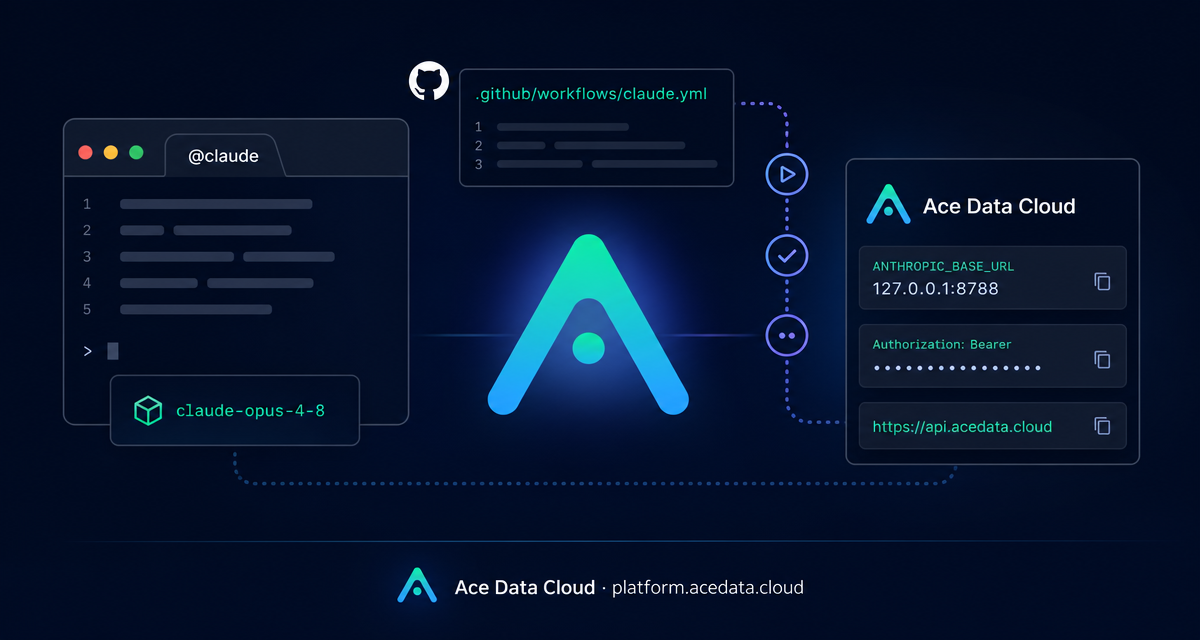
This guide walks through a practical GitHub Actions setup for Claude Code: a maintainer writes @claude in an issue or pull request comment, GitHub Actions starts a runner, a tiny local proxy adapts authentication, and Claude Code runs against the repository using Ace Data Cloud as the upstream API gateway.
What you can do
With the workflow described in the source documentation, you can turn GitHub issues and review comments into repository-aware Claude Code tasks. The action can be triggered from:
issue_commentevents when a new comment contains@claudepull_request_review_commentevents when a review comment contains@claudepull_request_reviewsubmissions when the review body contains@claudeissuesevents when a newly opened or assigned issue title or body contains@claude
The workflow can read the repository, comment back through the GitHub bot, and operate with the permissions explicitly granted in the workflow: contents: write, pull-requests: write, issues: write, and id-token: write. That makes it useful for small automation tasks such as reproducing a bug, proposing a patch, reviewing a diff, or answering a maintainer question with code context.
How it works
The key detail is authentication. The Ace Data Cloud gateway expects requests authenticated as Authorization: Bearer <token>. The anthropics/claude-code-action@v1 path, however, uses the Anthropic SDK convention and sends an x-api-key header.
The documented workaround is to start a local HTTP proxy inside the GitHub Actions runner. Claude Code is pointed at http://127.0.0.1:8788 through ANTHROPIC_BASE_URL. The proxy receives SDK-style requests, removes incoming authorization and x-api-key headers, injects Authorization: Bearer <ANTHROPIC_AUTH_TOKEN>, and forwards the request to https://api.acedata.cloud.
That gives you a clean boundary: GitHub stores the real token as a repository secret named ANTHROPIC_AUTH_TOKEN, the runner uses it only at runtime, and the action still receives a non-empty placeholder value for anthropic_api_key so its own validation can start.
Step 1: add the repository secret
In the target repository, add a GitHub Actions secret named ANTHROPIC_AUTH_TOKEN. In the GitHub UI, this is under Settings → Secrets and variables → Actions → New repository secret.
If you prefer the GitHub CLI, the documentation recommends setting the secret with an explicit value rather than piping from stdin accidentally:
gh secret set ANTHROPIC_AUTH_TOKEN --repo <org>/<repo> --body '<your-real-token>'A common failure mode is a secret that was accidentally set to a literal -. If you need to debug whether the secret is present, print only its length inside the workflow, for example echo "len=${#ACEDATA_TOKEN}", not the token itself.
Step 2: create the workflow
Create .github/workflows/claude.yml. The important pieces are the trigger filter, the local proxy step, and the Claude Code action step:
name: Claude Code

on:
  issue_comment:
    types: [created]
  pull_request_review_comment:
    types: [created]
  issues:
    types: [opened, assigned]
  pull_request_review:
    types: [submitted]

jobs:
  claude:
    if: |
      (github.event_name == 'issue_comment' && contains(github.event.comment.body, '@claude')) ||
      (github.event_name == 'pull_request_review_comment' && contains(github.event.comment.body, '@claude')) ||
      (github.event_name == 'pull_request_review' && contains(github.event.review.body, '@claude')) ||
      (github.event_name == 'issues' && (contains(github.event.issue.body, '@claude') || contains(github.event.issue.title, '@claude')))
    runs-on: ubuntu-latest
    permissions:
      contents: write
      pull-requests: write
      issues: write
      id-token: write
    env:
      ANTHROPIC_BASE_URL: http://127.0.0.1:8788
      CLAUDE_CODE_AUTO_COMPACT_WINDOW: '850000'
    steps:
      - uses: actions/checkout@v4
        with:
          fetch-depth: 1

      - name: Start AceData Cloud proxy (x-api-key → Bearer)
        env:
          UPSTREAM: https://api.acedata.cloud
          ACEDATA_TOKEN: ${{ secrets.ANTHROPIC_AUTH_TOKEN }}
        run: |
          python3 /tmp/proxy.py &

      - name: Run Claude Code via AceData Cloud
        uses: anthropics/claude-code-action@v1
        with:
          anthropic_api_key: dummy-not-used
          github_token: ${{ secrets.GITHUB_TOKEN }}
          claude_args: |
            --model claude-opus-4-8
          show_full_output: 'true'
The full document includes the Python proxy body. Keep that proxy behavior unchanged: it reads UPSTREAM and ACEDATA_TOKEN, forwards GET, POST, PUT, and DELETE, strips hop-by-hop headers, and replaces SDK authentication with the Bearer token expected by the upstream gateway.
Step 3: choose a model and bound the task
The sample workflow uses --model claude-opus-4-8. The same documented section notes that you can replace it with another supported Claude model such as claude-sonnet-4-5 or claude-haiku-4-5.
You can also pass additional Claude Code arguments through claude_args:
claude_args: |
  --model claude-sonnet-4-5
  --max-turns 8
The documented parameters include --model for the model name, --max-turns for the maximum dialogue turns per task, --allowed-tools to restrict tools with comma separation, and --mcp-config for an additional MCP configuration file path.
Step 4: trigger it from an issue or PR
Once the workflow is committed, open an issue or comment on a pull request with a body that contains @claude. A simple smoke test can be as small as:
@claude Reply with: OK.If everything is wired correctly, the GitHub Actions run starts, the local proxy listens on 127.0.0.1:8788, Claude Code sends requests through that base URL, and the bot posts the result back into the GitHub thread.
Troubleshooting notes
- If the action fails before running, make sure
anthropic_api_keyis set to a non-empty placeholder such asdummy-not-used. - If the proxy returns
401, verify thatANTHROPIC_AUTH_TOKENis actually populated and not accidentally set to-. - If no response appears after
@claude, check that the event is covered by the workflowif:condition and that Actions are enabled for the repository. - If you need deeper debugging, inspect the workflow run and add a failure-only step to print
/tmp/proxy.log.
The useful part of this setup is that it does not ask your team to leave GitHub. Maintainers keep using issues and pull requests, while the runner handles the temporary proxy and model call. For the complete workflow, including the full Python proxy implementation, read the Claude Code GitHub Actions integration guide.


Comments
Post a Comment