How to Run Claude Code from GitHub Actions with an Ace Data Cloud Proxy
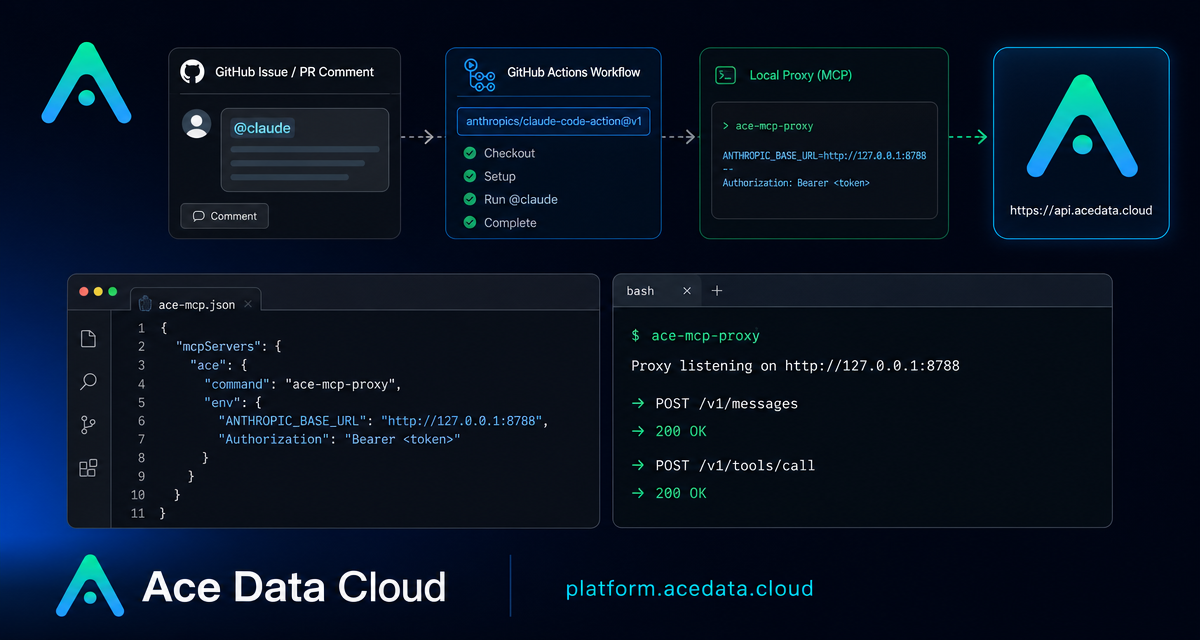
Code review bots are useful only when they can actually see the repository, respond in the right GitHub thread, and run with the same constraints as the rest of your CI pipeline. The Claude Code GitHub Actions setup gives you that workflow: mention @claude in an Issue, pull request, review, or comment, and a GitHub Actions job can run Claude Code against the repository.
This guide walks through the practical wiring described in the Ace Data Cloud documentation: a GitHub secret named ANTHROPIC_AUTH_TOKEN, a local proxy on the runner at 127.0.0.1:8788, and anthropics/claude-code-action@v1 configured with real claude_args.
What you can do
With this workflow in place, repository collaborators can ask Claude Code to work from normal GitHub surfaces instead of switching to a separate terminal session. The documented triggers cover:
issue_commentevents when a new comment contains@claude.pull_request_review_commentevents when a PR review comment contains@claude.pull_request_reviewsubmissions where the review body contains@claude.issuesevents where either the issue title or body contains@claude.
The same job can then read code, write changes, comment, or submit pull-request updates through the GitHub bot context, depending on the permissions and arguments you give the action.
How it works
The important detail is authentication. The Ace Data Cloud gateway expects requests authenticated as Authorization: Bearer <token>. The official anthropics/claude-code-action@v1, however, uses the Anthropic SDK path where requests are sent with x-api-key. The documented solution is to start a small local HTTP proxy inside the GitHub runner.
The data path is straightforward: GitHub sees @claude, starts the workflow, sets ANTHROPIC_BASE_URL to http://127.0.0.1:8788, and runs Claude Code. Requests hit the local proxy first. The proxy drops x-api-key, adds Authorization: Bearer <token>, and forwards the request to https://api.acedata.cloud.
1. Store the Ace Data Cloud token as a GitHub secret
In your repository, open Settings → Secrets and variables → Actions, create a new repository secret, and name it exactly ANTHROPIC_AUTH_TOKEN. The workflow reads this value through ${ secrets.ANTHROPIC_AUTH_TOKEN }.
If you prefer the GitHub CLI, the documentation recommends setting the value directly with --body rather than piping from stdin incorrectly:
gh secret set ANTHROPIC_AUTH_TOKEN --repo <org>/<repo> --body '<your-real-token>'Do not print the token itself in logs. If you need to verify that the secret exists during troubleshooting, print only a derived property such as its length.
2. Add the workflow
Create .github/workflows/claude.yml. The core fields to preserve are the event list, the if: guard that checks for @claude, the write permissions, ANTHROPIC_BASE_URL, and the non-empty placeholder anthropic_api_key.
name: Claude Code

on:
  issue_comment:
    types: [created]
  pull_request_review_comment:
    types: [created]
  issues:
    types: [opened, assigned]
  pull_request_review:
    types: [submitted]

jobs:
  claude:
    if: |
      (github.event_name == 'issue_comment' && contains(github.event.comment.body, '@claude')) ||
      (github.event_name == 'pull_request_review_comment' && contains(github.event.comment.body, '@claude')) ||
      (github.event_name == 'pull_request_review' && contains(github.event.review.body, '@claude')) ||
      (github.event_name == 'issues' && (contains(github.event.issue.body, '@claude') || contains(github.event.issue.title, '@claude')))
    runs-on: ubuntu-latest
    permissions:
      contents: write
      pull-requests: write
      issues: write
      id-token: write
    env:
      ANTHROPIC_BASE_URL: http://127.0.0.1:8788
      CLAUDE_CODE_AUTO_COMPACT_WINDOW: '850000'
    steps:
      - uses: actions/checkout@v4
        with:
          fetch-depth: 1

      - name: Start AceData Cloud proxy (x-api-key to Bearer)
        env:
          UPSTREAM: https://api.acedata.cloud
          ACEDATA_TOKEN: ${{ secrets.ANTHROPIC_AUTH_TOKEN }}
        run: |
          # Start the documented local proxy on 127.0.0.1:8788.
          # It removes x-api-key and forwards with Authorization: Bearer <token>.
          python3 /tmp/proxy.py &

      - name: Run Claude Code via AceData Cloud
        uses: anthropics/claude-code-action@v1
        with:
          anthropic_api_key: dummy-not-used
          github_token: ${{ secrets.GITHUB_TOKEN }}
          claude_args: |
            --model claude-opus-4-8
          show_full_output: 'true'
The placeholder value dummy-not-used is intentional. The action requires a non-empty anthropic_api_key or equivalent credential before it starts, but the actual upstream authentication is performed by the local proxy using ANTHROPIC_AUTH_TOKEN.
3. Bridge x-api-key to Authorization: Bearer
The proxy step is the only translation layer. It listens at 127.0.0.1:8788, receives the Anthropic SDK-style request, removes x-api-key, and forwards to https://api.acedata.cloud with Authorization: Bearer <token>. Keep the proxy local to the runner and source the token from ${ secrets.ANTHROPIC_AUTH_TOKEN }.
This is why ANTHROPIC_BASE_URL points to http://127.0.0.1:8788 instead of the upstream directly: Claude Code talks to the local adapter, while the adapter talks to Ace Data Cloud.
4. Choose a model and constrain the run
The documented example uses --model claude-opus-4-8. The same claude_args block can also pass supported Claude Code options such as --max-turns, --allowed-tools, and --mcp-config.
claude_args: |
  --model claude-sonnet-4-5
  --max-turns 8
  --allowed-tools Bash,Read,Edit
  --mcp-config .claude/mcp.json
CLAUDE_CODE_AUTO_COMPACT_WINDOW: '850000' sets the automatic compression trigger window to about 850,000 tokens. Keep it quoted in YAML so the environment variable is treated as a string. This value reserves space for tool results and final responses; it does not change the model context limit.
Triggering and debugging
To test the setup, open a new issue and include a short instruction such as @claude Reply with: OK.. If everything is connected, the Claude Code workflow appears under the repository Actions tab and the github-actions bot replies in the thread.
If nothing happens, first check that the event type is covered by the workflow if: condition. Then confirm that .github/workflows/claude.yml exists on the branch where Actions run, repository Actions are enabled, and the proxy step started successfully. For a 401, inspect whether the secret was set to the wrong value, especially the accidental literal - case described in the documentation.
Wrap-up
This pattern is small but useful: GitHub keeps the collaboration surface, Claude Code keeps the agent workflow, and the runner-local proxy adapts the authentication header expected by Ace Data Cloud. Once the workflow is committed, the day-to-day interface is just a normal GitHub mention.
Read the full source documentation here: Claude Code GitHub Actions Integration Guide.


Comments
Post a Comment