How to Poll Nano Banana Image Tasks Without Guessing the Result State
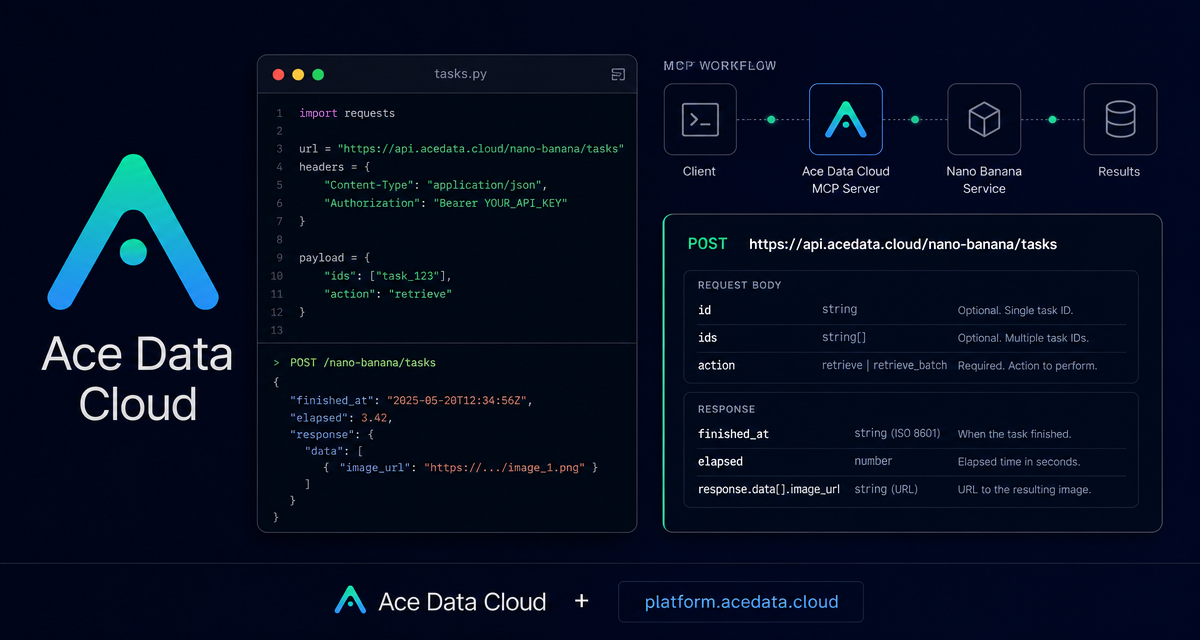
Image generation workflows usually fail in one boring place: the generation request is asynchronous, but the application still needs a reliable way to know when the final image URL is ready. The Nano Banana Tasks API gives you that missing polling layer for tasks created by the Nano Banana Images API.
What you can do
The Tasks API is a small but important endpoint: POST https://api.acedata.cloud/nano-banana/tasks. It lets you query the execution status and result details of a Nano Banana image task by sending the task ID that came back from the image generation request.
In practical terms, you can use it to:
- Retrieve one image generation task with
action: "retrieve"and anid. - Retrieve multiple task records with
action: "retrieve_batch"and anidsarray. - Read lifecycle fields such as
created_at,started_at,finished_at, andelapsed. - Get the original request body from
requestand the final task output fromresponse.
How it works
The endpoint accepts JSON and returns JSON. Every request should include these headers:
accept: application/jsonauthorization: Bearer {token}content-type: application/json
For a single task lookup, the request body contains two fields: id, the task ID to query, and action, set to retrieve. The example task ID used in the documentation is 4d320ead-4af4-4a55-8f3e-f2afebdf4fd0.
Poll one task
Here is the documented curl shape for retrieving a single task. In a real application, you would store the task ID returned by the image generation call, then poll this endpoint until the task record includes completion data.
curl -X POST 'https://api.acedata.cloud/nano-banana/tasks' -H 'accept: application/json' -H 'authorization: Bearer {token}' -H 'content-type: application/json' -d '{
  "id": "4d320ead-4af4-4a55-8f3e-f2afebdf4fd0",
  "action": "retrieve"
}'
A successful response returns the task details. The documented example includes the task identity, timestamps, the original generation request, and the final response. The image output lives under response.data, where each item can include an image_url.
{
  "id": "4d320ead-4af4-4a55-8f3e-f2afebdf4fd0",
  "created_at": 1757183036.787,
  "started_at": 1757183036.847,
  "finished_at": 1757183048.147,
  "elapsed": 11.3,
  "request": {
    "action": "generate",
    "prompt": "a white siamese cat"
  },
  "response": {
    "success": true,
    "task_id": "4d320ead-4af4-4a55-8f3e-f2afebdf4fd0",
    "data": [
      {
        "prompt": "a white siamese cat",
        "image_url": "https://platform.cdn.acedata.cloud/nanobanana/7e7bd000-698a-4e14-bb2d-3db61237e4bb.png"
      }
    ]
  }
}
Understand the lifecycle fields
The most useful polling rule is simple: treat finished_at as the completion signal. The documentation notes that finished_at is a Unix timestamp in seconds and is not returned if the task is not complete. The same is true for elapsed, which records the task execution time in seconds and is also absent before completion.
That means your application should avoid assuming that a task is done just because the API returned a record. Instead, check whether finished_at exists, then read response for the final result. This keeps your UI honest: show “processing” while the task is incomplete, and only render the image once the output URL is available.
Batch task retrieval
If you are building a gallery, queue dashboard, or batch image workflow, calling the endpoint once per task can become noisy. The API also supports batch lookup. The body changes from id to ids, and the action becomes retrieve_batch.
curl -X POST 'https://api.acedata.cloud/nano-banana/tasks' -H 'accept: application/json' -H 'authorization: Bearer {token}' -H 'content-type: application/json' -d '{
  "ids": ["1ebe4f2b-59ba-4385-a4ea-0ce8a3fe12ed", "1ebe4f2b-59ba-4385-a4ea-0ce8a3fe12ed"],
  "action": "retrieve_batch"
}'
The batch response contains items, an array of task detail objects with the same shape as a single-task response, and count, the number of returned batch query tasks. This is the format you want when your frontend needs to refresh the status of several generations at once.
A minimal Python polling helper
The documentation provides a direct Python request example. Here is a small wrapper around the same request body and headers. It does not invent a new SDK; it simply calls the documented endpoint with requests.post.
import requests

url = "https://api.acedata.cloud/nano-banana/tasks"
headers = {
    "accept": "application/json",
    "authorization": "Bearer {token}",
    "content-type": "application/json",
}
payload = {
    "id": "4d320ead-4af4-4a55-8f3e-f2afebdf4fd0",
    "action": "retrieve",
}

response = requests.post(url, json=payload, headers=headers)
task = response.json()

if "finished_at" in task:
    print("Task finished in", task.get("elapsed"), "seconds")
    print(task.get("response"))
else:
    print("Task is not finished yet")
Handle errors as part of the workflow
The API can return structured errors. The documented cases include 400 token_mismatched, 400 api_not_implemented, 401 invalid_token, 429 too_many_requests, and 500 api_error. A typical error body contains success: false, an error object with code and message, and a trace_id. In production, log the trace_id with the task ID so you can debug failed or unexpected results later.
Where this fits in a builder workflow
For a real app, I would keep the flow boring and explicit: create a Nano Banana image task, store the returned task ID, poll /nano-banana/tasks, check for finished_at, then read response.data[].image_url when it is present. That gives you a clean separation between generation and status tracking, which is exactly what an asynchronous image pipeline needs.
Read the full API notes in the Nano Banana Tasks API Integration Guide.


Comments
Post a Comment