How to Generate Music from the Terminal with Claude Code and Suno MCP
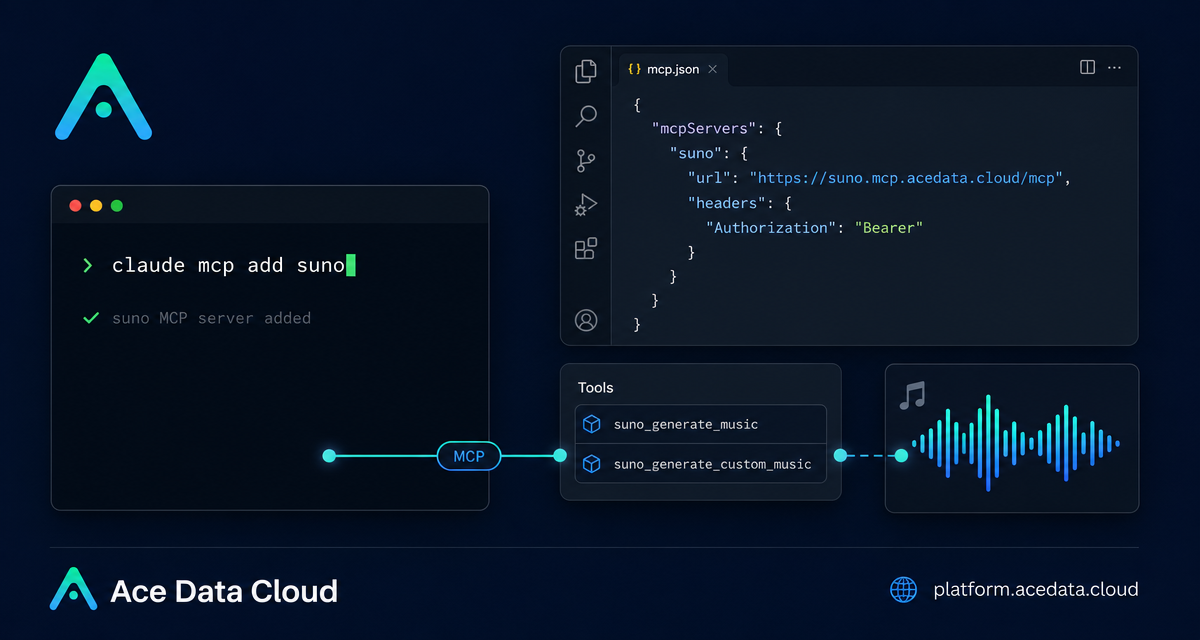
If you already live in the terminal, switching to a browser just to prototype a song idea can feel like breaking flow. The Claude Code + Suno MCP setup gives you a practical way to ask for lyrics, styles, covers, extensions, and stems from inside a Claude Code session.
What you can do
The useful part of this workflow is not that it hides music generation behind magic. It exposes a small set of concrete MCP tools to Claude Code, so you can describe an audio task in natural language and let the assistant pick the right tool.
- Generate a full song from a short description with
suno_generate_music. - Write your own lyrics and specify style or vocals with
suno_generate_custom_music. - Continue an existing song from a specific timestamp with
suno_extend_music. - Create a cover in a different style with
suno_cover_music. - Mash up two songs with
suno_mashup_music. - Separate vocals and accompaniment with
suno_stems_music. - Generate lyrics with
suno_generate_lyrics. - Save reusable voice styles with
suno_create_persona.
That is enough for a surprisingly complete builder workflow: draft an idea, generate a first version, iterate on the chorus, try a cover style, and split stems for downstream editing.
How it works
Claude Code supports MCP servers, and the Suno integration is exposed as an HTTP MCP server at https://suno.mcp.acedata.cloud/mcp. You add that server to Claude Code and pass an Ace Data Cloud API token as an authorization header. After that, Claude Code can discover the Suno tools and call them when your prompt requires music generation or editing.
The important detail is that this is a local developer configuration step, not an SDK install. You are teaching Claude Code where the MCP server is and how to authenticate to it.
Configure Suno MCP in Claude Code
Run the following command in your terminal, replacing YOUR_TOKEN with your Ace Data Cloud API token:
claude mcp add suno --transport http https://suno.mcp.acedata.cloud/mcp \
  -H "Authorization: Bearer YOUR_TOKEN"
There is one small but easy-to-miss detail: the header flag must be uppercase -H. A lowercase -h is interpreted as help, not as a header parameter.
Once the server is added, verify the connection:
claude mcp listYou should see the suno server marked as connected. If it is not connected, check the token value, the MCP URL, and the exact spelling of the Authorization: Bearer header.
Choose the right scope
Claude Code lets you decide where the MCP configuration should live. Without -s, the default is local, which applies only in the current directory when running commands. That is fine for a one-off experiment, but it is usually worth being explicit.
local: no-sor-s local; stored in~/.claude.json; effective only for the current project directory.user:-s user; stored in~/.claude.json; available globally across projects.project:-s project; stored in.mcp.jsonin the project root; useful when a team wants to share the MCP setup.
For team projects, -s project is useful because the configuration can be committed with the repository. Do not commit a real token to a public repo. Use environment-variable placeholders instead, then let each developer provide their own secret locally.
Try a few terminal-first prompts
After the setup, you do not need to remember the tool names for every task. In a Claude Code session, ask for the outcome you want:
Generate a folk song about a programmer working late at nightIf you want more control, split the request into a writing step and a generation step:
Write lyrics about spring rain, then generate a soft pop song with those lyricsFor iteration, refer back to an existing result:
The chorus sounds good. Extend the song from the chorus section.Or try a transformation-style workflow:
Cover the previously generated song in a jazz styleThis is where the MCP approach feels practical for builders. You can keep context in one assistant session: the prompt, the lyrics, the generated result, and the next edit all live in the same working conversation.
A minimal builder workflow
- Add the Suno MCP server with
claude mcp add suno. - Confirm it with
claude mcp list. - Ask Claude Code to draft lyrics for a specific scene, mood, or audience.
- Generate the first song with a clear style instruction.
- Iterate with cover, extend, mashup, or stems depending on what you need next.
For a prototype, that may be enough. For a repeatable internal tool, the same pattern can become a documented workflow for content, game audio sketches, podcast jingles, or product demo soundtracks.
Wrap-up
Claude Code + Suno MCP is a compact setup: one MCP server URL, one bearer token header, and a handful of music-focused tools. The main win is workflow continuity. You can stay in the terminal, keep the creative brief close to your code or project notes, and iterate without treating audio generation as a separate browser task.
Read the source documentation here: Claude Code integration with Suno MCP.


Comments
Post a Comment