How to Extract Structured Data from Web Pages with WebExtrator
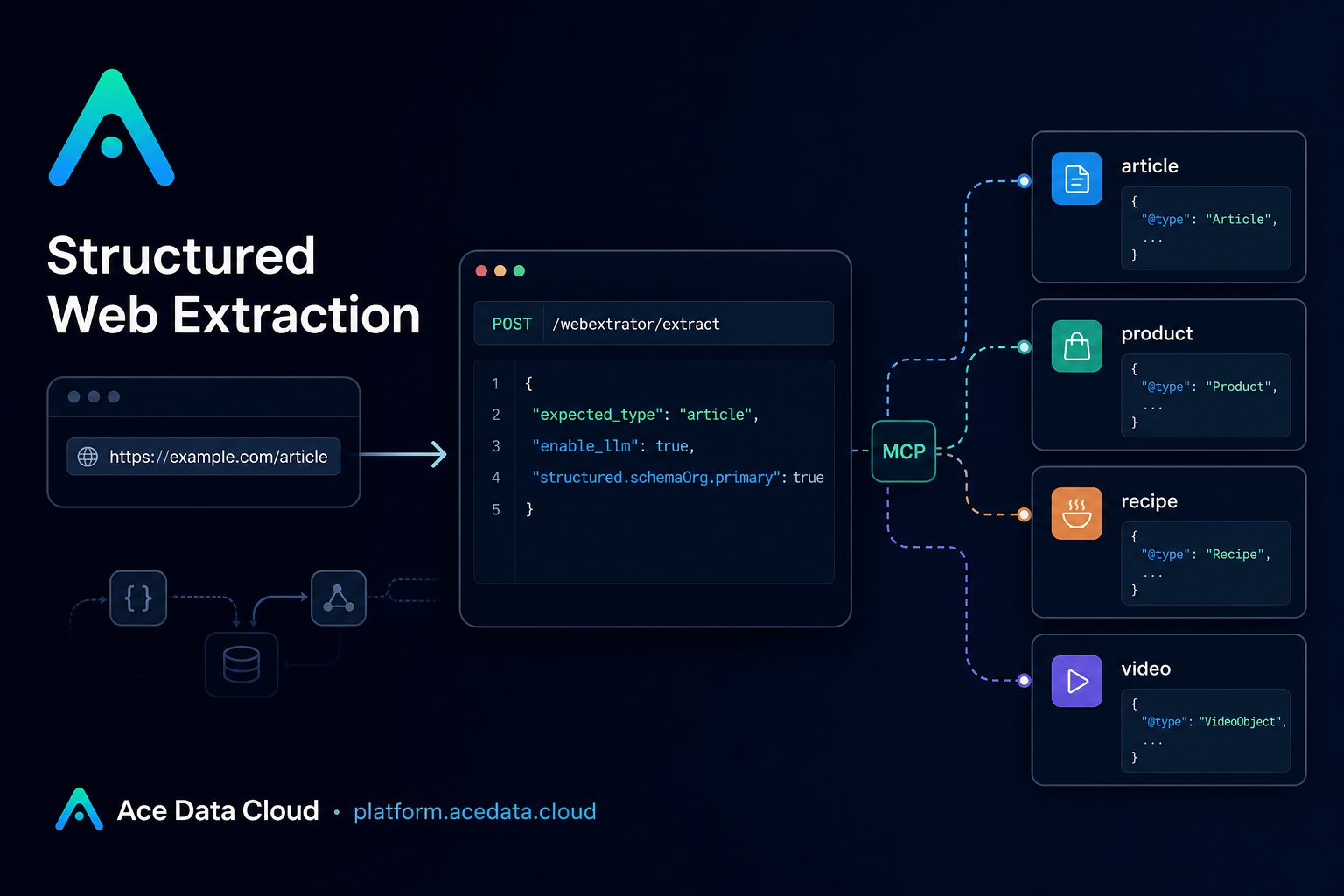
Scraping a page is easy until your downstream code needs more than raw HTML. Product pages need prices and ratings, articles need authors and publish dates, recipes need ingredients, and discussions need points or comment counts. The practical question is not “can I fetch the page?” but “can I turn it into a typed object I can trust?”
WebExtrator’s Extract API is built for that job. It accepts a URL, renders and reads the page, and returns cleaned text, Markdown, diagnostic signals, and structured data in one response. The endpoint is POST https://api.acedata.cloud/webextrator/extract.
What you can do
Use the Extract API when your application needs structured web content rather than a browser screenshot or raw document body. The response can identify a page as product, article, or general, and the structured layer can cover richer entities such as recipes, videos, job postings, events, FAQs, and discussions.
- Normalize article pages into titles, descriptions, bylines, language, publish dates, Markdown, and plain text.
- Extract product fields such as
name,sku,brand,offer.price,offer.currency,availability, andratingwhen supported by page metadata. - Read recipe pages into
ingredients[],instructions[], timing fields, nutrition, yield, and ratings. - Use LLM-backed extraction only when deterministic metadata is not enough.
How it works
The Extract API uses a layered pipeline. First, it looks for schema.org JSON-LD and maps known entities deterministically. This covers many common pages such as Wikipedia articles, BestBuy products, AllRecipes recipes, YouTube videos, and many news or product pages. If a schema.org primary entity is found, it becomes data.structured.schemaOrg.primary.
Second, if schema.org does not produce a primary result and you explicitly set enable_llm: true, the API can run typed LLM extraction. The selected schema depends on URL heuristics or the optional expected_type hint, and the output is validated before it is returned.
Third, Readability and Markdown fallback always run. That means even when a page has no rich structured metadata, you still get top-level content fields such as title, description, markdown, text, images, links, and rawSignals.
Authentication and the request shape
Requests use bearer-token authentication and JSON:
Authorization: Bearer YOUR_API_KEY
Content-Type: application/json
The Extract API accepts all Render API parameters listed in the source documentation, including url, user_agent, timeout, wait_until, delay, wait_for_selector, block_resources, headers, cookies, callback_url, bypass_cache, cache_ttl_seconds, and async. It also adds two extraction-specific fields:
expected_type: optional page-type hint. Supported values areproduct,article, andgeneral. This skips URL and text heuristics and sends the request down the matching branch.enable_llm: optional boolean, defaultfalse. When true, the API may use LLM extraction if schema.org does not provide a primary entity.
A minimal article extraction example
For pages with good schema.org metadata, you usually do not need LLM extraction. This request hints that the page should be treated as an article:
curl -X POST https://api.acedata.cloud/webextrator/extract   -H "Authorization: Bearer $API_KEY"   -H "Content-Type: application/json"   -d '{
    "url": "https://en.wikipedia.org/wiki/Diffbot",
    "expected_type": "article"
  }'
A successful synchronous response includes envelope fields such as success, task_id, trace_id, started_at, finished_at, and elapsed. The extracted payload is under data. For an article-like page, useful fields include data.contentType, data.title, data.description, data.byline, data.language, data.siteName, data.publishedAt, data.markdown, data.text, and data.structured.
When to enable LLM extraction
Keep enable_llm off for pages that already expose strong JSON-LD. The documentation is explicit: when the page has schema.org JSON-LD, enable_llm is ineffective because the deterministic mapper produces the result directly.
Enable it for pages that lack JSON-LD but still have a recognizable shape. For example, Hacker News and Reddit-style discussions can map to a discussion schema with fields such as title, author, postedAt, points, commentCount, body, and url. Job pages on Greenhouse, Lever, Workable, BambooHR, or similar domains can map to a job schema with fields such as title, company, location, remote, employmentType, responsibilities[], and qualifications[].
curl -X POST https://api.acedata.cloud/webextrator/extract   -H "Authorization: Bearer $API_KEY"   -H "Content-Type: application/json"   -d '{
    "url": "https://news.ycombinator.com/item?id=37000000",
    "enable_llm": true
  }'
Cache and async mode
For production workflows, two operational details matter. First, identical requests are cached under a Redis key shaped like webextrator:cache:extract:<sha256(canonical-json)>. You can use bypass_cache: true to skip reading from cache while still writing the result back, or cache_ttl_seconds: 0 to avoid storing the response. Cache hits include data.cached: true and data.cacheStoredAt.
Second, use async: true when extraction should not block the caller. Providing callback_url also enters asynchronous mode. The immediate response includes success, task_id, trace_id, and started_at; when the job completes, the full envelope is posted to your callback URL if configured.
Closing notes
The builder-friendly pattern is simple: start with deterministic extraction, add expected_type when you already know the page category, and enable LLM extraction only for pages where typed metadata is missing. That gives you stable structured output without treating every page like an expensive open-ended parsing problem.
Read the full WebExtrator Extract API documentation here: WebExtrator Extract API Integration Guide.


Comments
Post a Comment