How to Build a Voice-Cloned Music Workflow with the Suno API
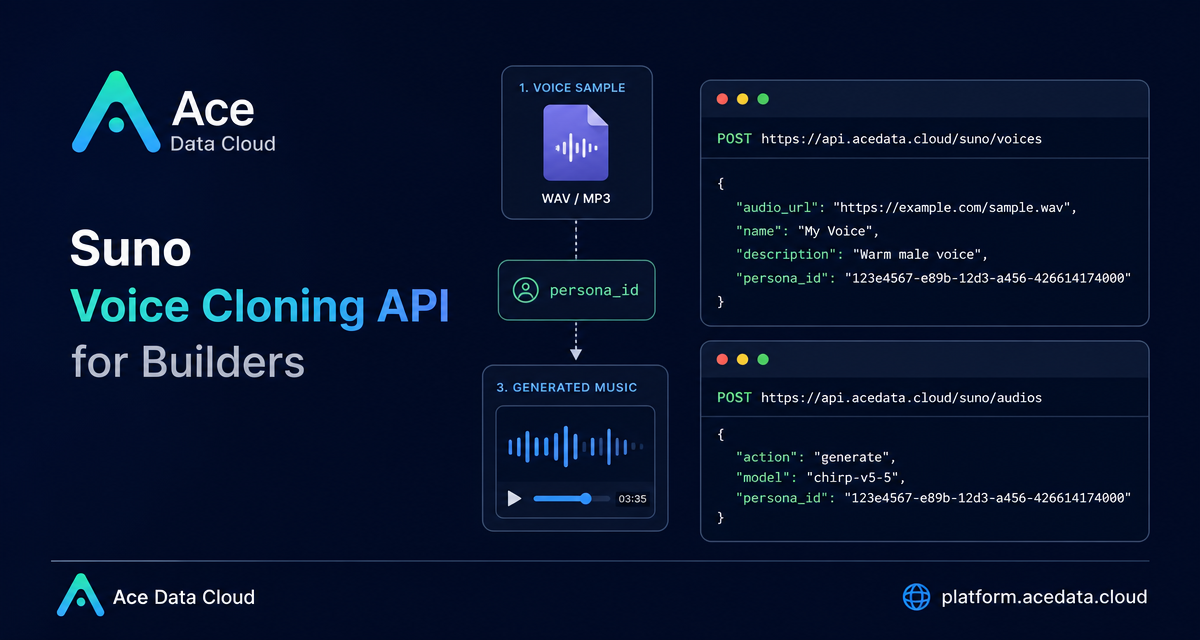
If you want generated music to carry a recognizable voice, the hard part is not only the model call. The practical challenge is building a small workflow around clean source audio, a reusable voice identifier, and a second generation request that actually uses that identifier.
This guide walks through a simple builder-oriented flow using Ace Data Cloud's Suno voice cloning API: upload a clear single-voice sample, receive a private persona_id, then pass that persona_id into a music generation request.
What you can do
The documented workflow supports two concrete steps:
- Create a custom voice character from a publicly accessible
audio_url. - Use the returned
persona_idin a Suno music generation request.
The voice creation request accepts three input parameters: audio_url, name, and description. Only audio_url is required. It must point to an MP3 or WAV file containing a clear single voice. The response includes data.persona_id, which is the value you should store and reuse in later calls.
There are a few important constraints worth designing around from the beginning. The audio file must be WAV or MP3, and its duration must be between 10 and 240 seconds. The recommended source material is a clean, single-voice recording of about 30 to 60 seconds. Background noise, accompaniment, echo, reverb, multiple speakers, or complete songs with accompaniment can reduce the chance of passing voiceprint verification.
How it works
The workflow is intentionally small:
- Host or provide a direct URL to a clean MP3 or WAV voice sample.
- Call
POST https://api.acedata.cloud/suno/voiceswithaudio_url. - Read
data.persona_idfrom the response. - Call
POST https://api.acedata.cloud/suno/audioswithactionset togenerate, a supported model, your music prompt, and thepersona_id.
One detail that matters in production: voice characters created by uploading audio are private resources. They do not support cross-account reuse. The returned name may be automatically generated by the system, so treat persona_id as the real durable reference in your application state.
Step 1: prepare the voice sample
Before writing code, spend time on the recording. A voice cloning API is sensitive to the source signal. The best input is a single speaker or singer, recorded clearly, with no music bed behind it. If you are building an internal tool, it is worth adding a preflight checklist in your UI:
- Is the file MP3 or WAV?
- Is the duration between
10and240seconds? - Is it a single recognizable voice?
- Is there no accompaniment, background noise, echo, or reverb?
The source document includes a directly callable MP3 example, https://cdn.acedata.cloud/suno_demo.mp3, described as a 41-second single dry voice sample. For WAV testing, it also provides https://cdn.acedata.cloud/uploads/82d23b97-ec1c-4b41-91b8-989fc51f8765, described as a 41-second mono 44.1kHz sample.
Step 2: create the voice character
Here is the documented request shape for creating a voice character:
curl -X POST 'https://api.acedata.cloud/suno/voices' -H 'accept: application/json' -H 'authorization: Bearer {token}' -H 'content-type: application/json' -d '{
  "audio_url": "https://cdn.acedata.cloud/suno_demo.mp3",
  "name": "My Voice",
  "description": "Single clear voice example"
}'
A successful response looks like this:
{
  "success": true,
  "task_id": "0fa609a6-c8d9-4bb5-8574-e4c93bb55d02",
  "data": {
    "persona_id": "1ab79a71-a229-4350-8f02-402ff02eac16",
    "name": "VOICE_20260803037676",
    "is_public": false
  }
}
In your own code, persist data.persona_id. The response's is_public field is false for uploaded voice characters because these voices are private. If the clone attempt fails with a voiceprint-related result such as voices_sound_different, the documentation recommends implementing one or two automatic retries. Voice cloning is compute intensive, and a compliant sample can still occasionally fail.
Step 3: generate music with the cloned voice
Once you have a persona_id, pass it into the music generation endpoint. The documented example uses action set to generate and model set to chirp-v5-5:
curl -X POST 'https://api.acedata.cloud/suno/audios' -H 'accept: application/json' -H 'authorization: Bearer {token}' -H 'content-type: application/json' -d '{
  "action": "generate",
  "model": "chirp-v5-5",
  "prompt": "A warm synth-pop song about city nights",
  "persona_id": "1ab79a71-a229-4350-8f02-402ff02eac16"
}'
The generated result can include fields such as id, title, audio_url, image_url, model, state, prompt, and duration. In the documented response, state is succeeded, model is chirp-v5-5, and duration is 156.28.
Implementation notes for builders
If I were adding this to a product, I would model it as two separate jobs. The first job validates source audio and creates the voice character. The second job generates music using a previously created persona_id. Keeping those steps separate makes the user experience clearer: users can fix a recording problem before they spend time tuning the music prompt.
Also note the model constraint in the documentation: voice cloning only supports chirp-v4-5 and above, including chirp-v4-5, chirp-v5, and chirp-v5-5. It does not support chirp-v4. If you expose a model picker, filter the options before submission instead of letting users discover this at runtime.
From there, the workflow is straightforward: record clean audio, create a private voice, store persona_id, and pass it into generation. For the full source reference, see the Suno Voice Cloning API integration documentation.


Comments
Post a Comment