How to Build a Simple Image Generation and Editing Flow with the Nano Banana Images API
If you are building a product feature that needs both text-to-image generation and image editing, the hardest part is often not the prompt itself. It is designing a small, predictable API flow that handles inputs, keeps track of results, and gives you enough metadata to debug failures later.
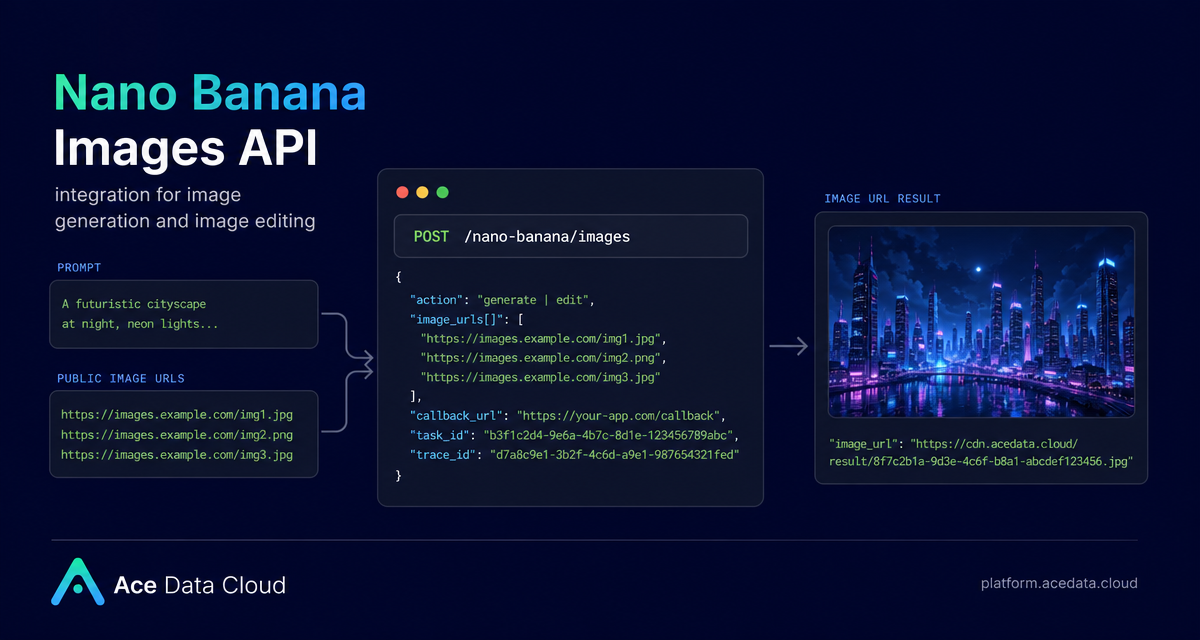
The Nano Banana Images API on Ace Data Cloud gives you one endpoint for two related jobs: generating an image from a prompt, and editing one or more existing images using a prompt. This guide walks through a practical integration pattern you can copy into a prototype, internal tool, or production worker.
What you can do
The API supports two actions on the same endpoint:
generate: create an image from a textprompt.edit: edit or combine existing images by sendingimage_urlsplus a textprompt.
Both actions use POST /nano-banana/images under the base URL https://api.acedata.cloud. Authentication is sent with the HTTP header authorization: Bearer {token}, and the request should use accept: application/json and content-type: application/json.
The useful thing for builders is that the response includes both a task_id and a trace_id. Keep them. The task_id lets you associate a request with the eventual output, while trace_id is useful when troubleshooting a failed or unexpected result.
How it works
A minimal request needs only two fields: action and prompt. For generation, that is enough. For editing, you also send image_urls, which is an array with at least one item. The image URLs must be publicly accessible direct links over HTTP or HTTPS; the documentation also notes that Base64 image data can be used.
The optional model field lets you choose variants such as nano-banana, nano-banana-2-lite, nano-banana-2, nano-banana-pro, or the corresponding :official channel versions. If you do not pass a model, nano-banana is the default. You can also pass count to request 1–4 images; the default is 1, and if some images fail, only successful images are returned and billed.
For layout-sensitive work, the API accepts optional aspect_ratio values such as 1:1 or 16:9, and optional resolution values such as 1K, 2K, or 4K. One model-specific constraint matters: nano-banana-2-lite only supports 1K.
Generate an image from a prompt
For a first integration, start with a small wrapper around action: generate. This keeps your application logic simple: receive a user prompt, add your product’s safety or style instructions if needed, call the API, then store the returned image_url with its task_id and trace_id.
curl -X POST 'https://api.acedata.cloud/nano-banana/images' \
  -H 'authorization: Bearer {token}' \
  -H 'accept: application/json' \
  -H 'content-type: application/json' \
  -d '{
    "action": "generate",
    "model": "nano-banana-pro",
    "prompt": "A photorealistic close-up portrait of an elderly Japanese ceramicist with deep, sun-etched wrinkles and a warm, knowing smile. He is carefully inspecting a freshly glazed tea bowl. The setting is his rustic, sun-drenched workshop. The scene is illuminated by soft, golden hour light streaming through a window, highlighting the fine texture of the clay. Captured with an 85mm portrait lens, resulting in a soft, blurred background (bokeh). The overall mood is serene and masterful. Vertical portrait orientation.",
    "count": 1
  }'
A successful response has this shape:
{
  "success": true,
  "task_id": "70e6931b-6e34-43db-9e36-8765e2809d04",
  "trace_id": "60df8d38-f265-4986-aec7-75c9220bced2",
  "data": [
    {
      "prompt": "A photorealistic close-up portrait of an elderly Japanese ceramicist...",
      "image_url": "https://platform2.cdn.acedata.cloud/nanobanana/1d0160b4-93f9-4229-8926-ea9ef0bed336.png"
    }
  ]
}
Edit or combine existing images
Editing uses the same endpoint, but switches action to edit. The image_urls array becomes the key input. You can pass a source photo and a second reference image, then describe the desired transformation in prompt.
curl -X POST 'https://api.acedata.cloud/nano-banana/images' \
  -H 'authorization: Bearer {token}' \
  -H 'accept: application/json' \
  -H 'content-type: application/json' \
  -d '{
    "action": "edit",
    "prompt": "let this man wear on this T-shirt",
    "image_urls": [
      "https://cdn.acedata.cloud/v8073y.png",
      "https://cdn.acedata.cloud/44xlah.png"
    ],
    "count": 1
  }'
This is useful for product mockups, virtual try-on prototypes, brand asset adaptation, or content tooling where a human supplies reference material and your system turns it into a repeatable workflow.
Use callbacks when requests may take time
For a quick CLI experiment, waiting on the HTTP response is fine. In an application, prefer callback_url. The callback URL must be publicly accessible and support POST JSON. The API can return quickly with a task_id, then send the complete JSON payload to your webhook when the task completes.
{
  "action": "generate",
  "prompt": "a white siamese cat",
  "count": 1,
  "callback_url": "https://your-app.example.com/webhooks/nano-banana"
}
On your side, store task_id when the request is created, and update the record when the callback arrives. Because the callback payload follows the same successful response structure, your result parser can be shared between synchronous and webhook-based flows.
Handle errors like an integration, not a demo
The API returns a standard error shape with success: false, an error object, and a trace_id. Common codes include token_mismatched, api_not_implemented, invalid_token, too_many_requests, and api_error.
{
  "success": false,
  "error": {
    "code": "api_error",
    "message": "Internal server error."
  },
  "trace_id": "2cf86e86-22a4-46e1-ac2f-032c0f2a4e89"
}
A practical production pattern is to log trace_id, preserve the original prompt, store the selected model, and avoid retrying blindly on too_many_requests. If your workflow requests multiple outputs with count, remember that the data array may contain only the successful images.
Putting it together
The cleanest mental model is: prompt in, optional public images in, API request out, image_url back. Start with generate, add edit when you have real image inputs, then move long-running work behind callback_url once you are wiring it into a user-facing product.
For the full parameter reference and examples, read the Nano Banana Images API Integration Guide.


Comments
Post a Comment