How to Build an Image Generation Workflow with Nano Banana Images API
If you want to let an app create or refine images from a prompt or source images, the Nano Banana Images API gives you a single HTTP endpoint that covers both generation and editing.
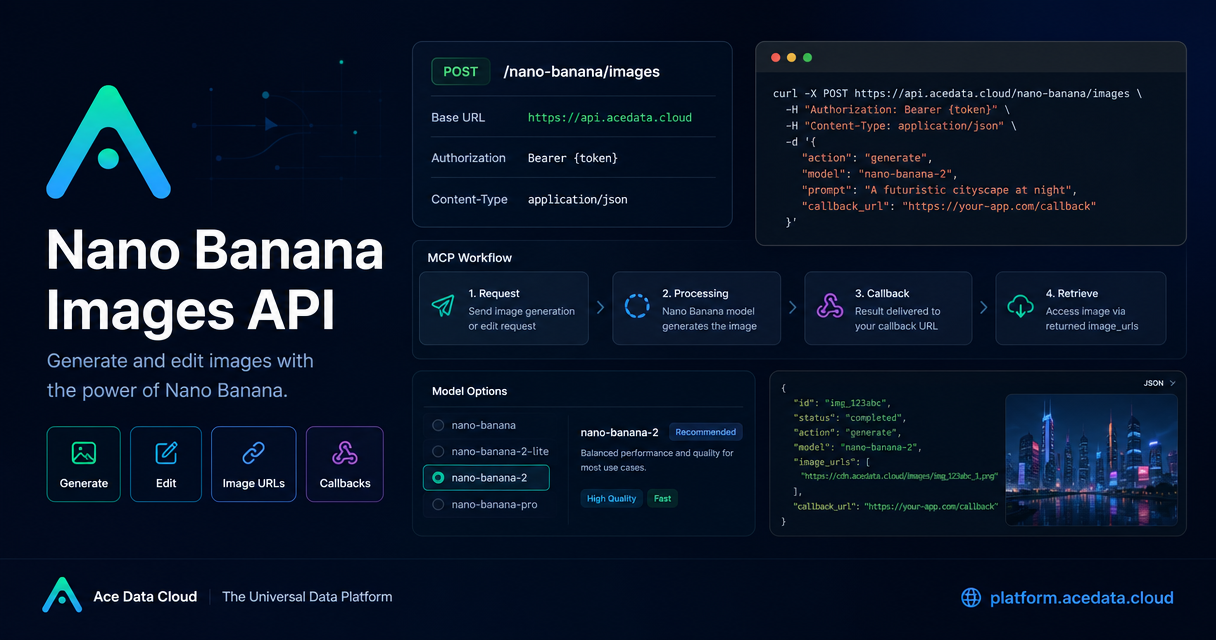
What you can do
The API supports two actions: generate and edit. According to the docs, both use the same endpoint, POST /nano-banana/images, on the base URL https://api.acedata.cloud. Authentication is done with authorization: Bearer {token}.
That makes the integration simple: one request path, one auth pattern, and two workflows you can combine in product features like image creation, asset cleanup, social post generation, or iterative prompt-to-image editing.
The model list is also flexible. You can choose nano-banana by default, or switch to nano-banana-2-lite, nano-banana-2, or nano-banana-pro. The guide also mentions official-channel variants such as :official for those same models.
How it works
At a high level, your app sends JSON to /nano-banana/images. The required fields are minimal:
action:generateoreditprompt: the text instructionimage_urls: required for editing, with one or more public image URLs
The docs also mention optional fields such as model, aspect_ratio, resolution, callback_url, and count. count supports 1–4 images, with a default of 1. If you use callback_url, the platform can POST the completed result back to your server instead of making you poll.
That is enough for a useful production flow:
- Send a prompt to generate a new asset.
- Save the returned
task_idandtrace_idfor tracking. - For edits, add source images in
image_urls. - Use callbacks when you do not want to hold an open connection.
A practical generate request
Here is the simplest shape of a generation call, based on the guide:
curl -X POST 'https://api.acedata.cloud/nano-banana/images' \
  -H 'authorization: Bearer {token}' \
  -H 'accept: application/json' \
  -H 'content-type: application/json' \
  -d '{
    "action": "generate",
    "model": "nano-banana-pro",
    "prompt": "A photorealistic close-up portrait of an elderly Japanese ceramicist carefully inspecting a freshly glazed tea bowl in a rustic workshop, soft golden hour light, 85mm portrait lens, shallow depth of field.",
    "count": 1
  }'
A Python version looks the same conceptually:
import requests

url = 'https://api.acedata.cloud/nano-banana/images'
headers = {
    'authorization': 'Bearer {token}',
    'accept': 'application/json',
    'content-type': 'application/json',
}
payload = {
    'action': 'generate',
    'model': 'nano-banana-pro',
    'prompt': 'A photorealistic close-up portrait of an elderly Japanese ceramicist carefully inspecting a freshly glazed tea bowl in a rustic workshop, soft golden hour light, 85mm portrait lens, shallow depth of field.',
    'count': 1,
}
response = requests.post(url, json=payload, headers=headers)
print(response.json())
Editing an existing image
Editing is where the API becomes especially practical. Instead of asking a model to redraw everything from scratch, you can provide one or more source images in image_urls and ask for a specific change.
The docs show this pattern clearly: pass action: "edit", include the images, and describe the transformation in prompt. That is useful when you want to:
- restyle a product shot
- composite one asset onto another
- iterate on an illustration without losing structure
- turn one visual into multiple campaign variants
For example, if you have a portrait and a shirt reference image, the guide demonstrates editing by sending both images in image_urls and describing the target result in the prompt.
Using callbacks for async workflows
The guide recommends callback_url for long-running jobs. This is a good fit for background workers, content pipelines, and automation scripts. Instead of waiting on the request, your system receives the completed JSON payload later.
A callback flow is especially useful if you are:
- building a queue-based image service
- wiring image generation into a CMS or bot
- saving results to object storage after completion
- coordinating image generation with other steps in a larger agent workflow
The response example in the doc includes success, task_id, trace_id, and data, where data[] contains the resulting image_url values.
A few implementation notes
Two details are easy to miss but matter in practice:
image_urlsmust be publicly accessible HTTP or HTTPS links.- The docs say HTTPS is recommended.
The guide also notes that nano-banana-2-lite only supports 1K resolution. If you are exposing resolution choices in your UI, that is worth validating before you submit the job.
For reliability, keep both task_id and trace_id in your logs. They make it much easier to debug a failed asset or match a callback to the original request.
How I would ship this in a real product
If I were wiring this into a builder workflow, I would start with three small features:
- A prompt box for generation.
- An upload step that collects one or more reference images for editing.
- A worker that submits jobs with
callback_urland stores the returned image URLs.
That keeps the UX simple while still using the full shape of the API. You get generation, editing, and async callbacks without needing multiple services.
If you want to go deeper, the full guide is here: Nano Banana Images API Integration Guide.


Comments
Post a Comment