How to Build Image Generation and Editing Workflows with the Nano Banana Images API
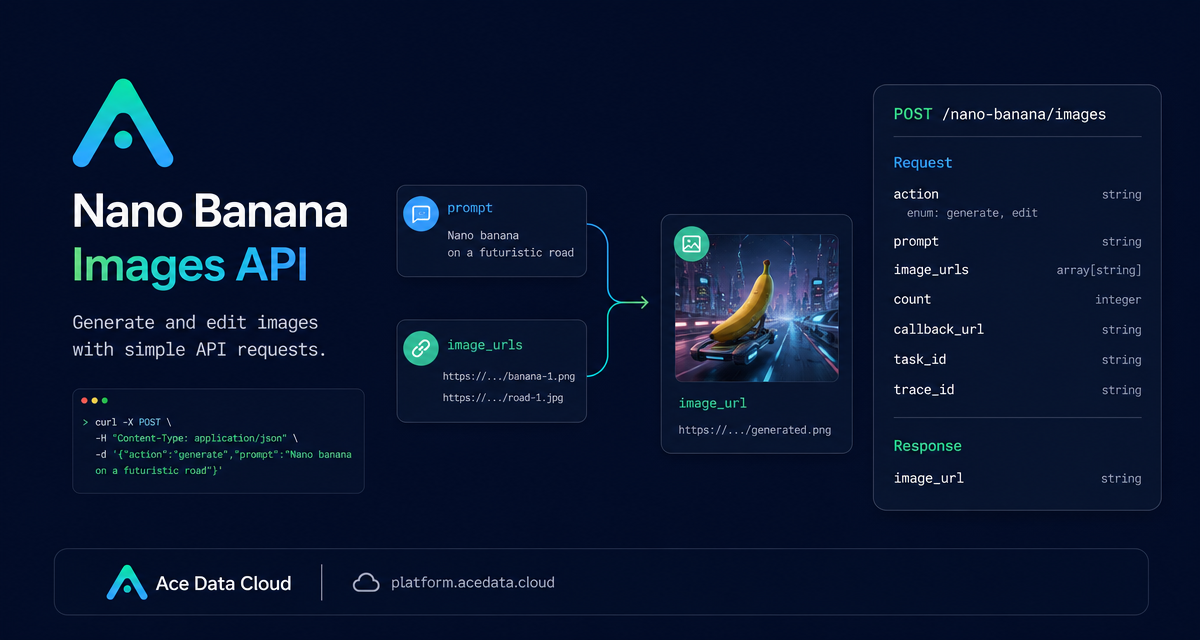
When you are building an app that needs image generation or practical image edits, the hard part is often not the prompt itself. It is designing a request shape that works for both text-to-image and image-to-image jobs, returns predictable result URLs, and can be wired into a product workflow without special cases.
The Nano Banana Images API keeps that surface area intentionally small. A single endpoint, POST /nano-banana/images, supports both generate and edit actions, so you can start with prompt-only generation and later add reference-image editing without changing the integration pattern.
What you can do
The API supports two common builder workflows:
- Generate images from text by setting
actiontogenerateand sending a clearprompt. - Edit existing images by setting
actiontoedit, sending one or moreimage_urls, and describing the target edit inprompt.
The same response pattern is used for both actions: a success flag, a task_id, a trace_id, and a data array containing output items with the echoed prompt and an image_url. That consistency is useful when you are saving job history, showing outputs in a gallery, or debugging failed user requests.
How it works
The base URL is https://api.acedata.cloud, and the endpoint is POST /nano-banana/images. Requests use bearer-token authentication in the HTTP header:
authorization: Bearer {token}accept: application/jsoncontent-type: application/json
For generation, the minimum required fields are action and prompt. For editing, you also provide image_urls, an array with at least one item. The image inputs can be publicly accessible HTTP or HTTPS URLs, and the documentation also describes Base64 data images as supported input.
You can optionally choose a model. The documented options include nano-banana as the default, plus nano-banana-2-lite, nano-banana-2, nano-banana-pro, and corresponding :official channel variants such as nano-banana-pro:official. Optional layout controls include aspect_ratio, for example 1:1 or 16:9, and resolution, for example 1K, 2K, or 4K. One specific limitation to remember: nano-banana-2-lite supports only 1K.
Start with prompt-only generation
A good first integration is a prompt-to-image form. Let the user write a prompt, optionally choose a model, and request one image. The count parameter can request between 1 and 4 images, with a default of 1.
curl -X POST 'https://api.acedata.cloud/nano-banana/images'   -H 'authorization: Bearer {token}'   -H 'accept: application/json'   -H 'content-type: application/json'   -d '{
    "action": "generate",
    "model": "nano-banana-pro",
    "prompt": "A clean product mockup on a deep navy developer desk, soft studio lighting, realistic shadows, 16:9 composition",
    "count": 1
  }'
A successful response follows this shape:
{
  "success": true,
  "task_id": "70e6931b-6e34-43db-9e36-8765e2809d04",
  "trace_id": "60df8d38-f265-4986-aec7-75c9220bced2",
  "data": [
    {
      "prompt": "A clean product mockup on a deep navy developer desk, soft studio lighting, realistic shadows, 16:9 composition",
      "image_url": "https://platform2.cdn.acedata.cloud/nanobanana/1d0160b4-93f9-4229-8926-ea9ef0bed336.png"
    }
  ]
}
In a production app, store both task_id and trace_id. The task ID helps you associate the result with your own job record, while the trace ID is useful when you need to investigate a specific request.
Add image editing with the same endpoint
Editing uses the same endpoint and response model. The difference is the request body: use action: edit and pass image_urls. This is a good fit for workflows such as trying a product image on a model, combining reference assets, or applying a natural-language transformation to an existing visual.
import requests

url = "https://api.acedata.cloud/nano-banana/images"
headers = {
    "authorization": "Bearer {token}",
    "accept": "application/json",
    "content-type": "application/json",
}
payload = {
    "action": "edit",
    "prompt": "let this man wear on this T-shirt",
    "image_urls": [
        "https://cdn.acedata.cloud/v8073y.png",
        "https://cdn.acedata.cloud/44xlah.png"
    ],
    "count": 1
}

resp = requests.post(url, json=payload, headers=headers)
print(resp.json())
The important implementation detail is accessibility: the URLs in image_urls must be direct image links that the service can fetch. HTTPS is recommended. If your app stores private uploads, create a temporary public URL or use a supported Base64 data image instead.
Use callbacks when the UI should not wait
Image jobs may take time, so the API supports an optional callback_url. When you include it, your server should expose a publicly accessible endpoint that accepts POST JSON. The platform can return basic task information immediately, then POST the completed payload to your callback when the task finishes.
{
  "action": "generate",
  "prompt": "a white siamese cat",
  "count": 1,
  "callback_url": "https://example.com/webhooks/nano-banana"
}
The callback payload uses the same structure as a successful response, including success, task_id, trace_id, and data[].image_url. That means your synchronous and asynchronous result handlers can share most of the same parsing code.
Handle errors deliberately
Failures return a standard shape with success: false, an error object, and a trace_id. Common documented error codes include token_mismatched for invalid request parameters, invalid_token for missing or failed authentication, too_many_requests for rate limiting, api_not_implemented, and api_error.
{
  "success": false,
  "error": {
    "code": "api_error",
    "message": "Internal server error."
  },
  "trace_id": "2cf86e86-22a4-46e1-ac2f-032c0f2a4e89"
}
For builders, the simplest pattern is to show the user a friendly retry message, log the trace_id, and avoid retrying automatically on too_many_requests until your own backoff window has passed.
Putting it together
If you are building an image feature, start with the smallest path: action, prompt, and count. Once that is stable, add image_urls for editing, then introduce callback_url when your product needs background processing. The useful part of the Nano Banana Images API is not only that it can generate and edit images; it is that both flows use one request pattern and one result shape.
For the full parameter list and the latest examples, read the Nano Banana Images API documentation.


Comments
Post a Comment