How to Add Text-to-Speech to an App with the Fish TTS API
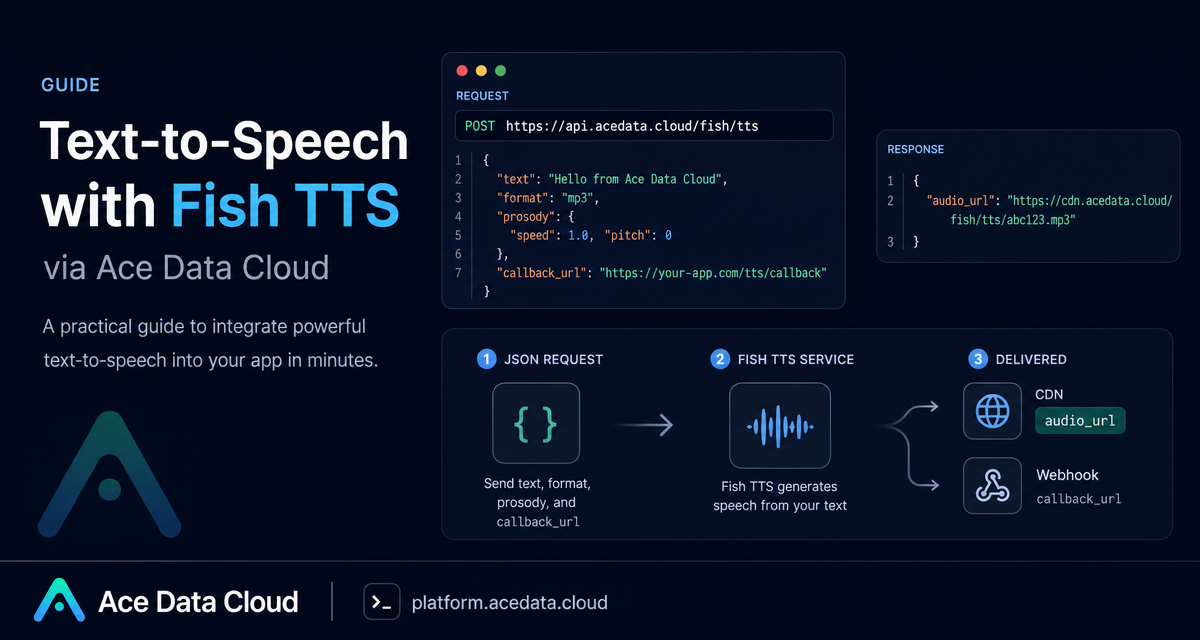
Voice output is one of those features that looks simple in a demo and becomes awkward in production: you need stable audio files, predictable formats, controllable speech speed, and a path for longer jobs that should not block a request thread.
This guide walks through a practical way to add text-to-speech to an app using the Fish TTS API through Ace Data Cloud. The goal is not to build a full voice product in one sitting; it is to get a reliable first integration that can generate an audio URL from text, tune delivery with a few fields, and move longer synthesis work to a callback flow.
What you can do
The Fish TTS endpoint is a JSON API exposed at POST https://api.acedata.cloud/fish/tts. You send text and synthesis options, and the response gives you an audio_url hosted on the platform CDN. That URL can be downloaded with a normal GET request or played directly in an HTML <audio> element.
The request supports common TTS controls you will probably need in an application:
text: the non-empty string to synthesize.format:mp3,wav, orpcm. The default ismp3;opusis not supported.prosody: speech delivery overrides, currently includingspeedandvolume.sample_rate: commonly16000,22050, or44100.mp3_bitrate:64,128, or192, only effective whenformatismp3.callback_url: an Ace Data Cloud extension for asynchronous synthesis.
How it works
Authentication is done with the authorization header: Bearer {token}. The request body is JSON, so content-type: application/json is required. You can also pass a model header. The documented model choices are s1, s2-pro, and s2.1-pro, with s2-pro as the default. In practice, that means your app can pick a default model at the HTTP layer and keep the body focused on per-message voice options.
For many product flows, the synchronous response is enough. A notification voice line, a short onboarding sentence, or a small audio preview can be generated inline, and your application stores the returned audio_url. For longer text, use callback_url so the API returns a task_id immediately and later posts the final result to your webhook.
Make a first synchronous request
Start with a short sentence and format: "mp3". MP3 is a practical default because it is browser-friendly and easy to serve from a CDN.
curl -X POST 'https://api.acedata.cloud/fish/tts' \
  -H 'authorization: Bearer {token}' \
  -H 'content-type: application/json' \
  -d '{
    "text": "Your build has finished successfully. The preview URL is ready.",
    "format": "mp3",
    "prosody": { "speed": 1.05, "volume": 0 },
    "mp3_bitrate": 128
  }'
A successful response contains an audio_url:
{
  "audio_url": "https://platform2.cdn.acedata.cloud/fish/e2ffcc06-18da-4a8c-b9aa-9337d0f9ec1d.mp3"
}
In a real app, store that URL next to the object that requested it: a message, lesson, notification, or generated script. The platform documentation notes that the CDN URL is long-term available, but it is still a good habit to keep a copy in your own storage if the audio becomes part of a durable user artifact.
Tune delivery with prosody and bitrate
Small voice controls make a big difference. A build notification can be slightly faster than a meditation script; an in-product voice tip may need no volume gain, while a mixed audio track might need attenuation. The prosody object supports speed, where 1.0 is normal speed, and volume, where 0 means no change and positive or negative numbers represent dB gain or attenuation.
If you are serving MP3, use mp3_bitrate when you want predictable file characteristics. The documented values are 64, 128, and 192. For web UI feedback and short clips, 128 is often a reasonable starting point.
Use callbacks for longer synthesis
Longer text can take several seconds or more, and a blocked HTTP request is rarely a good user experience. With callback_url, the endpoint immediately returns task metadata and later sends the completed result to your webhook.
curl -X POST 'https://api.acedata.cloud/fish/tts' \
  -H 'authorization: Bearer {token}' \
  -H 'content-type: application/json' \
  -d '{
    "text": "The weather is really nice today, let us go for a walk together.",
    "format": "mp3",
    "callback_url": "https://webhook.site/4815f79f-a40f-4078-ac85-1cc126b6bb34"
  }'
The immediate response looks like this:
{
  "task_id": "79d82713-2897-4eeb-9934-e7544d471aa7",
  "started_at": 1778462584.742
}
When the job completes, your callback receives JSON with the same task_id and the final audio_url:
{
  "task_id": "79d82713-2897-4eeb-9934-e7544d471aa7",
  "audio_url": "https://platform2.cdn.acedata.cloud/fish/bd66b8c5-7543-4557-b684-baa72407e336.mp3"
}
That structure is easy to map into a job table. Create a record before sending the request, store the returned task_id, mark it as processing, and update it when the webhook arrives. If the webhook is retried by your infrastructure, make the update idempotent by keying on task_id.
Call it from Python
Here is the same basic integration in Python. Keep the token in your secrets manager or environment, not in source control.
import requests

TOKEN = "YOUR_ACE_DATA_CLOUD_TOKEN"

payload = {
    "text": "A new comment needs your review.",
    "format": "mp3",
    "prosody": {"speed": 1.1, "volume": 0},
}

response = requests.post(
    "https://api.acedata.cloud/fish/tts",
    headers={
        "authorization": f"Bearer {TOKEN}",
        "content-type": "application/json",
        "model": "s2-pro",
    },
    json=payload,
    timeout=60,
)
response.raise_for_status()
audio_url = response.json()["audio_url"]
print(audio_url)
If you are switching models in code, keep the model header close to the request configuration rather than scattering it through business logic. If you need raw waveform processing or browser-side stitching, request format: "pcm" with an explicit sample_rate; the returned file uses a .wav extension because wav and pcm are returned in a WAV container.
Handle errors as product states
The documented error codes are useful enough to map directly into product behavior. 400 token_mismatched usually means missing or invalid parameters, such as empty text or an unsupported format. 401 invalid_token means authentication failed. 429 too_many_requests means the account hit a rate limit. 500 api_error indicates an internal server error.
{
  "success": false,
  "error": {
    "code": "api_error",
    "message": "fetch failed"
  },
  "trace_id": "2cf86e86-22a4-46e1-ac2f-032c0f2a4e89"
}
For a builder, the important move is to avoid treating every failure the same. Validation errors should be fixed before retrying. Rate limits should back off. Internal errors can be retried carefully, but your app should avoid creating duplicate audio jobs when a previous asynchronous request may still finish.
Where this fits
This API works well for product surfaces where text already exists and voice is an output format: learning apps, accessibility previews, agent status updates, short narration, customer-support macros, and generated content workflows. Start with synchronous MP3 generation for short text. Add prosody once the default voice feels too flat. Move to callback_url when synthesis time becomes visible to the user.
For the complete field list, model header options, callback behavior, and current examples, read the Fish TTS API integration guide.


Comments
Post a Comment