How to Add Remote MCP Servers to Claude Code
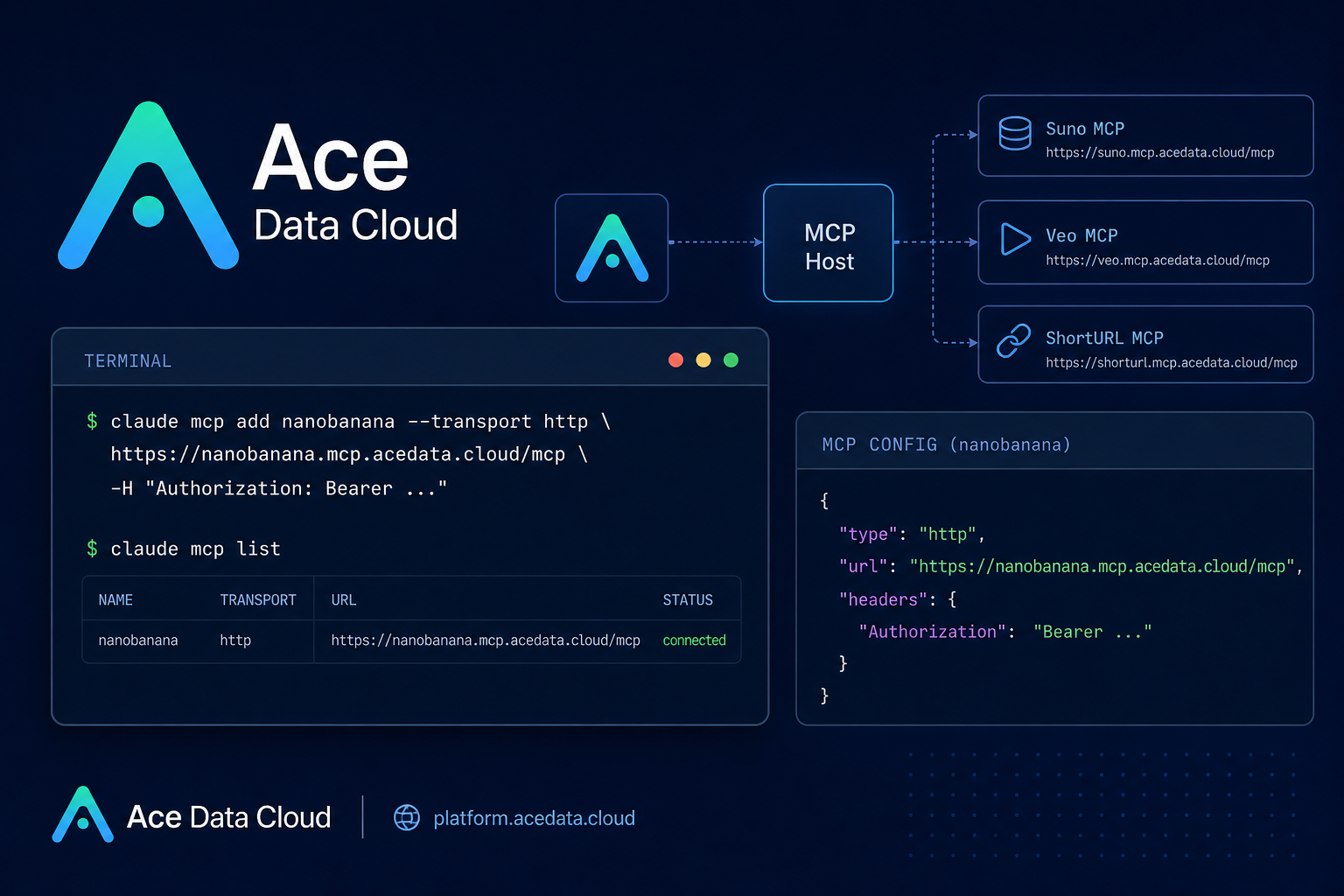
When you are coding in a terminal, the slow part is often not the code itself; it is the context switching: opening a browser to generate an image, searching for references, shortening a link, or preparing media assets for a README. Claude Code already gives you an AI assistant in the terminal. The practical next step is to connect it to remote MCP servers so the assistant can call external tools without leaving your project.
What you can do
The Ace Data Cloud Claude Code MCP document describes a set of managed remote MCP servers that you can add to Claude Code with HTTP transport. The listed servers cover several common builder workflows:
- Music:
Sunofor text-to-song, lyrics, covers, continuation, vocal separation, and Persona workflows. - Images:
Midjourney,Flux,Seedream, andNanoBananafor image generation, editing, mixing, product background replacement, Chinese prompt understanding, and related creative tasks. - Video:
Luma,Veo, andSeedancefor video generation workflows such as start/end frame control, native audio, motion generation, and dubbing. - Search and utilities:
Serpfor Google search andShortURLfor shortening long links or processing links in batch.
The useful pattern is not “one tool at a time.” It is chaining. For example, Claude Code can research a topic with search, draft a technical blog outline, generate a supporting illustration, and shorten the reference link from the same terminal conversation.
How it works
Each integration is a remote MCP server exposed over HTTP. In Claude Code, you register a server with claude mcp add, specify --transport http, pass the remote MCP URL, and attach an Authorization header.
The document shows this shape:
claude mcp add nanobanana --transport http https://nanobanana.mcp.acedata.cloud/mcp -H "Authorization: Bearer YOUR_TOKEN"Two details matter in day-to-day setup:
-Hmust be uppercase. Lowercase-his treated as help.- If you do not pass
-s, the default scope islocal, so the server is available only in the current directory. Use-s userfor all projects or-s projectwhen you want a project-level configuration.
Start with one server, then expand
You do not need to connect everything at once. If your current project involves screenshots, product mockups, or README art, start with an image server such as nanobanana. If you are building launch notes or tutorial pages, add serp and shorturl. If you are preparing demo assets, add one video or music server only when the workflow needs it.
Here are a few real remote URLs from the document:
https://suno.mcp.acedata.cloud/mcp
https://nanobanana.mcp.acedata.cloud/mcp
https://veo.mcp.acedata.cloud/mcp
https://shorturl.mcp.acedata.cloud/mcp
After adding the servers you need, verify the registration:
claude mcp listThe expected result is that your selected MCP servers appear as http type servers. If a single server is not working, the document recommends checking claude mcp list, removing and re-adding the server with claude mcp remove <name> followed by claude mcp add ..., and then checking your Ace Data Cloud balance.
Use a project-level .mcp.json when configuration belongs to the repo
For team projects, the document also shows a .mcp.json format. The important fields are type, url, and headers. A minimal project-level configuration for a search + image workflow can look like this:
{
  "mcpServers": {
    "nanobanana": {
      "type": "http",
      "url": "https://nanobanana.mcp.acedata.cloud/mcp",
      "headers": { "Authorization": "Bearer YOUR_TOKEN" }
    },
    "shorturl": {
      "type": "http",
      "url": "https://shorturl.mcp.acedata.cloud/mcp",
      "headers": { "Authorization": "Bearer YOUR_TOKEN" }
    }
  }
}
Do not commit real tokens to a public repository. The source document specifically calls out the safer approach: add .mcp.json to .gitignore and let each teammate fill in their own token, or use environment-variable placeholders.
A practical terminal workflow
Once the servers are registered, the workflow becomes conversational. Instead of manually opening several tools, you can ask Claude Code to perform a sequence. For example:
Help me:
1. Use Google Search to find the latest AI video generation technology trends
2. Write a technical blog outline based on the search results
3. Use Flux to generate an illustration for the blog
4. Use ShortURL to shorten key reference links
This is where MCP becomes useful for builders: the terminal becomes the coordination surface. The model can keep the objective in context, call the right tool, return the generated links, and continue to the next step.
Where the configuration is stored
For command-line registrations, the document notes that Claude Code stores configuration locally in ~/.claude.json on macOS/Linux or %USERPROFILE%\.claude.json on Windows. Project-level .mcp.json takes precedence over the global configuration, which is useful when a repo needs its own tool set while you keep personal defaults globally.
Wrap-up
The cleanest way to adopt MCP in Claude Code is to start with one real bottleneck: image editing for docs, search for research, short links for release notes, or media generation for tutorials. Add only the remote servers that match that task, verify them with claude mcp list, and keep tokens out of public repos.
For the complete list of server URLs, command examples, scopes, and troubleshooting notes, read the Ace Data Cloud document: Claude Code MCP Overview.


Comments
Post a Comment