How to Extract Structured Data from Web Pages with WebExtrator
Raw HTML is rarely the format you want in an application. If you are building a research agent, a price monitor, a content pipeline, or an internal knowledge tool, you usually need a cleaner object: title, author, product offer, recipe steps, page text, Markdown, source links, and a few diagnostics you can trust.
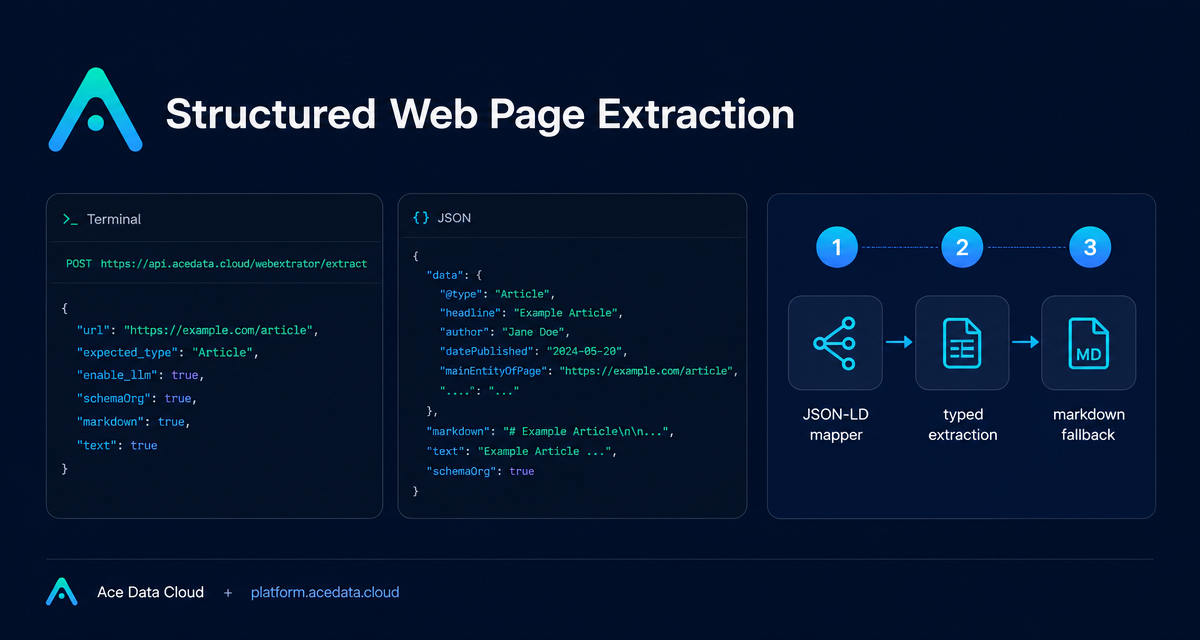
The WebExtrator Extract API is designed for that job. It accepts a URL and returns typed structured results, cleaned Markdown, and plain text from the rendered page through POST https://api.acedata.cloud/webextrator/extract.
What you can do
Use this endpoint when your next step is not “show me the webpage,” but “give my program the useful parts of the webpage.” The response can include:
- Top-level page fields such as
title,description,byline,language,siteName,publishedAt,images,links,markdown, andtext. - A
contentTypevalue ofproduct,article, orgeneral, determined by your hint, schema.org data, or heuristics. - Structured data under
data.structured, includingschemaOrg,openGraph,jsonLd, and, when enabled and needed,llmextraction output. - Debugging signals in
rawSignals, such as whether JSON-LD was found, the page status, and extracted text length.
That makes it useful for turning public pages into input for downstream systems: search indexes, review dashboards, RAG corpora, competitive research, browser agents, or scheduled crawlers.
How it works
The extraction pipeline has three layers. First, a deterministic schema.org JSON-LD mapper looks for structured entities already embedded in the page. This covers many common pages, including product pages, recipe pages, video pages, news articles, and Wikipedia-style articles.
If schema.org does not produce a primary typed entity, WebExtrator can optionally run typed LLM extraction. This path is controlled by enable_llm. The model output is validated against typed schemas, so the returned object still follows predictable shapes for supported kinds such as article, product, discussion, recipe, video, and job.
Finally, readability and Markdown fallback always run. This fills in top-level fields that earlier layers did not populate and produces the markdown and text outputs that are often the most useful inputs for agents and indexing jobs.
Start with deterministic extraction
For pages that already expose schema.org JSON-LD, you do not need LLM extraction. A simple request with a URL and an optional expected_type hint is enough:
curl -X POST https://api.acedata.cloud/webextrator/extract \
  -H "Authorization: Bearer YOUR_API_KEY" \
  -H "Content-Type: application/json" \
  -d '{
    "url": "https://en.wikipedia.org/wiki/Diffbot",
    "expected_type": "article"
  }'
The expected_type field can be product, article, or general. It is not required, but it lets you skip URL and text heuristics and directly follow the branch that matches your use case.
Read the response like an application object
The synchronous response envelope includes execution metadata such as success, task_id, trace_id, started_at, finished_at, and elapsed. The actual extraction result is inside data.
{
  "success": true,
  "task_id": "550e8400-e29b-41d4-a716-446655440000",
  "trace_id": "550e8400-e29b-41d4-a716-446655440001",
  "elapsed": 2.412,
  "data": {
    "kind": "extract",
    "url": "https://en.wikipedia.org/wiki/Diffbot",
    "finalUrl": "https://en.wikipedia.org/wiki/Diffbot",
    "contentType": "article",
    "title": "Diffbot",
    "markdown": "# Diffbot\n\nDiffbot is a developer of machine learning ...",
    "text": "Diffbot is a developer of machine learning algorithms ...",
    "structured": {
      "schemaOrg": { "primary": {}, "breadcrumbs": [], "all": [] },
      "openGraph": { "title": "...", "description": "...", "image": "...", "type": "..." },
      "jsonLd": []
    },
    "rawSignals": {
      "hasJsonLd": true,
      "pageStatus": 200,
      "textLength": 11473
    }
  }
}
In a real app, I usually treat markdown as the source for human-readable downstream tasks and structured.schemaOrg.primary or structured.llm.data as the machine object for filtering, sorting, or database inserts.
Use LLM extraction only when the page needs it
Some useful pages do not expose a clean JSON-LD entity. Hacker News discussion pages are one documented example. In those cases, set enable_llm to true:
curl -X POST https://api.acedata.cloud/webextrator/extract \
  -H "Authorization: Bearer YOUR_API_KEY" \
  -H "Content-Type: application/json" \
  -d '{
    "url": "https://news.ycombinator.com/item?id=37000000",
    "enable_llm": true
  }'
When LLM extraction runs successfully, the response can include data.structured.llm with kind, data, model, and promptCharCount. If the page already has a schema.org primary entity, enable_llm does not override the deterministic path; the mapper produces the typed result directly.
Handle cache and async jobs deliberately
Repeated identical requests are cached. Cache hits include data.cached: true and data.cacheStoredAt. You can use bypass_cache: true to skip reading from cache while still writing the new result back, or cache_ttl_seconds: 0 to avoid caching that response.
For longer jobs, set async: true, or provide callback_url. The API immediately returns success, task_id, trace_id, and started_at. When complete, the platform posts the full envelope to your callback URL, and historical results can be queried through /webextrator/tasks.
A practical pattern
A good production pattern is to start with expected_type when you know the page class, leave enable_llm off for pages likely to contain schema.org, and enable it only for domains where deterministic structure is weak. Store finalUrl, contentType, markdown, text, structured, and rawSignals together. That gives you both clean application data and enough diagnostics to explain why a page parsed the way it did.
If you want to build a small extractor worker, start with the endpoint and fields above, then expand into async callbacks once you have enough volume to justify queueing. The full reference is here: WebExtrator Extract API Integration Guide.


Comments
Post a Comment