A Practical Guide to Extracting Structured Data from Web Pages with WebExtrator
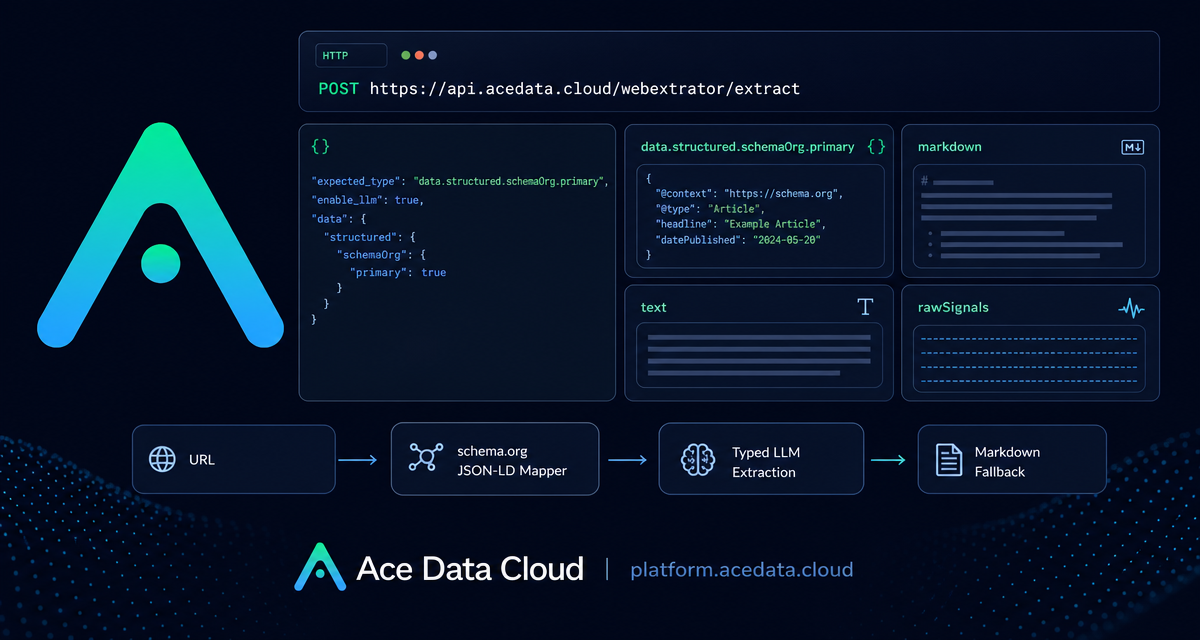
Raw HTML is rarely the shape you want in an application. If you are building a monitor, a research agent, a product indexer, or an internal knowledge pipeline, you usually need a clean title, canonical text, useful links, images, and typed fields you can validate before storing.
That is the job of Ace Data Cloud's WebExtrator Extract API: send it a URL and receive structured results, cleaned Markdown, plain text, and diagnostic signals in one response.
What you can do
The Extract API is designed for cases where a browser-rendered page needs to become application data. It supports article, product, recipe, video, discussion, job, event, and FAQ-style pages through a mix of deterministic and fallback extraction paths.
- Turn a news article or blog post into
title,description,byline,publishedAt,markdown, andtext. - Extract product fields such as
name,sku,brand,offer.price,offer.currency, andratingwhen schema.org data is available. - Capture recipe details like
ingredients[],instructions[],cookTime,totalTime, andnutrition. - Handle pages without JSON-LD by enabling typed LLM extraction with
enable_llm.
The endpoint is:
POST https://api.acedata.cloud/webextrator/extractHow it works
The API uses a three-layer pipeline. First, a schema.org JSON-LD mapper looks for deterministic structured data. This covers many pages such as Wikipedia, BestBuy, AllRecipes, YouTube, news sites, and product pages. If a schema.org primary entity is found, the result appears under data.structured.schemaOrg.primary.
Second, when schema.org is not hit and enable_llm is set to true, the extractor can run typed LLM extraction. The document describes Zod-validated output schemas for kinds such as article, product, discussion, recipe, video, and job.
Third, Readability and Markdown fallback always run. This is important because even when typed extraction is partial, you still get useful top-level fields plus markdown and text for downstream indexing, summarization, or review.
Start with deterministic extraction
For pages likely to include JSON-LD, start without LLM extraction. You can provide expected_type as a hint. The accepted values are product, article, and general. This skips URL and text heuristics and sends the request down the intended branch.
curl -X POST https://api.acedata.cloud/webextrator/extract \
  -H "Authorization: Bearer YOUR_API_KEY" \
  -H "Content-Type: application/json" \
  -d '{
    "url": "https://en.wikipedia.org/wiki/Diffbot",
    "expected_type": "article"
  }'
A successful synchronous response includes an envelope with success, task_id, trace_id, started_at, finished_at, elapsed, and a data object. Inside data, you can read fields such as kind, url, finalUrl, contentType, title, language, images, links, markdown, text, structured, and rawSignals.
Use enable_llm for pages without JSON-LD
Some useful pages do not expose schema.org data. Hacker News discussion pages are one example in the documentation. In those cases, set enable_llm to true. When it succeeds, the typed result is returned under data.structured.llm.data; if it fails, data.structured.llmError can appear while heuristic results still return.
curl -X POST https://api.acedata.cloud/webextrator/extract \
  -H "Authorization: Bearer YOUR_API_KEY" \
  -H "Content-Type: application/json" \
  -d '{
    "url": "https://news.ycombinator.com/item?id=37000000",
    "enable_llm": true
  }'
For a discussion page, the documented LLM schema requires title and may include author, postedAt, points, commentCount, body, and url. That makes it practical to store a discussion as a typed record instead of scraping table rows by hand.
Debug with raw signals and cache behavior
The rawSignals object is useful when extraction does not look the way you expected. It can include whether JSON-LD was found through hasJsonLd, the rendered page title, meta description, HTTP-like pageStatus, and textLength.
The API also caches identical requests. Cache keys ignore async, bypass_cache, and cache_ttl_seconds, while cookies and headers are bucketed for caching. If you need a fresh read, set bypass_cache: true. If a response should not be cached, set cache_ttl_seconds: 0. Cache hits include data.cached: true and data.cacheStoredAt.
When to run asynchronously
If you do not want the client to wait for the full extraction, set async: true. Providing callback_url also enters asynchronous mode. The initial response includes success, task_id, trace_id, and started_at. When complete, the platform posts the full envelope to your callback URL if configured, and historical tasks can be queried through /webextrator/tasks.
A practical pattern
In a production pipeline, I would start with a conservative request: pass the URL, set expected_type when I know the source class, and leave enable_llm off. If structured.schemaOrg.primary is missing but rawSignals.textLength shows enough content, retry with enable_llm: true for the subset of pages where typed fields matter.
That keeps the first path deterministic and makes the LLM path an explicit fallback rather than the default. The result is easier to reason about: structured data when the page provides it, typed extraction when you opt in, and Markdown/text fallback for everything else.
Read the full integration reference here: WebExtrator Extract API Integration Guide.


Comments
Post a Comment