How to Build an Async AI Video Pipeline with the Maestro API
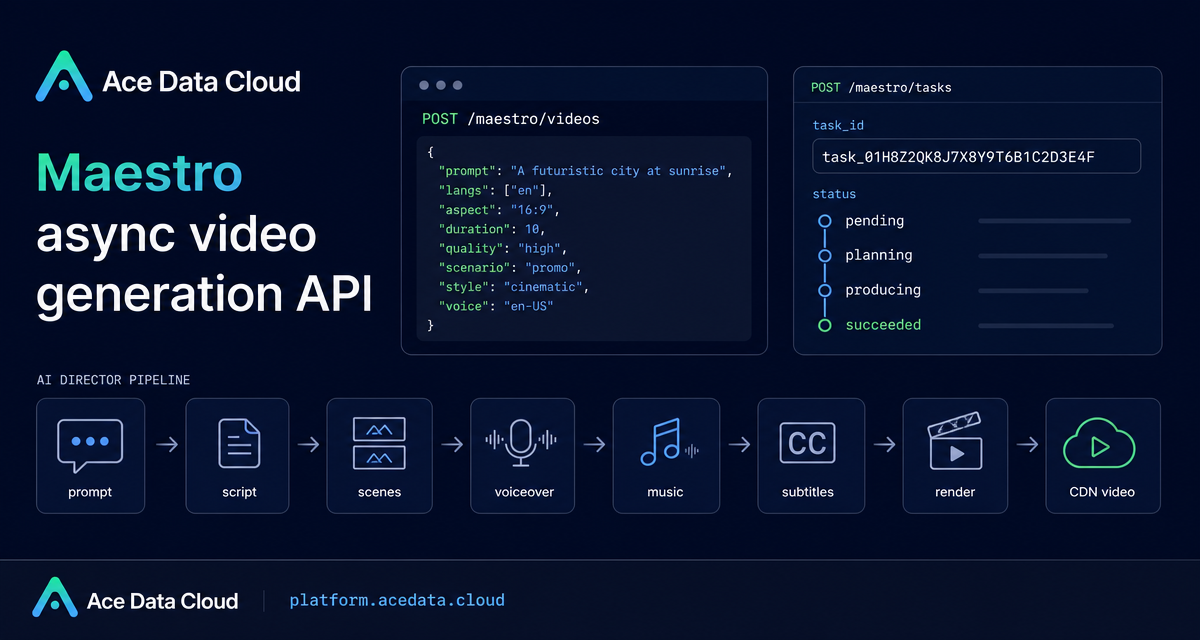
Most video automation projects fail at the same point: turning a useful prompt into a finished, subtitled video without building a separate script writer, voiceover step, music step, renderer, and status queue. The Maestro API is useful when you want that pipeline to behave like one asynchronous job instead of a fragile chain of tools.
What you can do
Maestro exposes a native agent-style video production interface. You send a natural language prompt, optionally attach reference media with file_urls, and receive a task_id. Behind that task, the system handles planning, script writing, scene generation, voiceover, music, subtitles, synthesis, rendering, and CDN upload.
The practical use cases are straightforward:
- Generate a short explainer from one prompt.
- Create multiple language variants from the same visual footage with
langs. - Route the output toward a format such as
drama,avatar,motion, orslideshowusingscenario. - Iterate on a previous task with
actionset toremix,edit, orextendand aref_task_id.
How it works
The generation endpoint is:
POST https://api.acedata.cloud/maestro/videosThis endpoint is asynchronous. A successful submission returns immediately with success, task_id, and trace_id. You then poll:
POST https://api.acedata.cloud/maestro/tasksThe task status can move through pending, planning, producing, and succeeded, or end as failed. Polling the task endpoint is documented as free of charge, which matters because real video production may take longer than a normal HTTP request should remain open.
Start with the smallest useful request
The required field is prompt. The common optional fields are langs, aspect, and duration. The documented default language is ["zh-cn"], the default aspect ratio is 9:16, and the default duration is 30 seconds. The duration field accepts a target duration from 1 to 600 seconds.
curl -X POST 'https://api.acedata.cloud/maestro/videos'   -H 'accept: application/json'   -H 'authorization: Bearer {token}'   -H 'content-type: application/json'   -d '{
    "prompt": "Explain what a vector database is in 20 seconds, suitable for a zero-based audience, ending with a memorable point.",
    "langs": ["zh-cn", "en"],
    "aspect": "9:16",
    "duration": 20
  }'
A successful response looks like this:
{
  "success": true,
  "task_id": "f57e99c4f60f4373a15517742ce2357d",
  "trace_id": "70e1cb12-c619-4292-a416-90191205996b"
}
Store both identifiers. Your application logic should treat task_id as the durable handle for result polling, while trace_id is useful when you need to debug a request.
Choose format, style, and voice deliberately
Maestro can infer the video type automatically, but production systems usually benefit from being explicit. The scenario field is a routing hint. Valid documented values include auto, narrated, drama, avatar, motion, and slideshow. The style field controls visual direction and supports presets such as cinematic, glass, luxury, swiss, modern, editorial, warm, vibrant, neon, mono, pastel, bold, industrial, futuristic, and retro.
Voiceover can also be guided with voice. The documented options include auto, warm-female, bright-female, anchor-female, clean-female, calm-male, deep-male, documentary-male, energetic-male, and storyteller-male.
curl -X POST 'https://api.acedata.cloud/maestro/videos'   -H 'accept: application/json'   -H 'authorization: Bearer {token}'   -H 'content-type: application/json'   -d '{
    "prompt": "Two co-renting roommates fall out and reconcile over a cat, three acts of reversal, ending warmly",
    "scenario": "drama",
    "style": "cinematic",
    "aspect": "9:16",
    "duration": 40
  }'
Poll for completion
Once you have the task ID, poll /maestro/tasks. Keep this code path separate from submission so a retry in your worker does not accidentally create duplicate videos.
curl -X POST 'https://api.acedata.cloud/maestro/tasks'   -H 'accept: application/json'   -H 'authorization: Bearer {token}'   -H 'content-type: application/json'   -d '{
    "id": "f57e99c4f60f4373a15517742ce2357d"
  }'
When the task completes, each language corresponds to a variant in the result. That makes multilingual generation easier to model: your database can keep one internal job row and attach one output variant per requested language.
Iterate instead of starting over
For real builder workflows, first drafts are rarely final. Maestro supports action values of remix, edit, and extend. These must be used with ref_task_id, the previous task ID you want to use as the starting point.
curl -X POST 'https://api.acedata.cloud/maestro/videos'   -H 'accept: application/json'   -H 'authorization: Bearer {token}'   -H 'content-type: application/json'   -d '{
    "action": "remix",
    "ref_task_id": "f57e99c4f60f4373a15517742ce2357d",
    "prompt": "Change the opening title to a more impactful one, and darken the overall color scheme"
  }'
Use remix when you want to reinterpret the original structure, edit for more targeted changes such as title or voiceover adjustments, and extend when the existing video needs more content.
Handle errors and cost boundaries
Production integrations should handle the documented error families: 400 invalid_request, 401 invalid_token, 403 forbidden, 429 too_many_requests, and 500 api_error. The documented error shape includes success: false, an error object with code and message, and a trace_id.
Billing is based on the actual final product, not merely the requested duration, and failed tasks are not charged. The documented estimate is:
Points ≈ 0.85 × final product duration in seconds × quality multiplier × scenario multiplier + 6 × max(number of languages - 1, 0)The documented quality multipliers are draft at 0.5×, standard at 1×, and premium at 2×. The documented scenario multipliers are drama at 1.35×, avatar at 1.15×, and others at 1×.
Where this fits
The cleanest mental model is not “call an AI video model.” It is “submit a video production job, persist the task ID, poll until completion, and attach the resulting variants to your product.” That pattern makes Maestro a good fit for content tools, internal enablement apps, localization workflows, and experiments where video is an output artifact rather than a manual editing project.
For the complete field reference and examples, read the Maestro Video Generation API Integration Guide.


Comments
Post a Comment