A Practical Guide to X402 Payments in Python with Ace Data Cloud
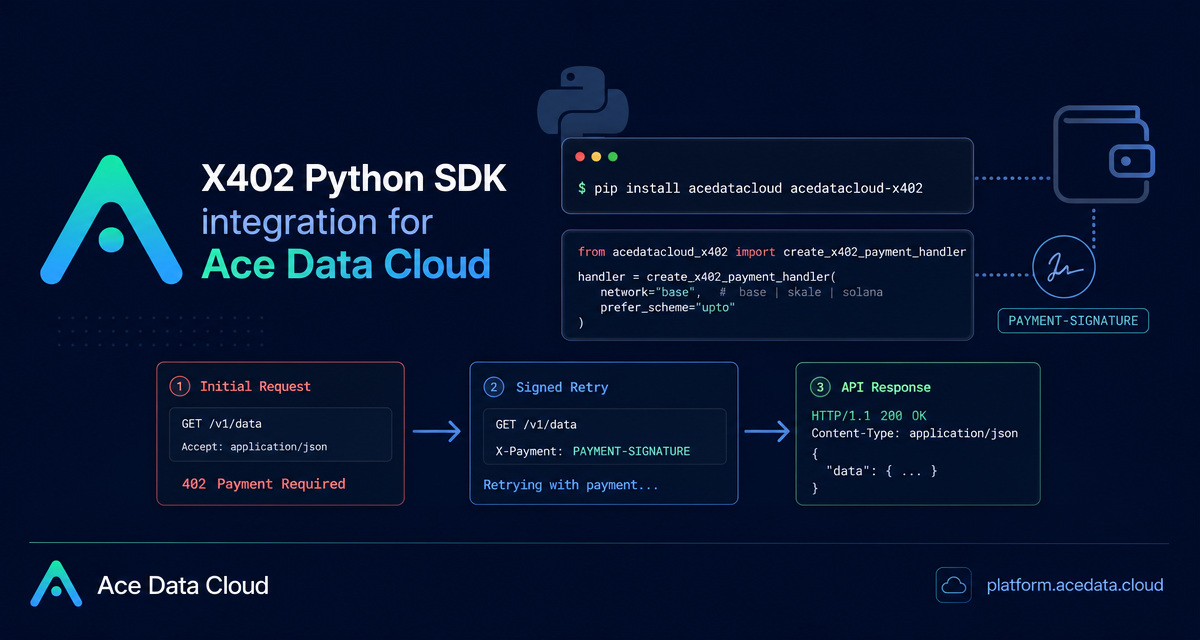
If you are building a Python agent, batch job, or backend service that calls AI APIs, prepaid API tokens are not always the cleanest fit: you may want the request itself to carry the payment proof, be retried automatically after a 402 Payment Required, and still keep your wallet key local.
What you can do
The Ace Data Cloud X402 Python SDK path lets a Python program call Ace Data Cloud APIs without an Ace Data Cloud API token. Instead, the application uses acedatacloud for the API call and acedatacloud-x402 to sign the PAYMENT-SIGNATURE header required by the payment flow.
In practical terms, you can:
- Use an EVM wallet on
baseorskalefor X402-paid API calls. - Use a Solana keypair with
network="solana". - Call the regular Python SDK surface, such as
client.openai.chat.completions.create(...). - Prefer
uptosettlement for post-measured calls on Base by passingprefer_scheme="upto". - Use the same payment handler with
AsyncAceDataCloudfor async Python services.
How it works
The high-level flow is intentionally small. Your first request is made without an API token. When the API returns 402 Payment Required, the SDK transport layer reads the returned payment requirement, asks the X402 payment handler to sign it, attaches the resulting PAYMENT-SIGNATURE, and retries the original request.
The wallet private key is used for local signing only. The documented Python example creates a signer with EVMAccountSigner.from_private_key(os.environ["EVM_PRIVATE_KEY"]), then passes that signer into create_x402_payment_handler(...). The private key itself is not sent to Ace Data Cloud.
Install the two Python packages
Start with the SDK and the X402 payment client:
pip install acedatacloud acedatacloud-x402If you plan to use upto, install the CLI extras as well. The documented CLI provides approve-permit2, which performs the one-time Permit2 approval required before signing upto payments.
pip install 'acedatacloud-x402[cli]'Make a paid API call on Base
Here is the minimal shape for an EVM-based call. It uses network="base", signs with EVM_PRIVATE_KEY, and calls a chat completion with model="gpt-4o-mini". One important detail from the SDK documentation: the current Python SDK response is a dict, so read it with dictionary indexing instead of assuming a .choices attribute.
import os

from acedatacloud import AceDataCloud
from acedatacloud_x402 import EVMAccountSigner, create_x402_payment_handler

signer = EVMAccountSigner.from_private_key(os.environ["EVM_PRIVATE_KEY"])

client = AceDataCloud(
    payment_handler=create_x402_payment_handler(
        network="base",
        evm_signer=signer,
    )
)

res = client.openai.chat.completions.create(
    model="gpt-4o-mini",
    messages=[{"role": "user", "content": "Say hi in 3 words"}],
    max_tokens=10,
)

print(res["choices"][0]["message"]["content"])
To use SKALE instead, keep the same structure and change only the network name:
client = AceDataCloud(
    payment_handler=create_x402_payment_handler(
        network="skale",
        evm_signer=signer,
    )
)
Use Solana when your payment key is not EVM
The Solana path uses a base58 encoded secret key and SolanaKeypairSigner.from_base58(...). The documented flow constructs and submits an SPL USDC TransferChecked transaction, then places the transaction signature into the PAYMENT-SIGNATURE envelope.
import os

from acedatacloud import AceDataCloud
from acedatacloud_x402 import SolanaKeypairSigner, create_x402_payment_handler

client = AceDataCloud(
    payment_handler=create_x402_payment_handler(
        network="solana",
        solana_signer=SolanaKeypairSigner.from_base58(os.environ["SOLANA_SECRET_KEY"]),
    )
)

res = client.openai.chat.completions.create(
    model="gpt-4o-mini",
    messages=[{"role": "user", "content": "Say hi in 3 words"}],
    max_tokens=10,
)
For strict reconciliation, the documentation recommends using your own Solana RPC to query transaction confirmation instead of relying on public RPC behavior.
Prefer upto for post-measured calls
Some API costs are only known after the response is complete. For those cases, the API may return both exact and upto. If you want the Python SDK to prioritize upto on Base, pass prefer_scheme="upto" into the payment handler:
client = AceDataCloud(
    payment_handler=create_x402_payment_handler(
        network="base",
        evm_signer=signer,
        prefer_scheme="upto",
    )
)
Before first use, authorize Permit2 for USDC on the target chain. The CLI path is:
X402_PRIVATE_KEY=0x... acedatacloud-x402 approve-permit2 --network baseThe programmatic helper is also documented:
from acedatacloud_x402 import EVMAccountSigner, approve_permit2

approve_permit2(
    rpc_url="https://mainnet.base.org",
    signer=EVMAccountSigner.from_private_key("0x..."),
    token_address="0x833589fCD6eDb6E08f4c7C32D4f71b54bdA02913",
)
This helper is idempotent: when allowance is already sufficient, it returns {"skipped": true} and does not repeat the on-chain transaction.
When to drop down to low-level signing
Most application code should use create_x402_payment_handler. If you are building tests, a proxy layer, a gateway integration, or an unofficial SDK, the documentation also exposes low-level signing with sign_evm_payment:
import base64
import json

from acedatacloud_x402 import EVMAccountSigner, sign_evm_payment

envelope = sign_evm_payment(requirement, EVMAccountSigner.from_private_key("0x..."))
x_payment = base64.b64encode(json.dumps(envelope, separators=(",", ":")).encode()).decode()
The builder-friendly takeaway is that X402 can be added around normal SDK calls instead of replacing your application logic. Keep keys in environment variables, choose the documented network path, handle the SDK response as a dictionary, and save request IDs plus transaction metadata when you need reconciliation. For the complete reference, see the Ace Data Cloud X402 Python SDK integration tutorial.


Comments
Post a Comment