How to Use NanoBanana MCP with Claude Code for Terminal-Based Image Editing
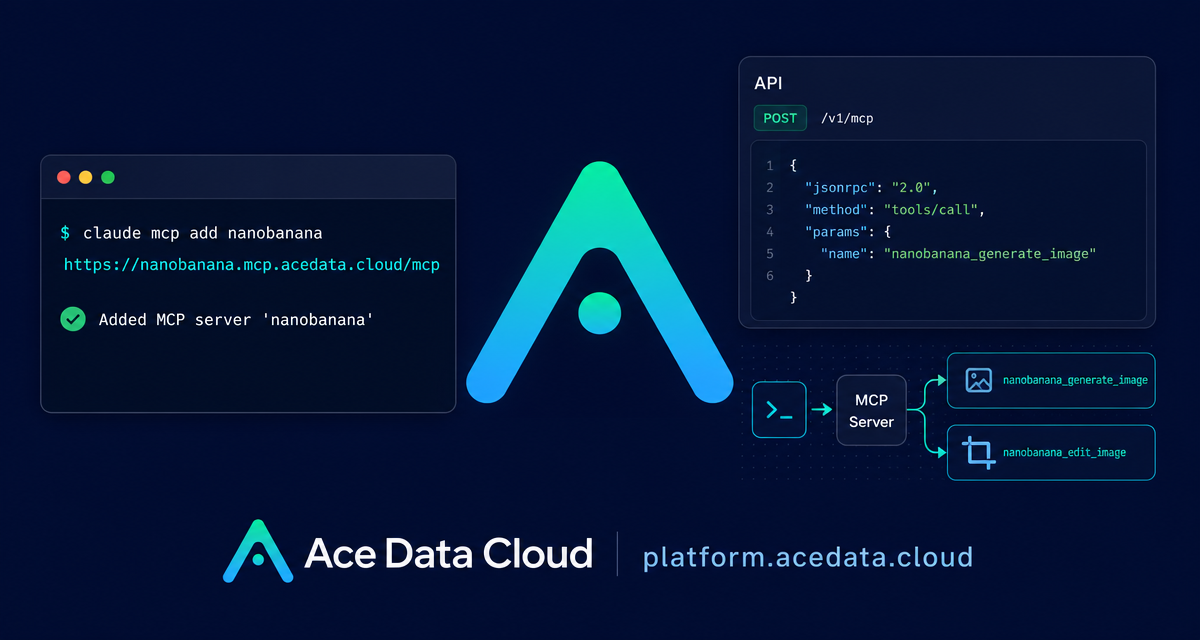
Most image workflows break your focus: you write code in the terminal, then switch to a browser tab, upload assets, copy prompts around, and manually bring the result back into your project. The NanoBanana MCP setup gives Claude Code a more direct path: generate and edit images from the same terminal session where you are already building.
What you can do
The NanoBanana MCP server exposes two core tools to Claude Code:
nanobanana_generate_imagefor text-to-image generation.nanobanana_edit_imagefor image editing, including multi-image input.
The practical difference is that you can describe the image task in natural language inside Claude Code. For example, you can ask it to generate a 404 page illustration, remove unwanted text from a screenshot, or combine objects from one image with the scene of another image. The underlying capability described in the documentation is based on Gemini image understanding, so the workflow is not limited to simple prompt-to-picture generation.
How it works
Claude Code supports MCP servers as external tools. Once the NanoBanana MCP server is registered, Claude Code can call the image generation and editing tools when your prompt requires them. The remote MCP endpoint used by the documented setup is:
https://nanobanana.mcp.acedata.cloud/mcpAuthentication is handled with an Ace Data Cloud API token in the Authorization header. The important setup detail is that Claude Code expects the header flag to be uppercase -H. Lowercase -h is interpreted as --help, not as a header parameter.
Configure NanoBanana in Claude Code
From the terminal, add the MCP server with the documented command below. Replace YOUR_API_TOKEN with your own token:
claude mcp add nanobanana --transport http https://nanobanana.mcp.acedata.cloud/mcp -H "Authorization: Bearer YOUR_API_TOKEN"By default, if you do not pass a scope, Claude Code uses the local scope. The documentation describes three useful scopes:
local: effective only in the current project directory, stored in~/.claude.json.user: available across all projects, also stored in~/.claude.json.project: written to.mcp.jsonin the project root, so the configuration can be shared with a team.
If you use -s project, do not commit real tokens to a public repository. The documentation recommends using environment-variable placeholders such as ${ENV_VAR} plus local environment variables instead.
After configuration, verify the connection:
claude mcp listYou should see nanobanana marked as connected before relying on it in a workflow.
Use case 1: generate a small product or documentation illustration
A common builder workflow is creating lightweight illustrations for docs, error pages, or onboarding screens. Instead of leaving Claude Code, describe the target asset directly in the session:
Generate an illustration of a small dinosaur crouching next to a crack in the ground looking down, for use on a 404 pageClaude Code can route this request to nanobanana_generate_image. This is useful when the image is part of a coding task: you can generate the asset while you are also editing the page, checking filenames, or updating the UI copy.
Use case 2: edit screenshots without opening a separate design tool
The documented editing tool is nanobanana_edit_image. A simple but practical example is cleaning a screenshot before publishing it in a README, changelog, or internal guide:
Edit this image to remove the text watermark in the bottom right corner, filling the backgroundThis keeps the task close to the content you are preparing. If the screenshot is already part of your project context, you can ask Claude Code to apply the edit and then continue with the surrounding documentation work.
Use case 3: compose multiple images into one scene
The more interesting workflow is multi-image composition. The documentation notes that nanobanana_edit_image supports multiple image URLs as input, and that Gemini can understand relationships between images. A natural prompt looks like this:
Put the phone from the first image onto the desk in the second image, adjusting angle and lighting to make it look naturalThis is the kind of task that is awkward in a pure text-to-image workflow. You are not asking for a brand-new image from scratch; you are asking the model to preserve meaningful parts of existing images and combine them coherently.
A small workflow I would use in a real project
- Add the NanoBanana MCP server to Claude Code with
claude mcp add. - Run
claude mcp listand confirm thatnanobananais connected. - Keep source images as stable URLs when using multi-image editing.
- Ask for one concrete output at a time: generate, remove, or compose.
- Review the image before committing it to docs or UI assets.
The main benefit is not that you avoid every design tool forever. It is that small visual tasks stop becoming context switches. For many docs, landing pages, prototypes, and internal tools, that is enough to keep momentum.
Closing notes
NanoBanana MCP is best treated as a terminal-native image helper for Claude Code: two tools, one MCP endpoint, and a workflow that fits naturally beside code and documentation. Start with a narrow task, verify the connection, and keep prompts specific about what should be generated or edited.
For the original setup details and examples, read the Ace Data Cloud documentation: Claude Code integration with NanoBanana MCP.


Comments
Post a Comment