How to Use NanoBanana MCP in Claude Code for Terminal-Based Image Workflows
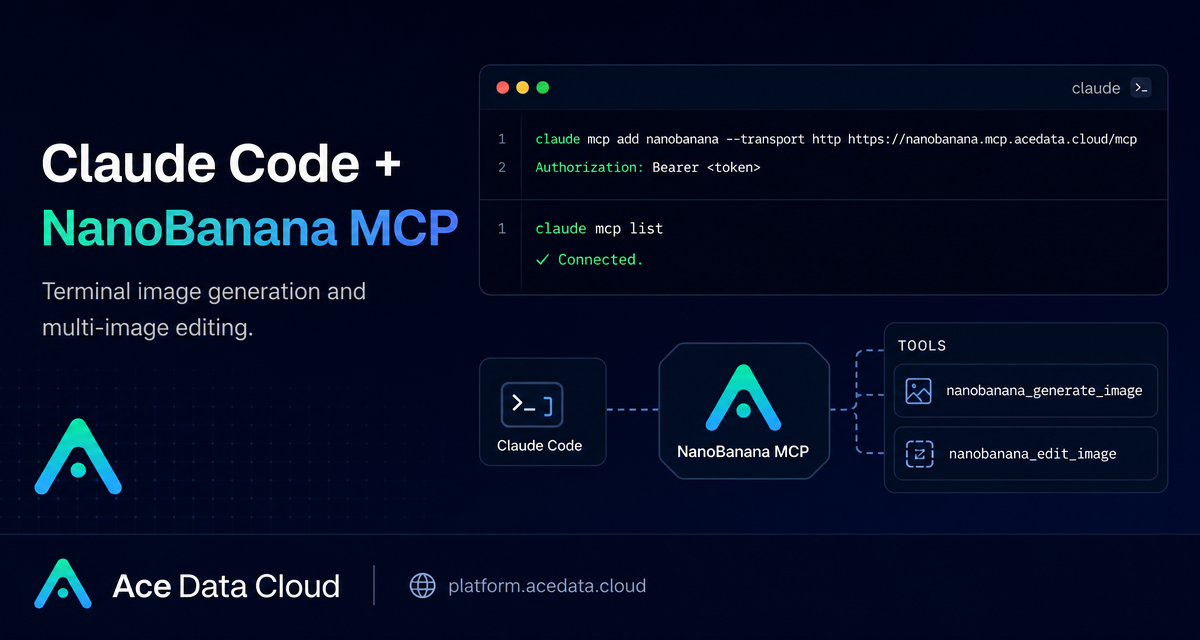
When you are building a product, a docs site, or a small internal tool, image work often becomes a context-switching tax: open a separate web app, upload references, write prompts, download results, and then return to the terminal. The NanoBanana MCP integration for Claude Code is useful because it moves that loop into the same place where you already plan, code, and review changes.
What you can do
The NanoBanana MCP server lets Claude Code call Gemini-powered image tools from a terminal session. The documented tool surface is intentionally small:
nanobanana_generate_imagefor text-to-image generation.nanobanana_edit_imagefor image editing, including multi-image input.
The practical difference from a basic image generator is image understanding. You can describe a relationship between multiple inputs, such as taking an object from one image and placing it into another scene while matching angle and lighting. That makes it useful for product mockups, page illustrations, screenshot cleanup, and quick visual experiments during development.
How it works
Claude Code connects to the NanoBanana MCP server over HTTP. You register the server once with claude mcp add, pass an authorization header, and then ask Claude Code to generate or edit images in natural language. The MCP server exposes the image tools; Claude Code decides when to call them based on your request.
The documented server URL is https://nanobanana.mcp.acedata.cloud/mcp. Configuration uses an AceData Cloud API token in the HTTP header:
claude mcp add nanobanana --transport http https://nanobanana.mcp.acedata.cloud/mcp -H "Authorization: Bearer YOUR_TOKEN"One detail worth remembering: the header flag must be uppercase -H. Lowercase -h is interpreted as help, not as an HTTP header.
Choose the right Claude Code scope
By default, if you omit -s, Claude Code uses the local scope. That means the MCP configuration only applies to the directory where you ran the command. For a one-off project, that is fine. For everyday usage, you may prefer a wider scope.
local: no-sor-s local; stored in~/.claude.json; effective only in the current project directory.user:-s user; stored in~/.claude.json; available across projects.project:-s project; stored in.mcp.jsonin the project root; can be shared with a team.
If you use -s project, do not commit a real token to a public repository. Use an environment-variable placeholder in the shared config and keep the secret outside git.
Verify the connection before asking for images
After adding the server, run:
claude mcp listYou should see nanobanana marked as ✓ Connected. This small check saves time because image requests will fail later if the server was not registered correctly or the header was malformed.
Use case 1: multi-image composition
A common builder workflow is compositing a product, icon, device, or object into another scene. The documented example is to put the phone from a first image onto the desk in a second image, adjusting angle and lighting so the result looks natural.
In Claude Code, you can write a plain instruction like:
Put the phone from the first image onto the desk in the second image, adjusting angle and lighting to make it look natural.Because nanobanana_edit_image supports multiple image URLs as input, you can keep the task conversational while still using the underlying image-editing tool.
Use case 2: cleanup for screenshots and docs
Another practical use is removing unwanted text from an image. For example, when a screenshot contains a watermark or a distracting label, you can ask:
Edit this image to remove the text watermark in the bottom right corner, filling the background.This is especially handy for documentation and landing pages, where a small visual distraction can make a tutorial harder to read.
Use case 3: generate illustrations while coding
For interface states such as empty pages, error screens, or 404 pages, you can generate a lightweight illustration without leaving the terminal:
Generate an illustration of a small dinosaur crouching next to a crack in the ground looking down, for use on a 404 page.The point is not to replace a design process. It is to reduce the cost of creating a first visual draft while you are still shaping the product experience.
A small workflow I would actually use
- Add the MCP server with
claude mcp add. - Run
claude mcp listand confirm✓ Connected. - Keep reference images in a project folder or use stable image URLs.
- Ask Claude Code for a focused edit, not a vague redesign.
- Review the generated result, then iterate on one variable: composition, lighting, object placement, or text removal.
This keeps image generation close to the real development loop. You can update a docs page, generate a matching illustration, and keep the surrounding code review context in one conversation.
If you want the exact setup notes and related examples, read the original Ace Data Cloud document: Claude Code integration with NanoBanana MCP.


Comments
Post a Comment