How to Build a Text-to-Video Workflow with the Seedance API
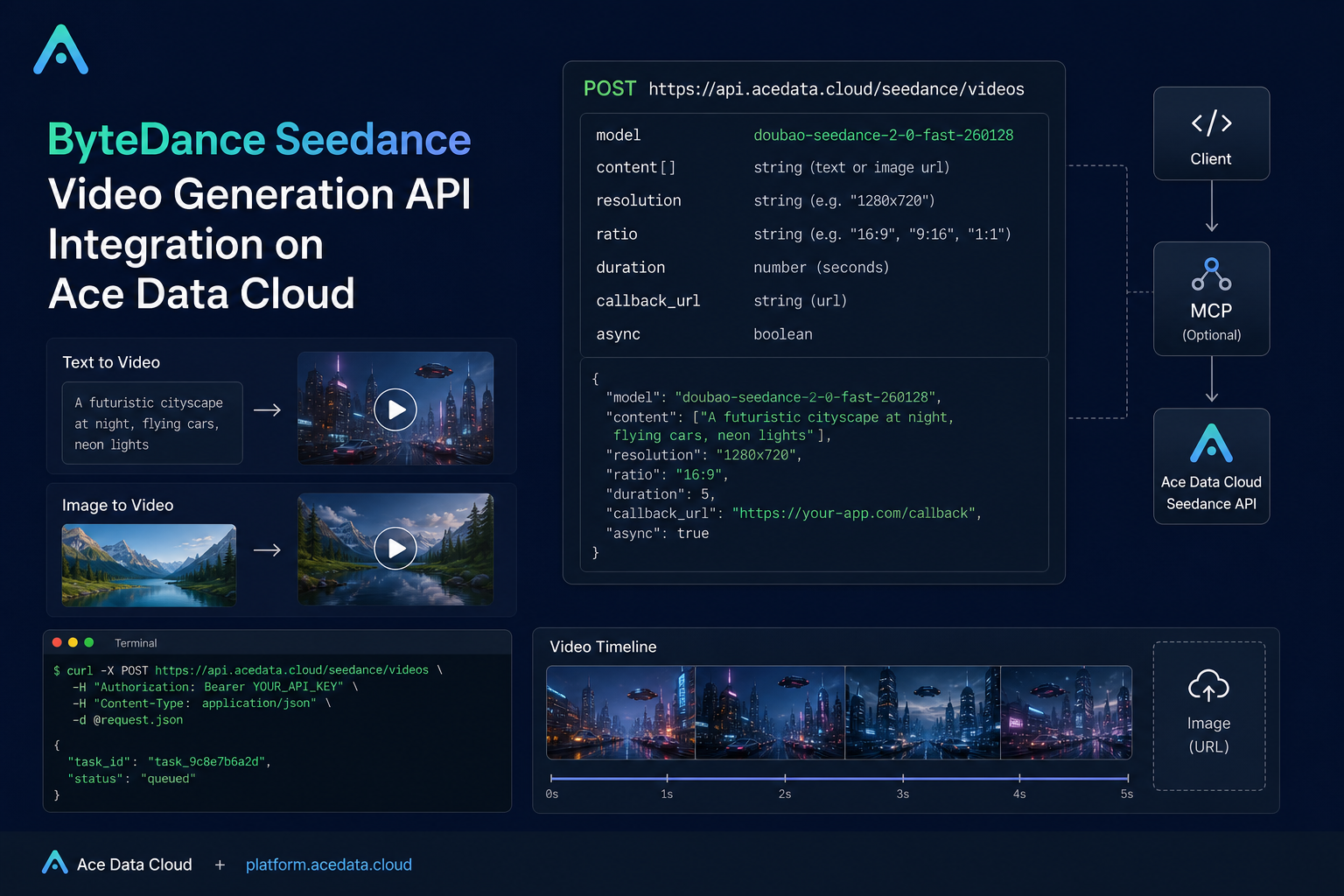
Turning a prompt or a reference image into a short video is useful, but it becomes much more useful when you can wire it into a real application: a campaign tool, an internal creative review flow, a product demo generator, or an automated content pipeline. This guide walks through the practical shape of that workflow using the Seedance video generation API on Ace Data Cloud.
What you can do
The Seedance API exposes a single video generation endpoint:
POST https://api.acedata.cloud/seedance/videosFrom the public documentation, the endpoint supports several useful modes:
- Text to video: pass a prompt as
content[].type = "text"withcontent[].text. - Image to video: pass an
image_urlitem incontent, then describe the motion with a text prompt. - First and last frame control: provide image items with
roleasfirst_frameandlast_frame. - Character reference with Seedance 2.0: use
role = "reference_image"with a Seedance 2.0 model to preserve the appearance of a person or character while changing scene, action, or shot. - Async execution: use
callback_url, or passasyncastrue, to avoid holding a long HTTP connection while the video is generated.
The core request fields are intentionally simple: model, content, resolution, ratio, duration, and optional controls such as seed, camerafixed, watermark, return_last_frame, execution_expires_after, callback_url, and async.
How it works
A request is sent as JSON with an authorization bearer token, accept: application/json, and content-type: application/json. The content field is an array because the model can combine multiple inputs: text, image references, audio references in Seedance 2.0, and video references in Seedance 2.0.
For basic text-to-video, a minimal request contains a text prompt, a model, and a few output options. For example, the documentation uses doubao-seedance-2-0-fast-260128 for a five-second 720p video in 16:9.
Start with a text-to-video request
Here is the smallest practical version of a text-to-video call. In production, keep the token in a secret manager rather than hard-coding it.
curl -X POST 'https://api.acedata.cloud/seedance/videos' \
  -H 'authorization: Bearer ${bearer_token}' \
  -H 'accept: application/json' \
  -H 'content-type: application/json' \
  -d '{
    "content": [
      {
        "type": "text",
        "text": "A white ceramic coffee mug on a glossy marble countertop with soft morning window light. The camera slowly orbits 360 degrees around the mug, steam gently rising."
      }
    ],
    "model": "doubao-seedance-2-0-fast-260128",
    "resolution": "720p",
    "ratio": "16:9",
    "duration": 5
  }'
A successful response includes success, task_id, trace_id, and a data object. When generation succeeds, data may include status, model, duration, resolution, ratio, and the final video_url.
{
  "success": true,
  "task_id": "9777f36b-4f44-47ff-962d-45cd2f7aeaa8",
  "trace_id": "ce5da2ca-6695-4459-9d2c-2ef9f86db752",
  "data": {
    "task_id": "7e4e1773-510a-4a73-9ab4-98dd1a0b2a7f",
    "status": "succeeded",
    "model": "doubao-seedance-2-0-fast-260128",
    "duration": 5,
    "resolution": "720p",
    "ratio": "16:9",
    "video_url": "https://platform2.cdn.acedata.cloud/seedance/036f24ed-a9b1-49b3-92c4-30049a3bc152.mp4"
  }
}
Use explicit fields instead of inline prompt flags
The documentation still describes inline parameters such as --rs, --rt, --dur, --seed, --cf, and --wm. They map to fields like resolution, ratio, duration, seed, camerafixed, and watermark.
For application code, I would use the top-level JSON fields instead. The docs recommend this because strict validation gives clearer errors when a value is wrong. It also makes your request builder easier to test: you can validate resolution against 480p, 720p, and 1080p; validate ratio against 16:9, 4:3, 1:1, 3:4, 9:16, 21:9, and adaptive; and keep duration within the documented range for the model family you are using.
Add an image reference carefully
For image-to-video, the important implementation detail is the shape of image_url. It must be an object, not a plain string. The documented shape is:
{
  "type": "image_url",
  "image_url": {
    "url": "https://example.com/reference.png"
  }
}
Passing "image_url": "https://..." is not supported and can return a 400 error. If you want to control the opening and ending frames, provide two image items and use role values first_frame and last_frame. For Seedance 2.0 character workflows, use role = "reference_image"; the docs note that this cannot be combined with first_frame or last_frame.
Design for asynchronous generation
Video generation can take longer than a normal API request budget. The docs describe a callback_url flow: send the request with a callback URL, receive a response containing task_id, then handle a later POST to your callback endpoint with the final result.
{
  "task_id": "f7096c6c-9430-4392-8201-d259632d7afd"
}
The callback payload includes the same outer task_id, which makes it straightforward to correlate the result with your database row or job record. If you do not want to provide a callback URL, the docs also mention passing async as true and then polling the task query interface for results.
Handle errors as part of the workflow
For a builder-facing integration, do not treat errors as an afterthought. The documentation lists error cases including 400 token_mismatched, 400 api_not_implemented, 401 invalid_token, 429 too_many_requests, and 500 api_error. A typical error response includes success: false, an error object with code and message, and a trace_id.
{
  "success": false,
  "error": {
    "code": "api_error",
    "message": "fetch failed"
  },
  "trace_id": "2cf86e86-22a4-46e1-ac2f-032c0f2a4e89"
}
That trace_id is worth storing with your job record. When a user reports a failed generation, it gives you a concrete handle for debugging instead of relying on screenshots or vague timestamps.
Closing thoughts
The nice part about this API shape is that it is easy to start small: one prompt, one model, one video URL. Then you can add reference images, first/last frame control, character references, callbacks, and stricter validation as your workflow matures. If you are building a tool where video generation is one step in a larger pipeline, that incremental path matters.
You can read the full Seedance integration documentation here: ByteDance Seedance Videos API Integration Guide.


Comments
Post a Comment