How to Build an Image Generation and Editing Workflow with Nano Banana Images API
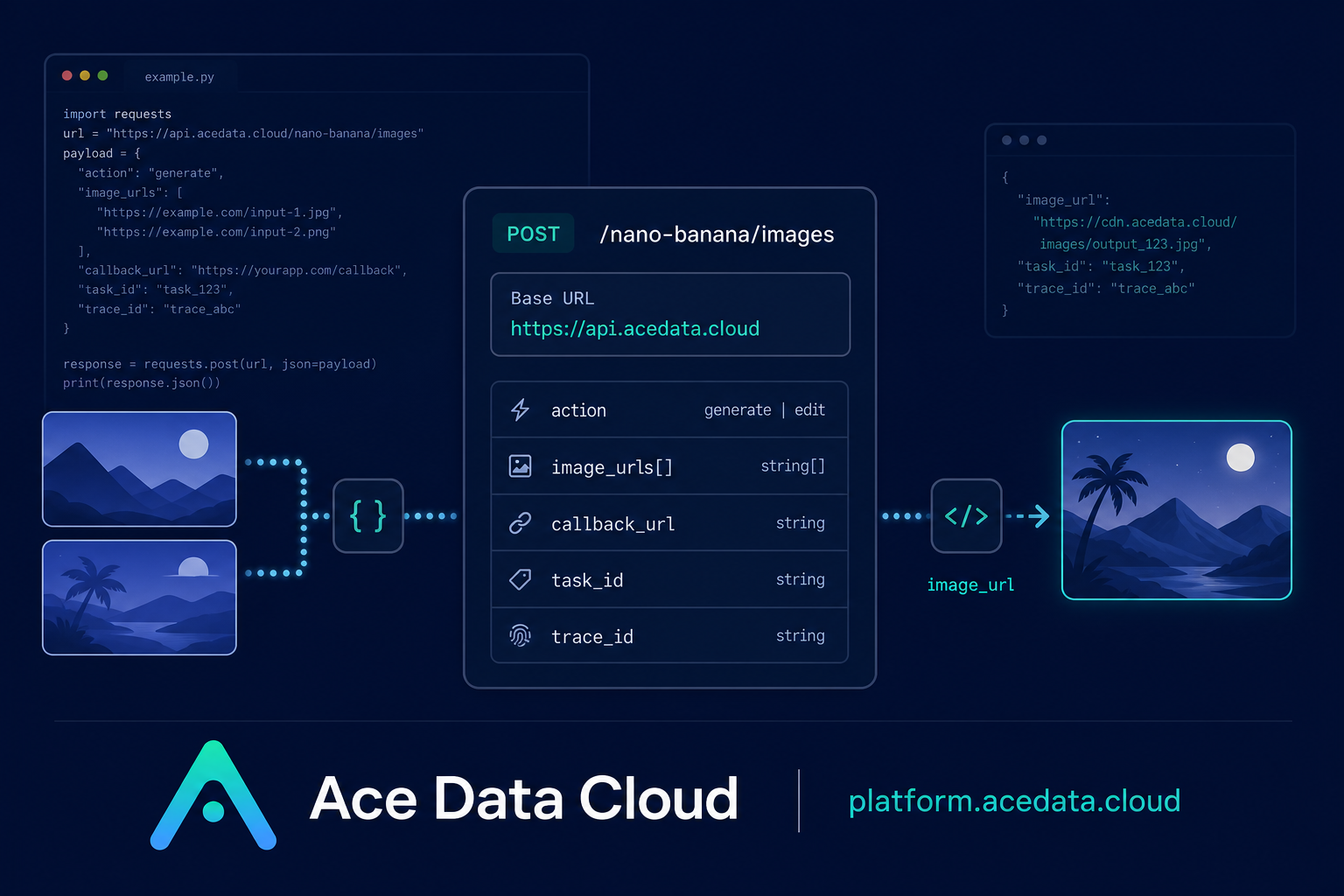
Most image features start simple: a user types a prompt, clicks a button, and expects an image back. The tricky part is making that flow reliable enough for a real product: choosing the right action, passing reference images for edits, tracking tasks, and handling asynchronous completion without leaving users guessing.
This guide walks through a practical workflow using the Nano Banana Images API on Ace Data Cloud. The API exposes one endpoint for both text-to-image generation and image editing, so you can keep your integration small while still supporting common builder scenarios such as prompt-based asset creation, product mockups, avatar edits, and multi-image composition.
What you can do
The Nano Banana Images API supports two documented actions through the same endpoint:
generate: create images from a textprompt.edit: edit one or more provided images usingimage_urlsplus a textprompt.
The interface is useful when your application needs to turn structured user intent into visual output. For example, you might generate concept art from a prompt, let a seller place a shirt onto a model photo, or build a small internal tool that takes product shots and returns edited variants.
The documented endpoint is POST /nano-banana/images under the base URL https://api.acedata.cloud. Requests use JSON, with authorization: Bearer {token} in the HTTP header, plus accept: application/json and content-type: application/json.
How it works
At a high level, every request sends an action and a prompt. For generation, those two fields are the minimum required parameters. For editing, you also provide image_urls, an array containing at least one publicly accessible image URL. The documentation notes that HTTP or HTTPS links can be used, and Base64 image data is also supported; HTTPS is recommended for direct links.
The response includes success, a task_id, a trace_id, and a data array. Each successful item in data includes the echoed prompt and an image_url. Keep both task_id and trace_id; they are the fields you will want when correlating requests, callbacks, logs, and support reports.
Choosing a model and output count
The model field is optional. If you do not set it, the default is nano-banana. The documented model options include nano-banana, nano-banana-2-lite, nano-banana-2, and nano-banana-pro, along with corresponding :official channel versions such as nano-banana-pro:official.
You can request multiple outputs with count. The API supports count values from 1 to 4, with a default of 1. One useful implementation detail: if some images fail, only the successful images are returned in data. That means your UI should render results based on the array you receive, not on the number you requested.
The API also documents optional layout controls such as aspect_ratio, for example 1:1 or 16:9, and resolution, such as 1K, 2K, or 4K. Note that nano-banana-2-lite only supports 1K.
Generating an image from a prompt
For a first integration, start with action: generate. Keep the prompt specific enough to describe subject, setting, style, lighting, and orientation, then store the returned image_url.
curl -X POST 'https://api.acedata.cloud/nano-banana/images' \
  -H 'authorization: Bearer {token}' \
  -H 'accept: application/json' \
  -H 'content-type: application/json' \
  -d '{
    "action": "generate",
    "model": "nano-banana-pro",
    "prompt": "A photorealistic close-up portrait of an elderly Japanese ceramicist with deep, sun-etched wrinkles and a warm, knowing smile. He is carefully inspecting a freshly glazed tea bowl. The setting is his rustic, sun-drenched workshop. The scene is illuminated by soft, golden hour light streaming through a window, highlighting the fine texture of the clay. Captured with an 85mm portrait lens, resulting in a soft, blurred background (bokeh). The overall mood is serene and masterful. Vertical portrait orientation.",
    "count": 1
  }'
A successful response has this shape:
{
  "success": true,
  "task_id": "70e6931b-6e34-43db-9e36-8765e2809d04",
  "trace_id": "60df8d38-f265-4986-aec7-75c9220bced2",
  "data": [
    {
      "prompt": "A photorealistic close-up portrait of an elderly Japanese ceramicist...",
      "image_url": "https://platform2.cdn.acedata.cloud/nanobanana/1d0160b4-93f9-4229-8926-ea9ef0bed336.png"
    }
  ]
}
Editing with reference images
For editing, switch the action to edit and include image_urls. The API can combine multiple materials with the prompt, which makes it a good fit for workflows where the user uploads a base image and one or more references.
import requests

url = "https://api.acedata.cloud/nano-banana/images"
headers = {
    "authorization": "Bearer {token}",
    "accept": "application/json",
    "content-type": "application/json",
}
payload = {
    "action": "edit",
    "prompt": "let this man wear on this T-shirt",
    "image_urls": [
        "https://cdn.acedata.cloud/v8073y.png",
        "https://cdn.acedata.cloud/44xlah.png"
    ],
    "count": 1
}
resp = requests.post(url, json=payload, headers=headers)
print(resp.json())
In a production app, validate that each image URL is publicly reachable before sending the request. If users upload local files, put them behind a temporary public URL or convert them to supported Base64 image data before calling the API.
Using callbacks for longer jobs
Image generation and editing may take time. To avoid holding open a client request, the API supports an optional callback_url. Add a publicly accessible webhook URL that accepts POST JSON. The API can return a response containing the task_id, then send the completed JSON payload to your callback when the task finishes.
The callback payload follows the same successful response structure: success, task_id, trace_id, and data with one or more image_url values. A simple pattern is to create a database record before calling the API, store the task_id, mark the job as pending, and update it when your webhook receives the matching completion event.
Error handling you should implement
When a call fails, the API returns success: false, an error object, and a trace_id. The documented error codes include token_mismatched for invalid requests or incorrect parameters, api_not_implemented, invalid_token, too_many_requests, and api_error.
Treat 401 invalid_token as an authentication problem, 429 too_many_requests as a retry/backoff case, and 500 api_error as a server-side failure that should be logged with the returned trace_id. Avoid blindly retrying image creation without idempotency in your own system, because repeated requests can create duplicate user-visible outputs.
A practical builder pattern
The simplest reliable architecture is: accept the user request, normalize it into action, prompt, optional image_urls, and optional output settings, then call POST /nano-banana/images. Store task_id, trace_id, the requested count, and each returned image_url. Render the data array as the source of truth, because partial success is possible.
That keeps your first version small while still leaving room for callbacks, multi-image editing, model selection, aspect ratio controls, and higher-resolution workflows later. For the full field list and examples, read the Nano Banana Images API documentation.


Comments
Post a Comment