How to Build Image Generation and Editing Workflows with the Nano Banana Images API
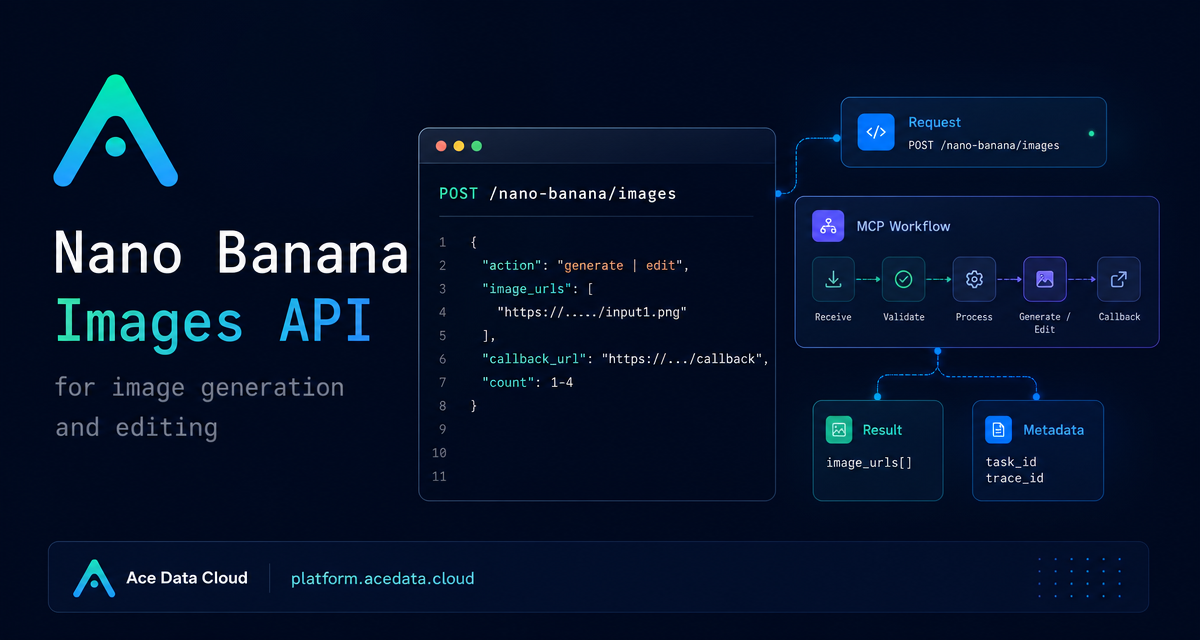
If you are building an app that needs both text-to-image generation and image-to-image editing, the annoying part is often not the model call itself. It is keeping the request shape simple enough for product code, while still supporting reference images, async callbacks, and traceable results. The Nano Banana Images API gives you one endpoint for both workflows: generate a new image from a prompt, or edit one or more existing images with a prompt.
What you can do
The core capability is intentionally compact. You call POST /nano-banana/images on the base URL https://api.acedata.cloud, authenticate with authorization: Bearer {token}, and choose an action.
action: generatecreates images from a textprompt.action: editmodifies or combines existing images passed throughimage_urls.countrequests 1 to 4 images. If some images fail, only the successful images are returned and billed.callback_urllets your app receive the result later instead of keeping a long request open.task_idandtrace_idgive you something concrete to store for support, retries, and result association.
That makes the API useful for practical product features: a design assistant that creates first-draft visuals, an ecommerce tool that applies a shirt image to a model photo, or a content pipeline that generates a batch of social thumbnails from structured prompts.
How it works
The request uses JSON and standard HTTP headers:
accept: application/jsoncontent-type: application/jsonauthorization: Bearer {token}
Only two fields are required for generation: action and prompt. For editing, you also provide image_urls, an array with at least one publicly accessible image. The documentation notes that these can be direct HTTP or HTTPS links, and HTTPS is recommended. Base64 data URLs are also supported for images.
The optional model field defaults to nano-banana. Other documented options include nano-banana-2-lite, nano-banana-2, nano-banana-pro, and the corresponding :official variants such as nano-banana-pro:official. If you set resolution, the documented examples include 1K, 2K, and 4K, with one important constraint: nano-banana-2-lite only supports 1K. You can also pass an aspect_ratio such as 1:1 or 16:9.
Generate an image from a prompt
For a basic text-to-image workflow, send action: generate. In a real product, I would usually keep the prompt in a template and fill it from user intent or structured fields such as product type, background, color palette, and aspect ratio.
curl -X POST 'https://api.acedata.cloud/nano-banana/images' \
  -H 'authorization: Bearer {token}' \
  -H 'accept: application/json' \
  -H 'content-type: application/json' \
  -d '{
    "action": "generate",
    "model": "nano-banana-pro",
    "prompt": "A clean developer-tool hero image showing an API card, terminal window, and image preview grid on a deep navy background.",
    "count": 1
  }'
A successful response includes success, task_id, trace_id, and a data array. Each item in data contains the echoed prompt and an image_url for the generated image.
{
  "success": true,
  "task_id": "70e6931b-6e34-43db-9e36-8765e2809d04",
  "trace_id": "60df8d38-f265-4986-aec7-75c9220bced2",
  "data": [
    {
      "prompt": "A clean developer-tool hero image showing an API card, terminal window, and image preview grid on a deep navy background.",
      "image_url": "https://platform2.cdn.acedata.cloud/nanobanana/1d0160b4-93f9-4229-8926-ea9ef0bed336.png"
    }
  ]
}
Edit one or more existing images
The editing flow uses the same endpoint. The difference is that you set action to edit and provide image_urls. This is helpful when the output should preserve or combine source material, such as applying a garment reference to a person photo or turning a product photo into a new campaign scene.
import requests

url = "https://api.acedata.cloud/nano-banana/images"
headers = {
    "authorization": "Bearer {token}",
    "accept": "application/json",
    "content-type": "application/json",
}
payload = {
    "action": "edit",
    "prompt": "Place the product into a clean studio scene with soft shadows and keep the original product shape intact.",
    "image_urls": [
        "https://cdn.acedata.cloud/v8073y.png",
        "https://cdn.acedata.cloud/44xlah.png"
    ],
    "count": 1
}
resp = requests.post(url, json=payload, headers=headers)
print(resp.json())
The response shape is the same as generation: a top-level success, task_id, trace_id, and a data list with prompt and image_url. In application code, store the task_id beside your internal job ID and keep the trace_id in logs. It gives you a clean path for troubleshooting without guessing which user action produced which image.
Use callbacks for production jobs
Image generation and editing can take time. If your backend is behind a worker queue or your frontend should not wait on an open HTTP request, add callback_url. The callback URL must be publicly accessible and support POST JSON. The platform can immediately return task information, then POST the completed JSON payload to your callback when the task finishes.
{
  "action": "generate",
  "prompt": "a white siamese cat",
  "count": 1,
  "callback_url": "https://example.com/webhooks/nano-banana"
}
The callback payload follows the same successful response structure, including success, task_id, trace_id, and data. For most builder workflows, this is the cleaner pattern: enqueue the job, return your own job ID to the client, and update the UI when your webhook receives the final image_url.
Handle errors deliberately
The documented error response includes success: false, an error object, and a trace_id. Common error codes include token_mismatched for invalid parameters, api_not_implemented, invalid_token, too_many_requests, and api_error. In practice, I would treat invalid_token as an authentication or configuration problem, too_many_requests as a retry-or-backoff path, and keep the returned trace_id in logs for every failed call.
{
  "success": false,
  "error": {
    "code": "api_error",
    "message": "Internal server error."
  },
  "trace_id": "2cf86e86-22a4-46e1-ac2f-032c0f2a4e89"
}
Where I would use this
The best fit is not “make a random image” but a repeatable product workflow: generate several candidates with count, edit from known source assets with image_urls, and connect the result back to your system with task_id and trace_id. The API surface is small enough that you can wrap it in a single service function, then let product teams iterate on prompts, aspect ratios, and callback handling without changing the integration shape.
If you want the original reference, read the Nano Banana Images API Integration Guide.


Comments
Post a Comment