How to Add Claude Code to GitHub Actions for PR Reviews and Issue Automation
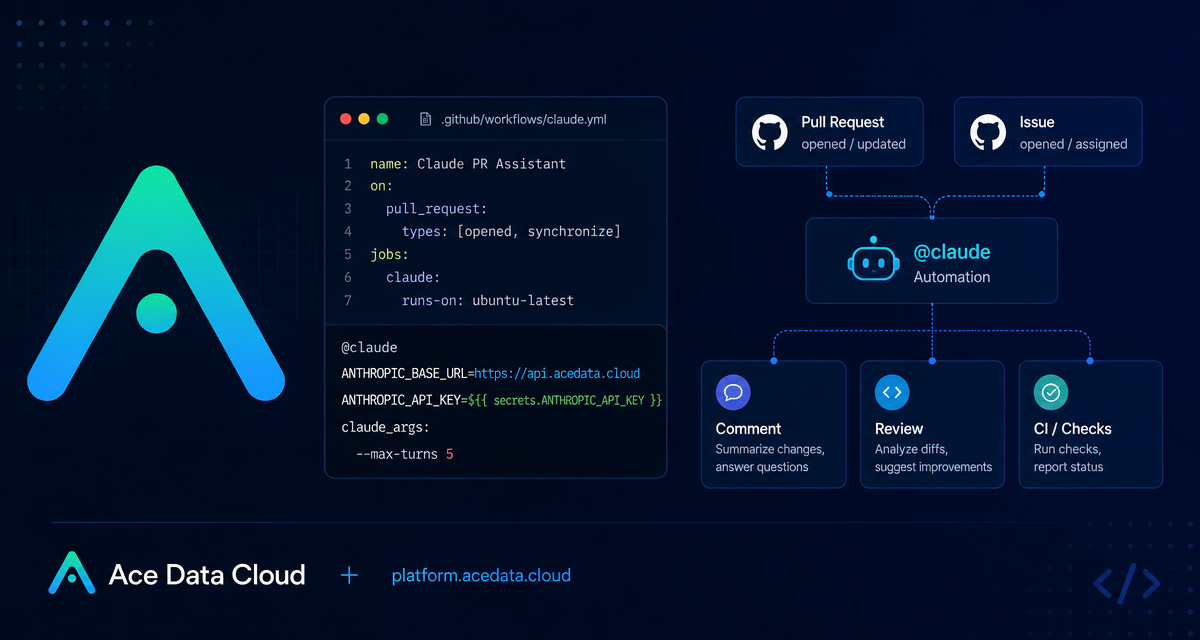
Code review automation is useful only when it fits the way a team already works: issues, pull requests, comments, and CI logs. This guide walks through a practical setup for using Claude Code inside GitHub Actions, routed through Ace Data Cloud, so a repository can respond to @claude comments, review pull requests, and run scheduled engineering tasks without changing your normal GitHub workflow.
What you can do
With the GitHub Actions integration, Claude Code can become part of the repository workflow rather than a separate chat window. The documented setup supports several concrete patterns:
- Respond from issues or pull requests: mention
@claudein an issue or PR comment and ask for implementation, review, debugging, or design help. - Create implementation pull requests: describe a feature or bug in an issue, then ask Claude to turn that task into runnable code.
- Run automatic pull request review: configure a workflow that runs on
pull_requestevents and sends a/reviewprompt. - Automate scheduled repository tasks: use GitHub’s
scheduletrigger to generate reports such as yesterday’s commits and unresolved issues.
The important constraint is that the integration still runs inside GitHub Actions. That means your automation is observable in CI, controlled by repository permissions, and configured as code in .github/workflows/claude.yml.
How it works
The setup has three moving parts. First, the Claude GitHub App needs to be installed on the repository. The app requires repository permissions for Contents, Issues, and Pull requests, each at read and write level, because it may need to modify files, respond to issues, create pull requests, and push changes.
Second, the Ace Data Cloud API token is stored as a GitHub Actions repository secret named ANTHROPIC_API_KEY. The workflow passes that secret to anthropics/claude-code-action@v1 using the anthropic_api_key input. Do not write the token directly into the YAML file.
Third, when using Ace Data Cloud’s proxy endpoint, the workflow sets ANTHROPIC_BASE_URL to https://api.acedata.cloud. This keeps the action interface familiar while routing API traffic through the documented base URL.
Start with explicit comment-based automation
The safest first version is comment-driven. It runs when a user creates an issue comment or pull request review comment, and Claude responds only when the repository conversation includes the trigger phrase. The default trigger phrase documented for the action is @claude.
name: Claude Code
on:
  issue_comment:
    types: [created]
  pull_request_review_comment:
    types: [created]

jobs:
  claude:
    runs-on: ubuntu-latest
    steps:
      - uses: anthropics/claude-code-action@v1
        with:
          anthropic_api_key: ${{ secrets.ANTHROPIC_API_KEY }}
        env:
          ANTHROPIC_BASE_URL: "https://api.acedata.cloud"
After the workflow is enabled, the repository interaction stays simple. In an issue, a maintainer can write:
@claude Implement the functionality based on the description of this Issue
@claude Fix the TypeError in the user dashboard component
@claude How should user authentication for this endpoint be implemented?
This is a good starting point because it avoids surprise runs. A human chooses when to invoke the agent, and the full execution remains visible in the Actions tab.
Add automatic pull request review
Once comment-based usage is working, the next useful step is a review workflow. The documented action supports a prompt input, including a review skill such as /review. It also supports claude_args, which are passed to the Claude Code CLI.
name: Code Review
on:
  pull_request:
    types: [opened, synchronize]

jobs:
  review:
    runs-on: ubuntu-latest
    steps:
      - uses: anthropics/claude-code-action@v1
        with:
          anthropic_api_key: ${{ secrets.ANTHROPIC_API_KEY }}
          prompt: "/review"
          claude_args: "--max-turns 5"
        env:
          ANTHROPIC_BASE_URL: "https://api.acedata.cloud"
The --max-turns argument is especially useful for cost and runtime control. The documentation lists the default maximum dialogue turns as 10; setting --max-turns 5 makes the review bounded and predictable.
Teach the agent your repository standards
For day-to-day engineering work, the most valuable configuration is often not in the workflow file itself. The guide recommends adding a CLAUDE.md file at the repository root. Claude automatically reads it and follows the project’s coding style, review standards, and repository-specific rules.
A minimal CLAUDE.md might define how tests should be run, which directories are generated code, how errors are handled, or what a good pull request should include. Keep this file operational and specific. For example, “run the existing unit tests before proposing a final patch” is more useful than a broad statement such as “write clean code.”
Use scheduled jobs for engineering reports
The same action can run on a cron schedule. The documented example uses GitHub’s schedule trigger and passes a natural-language prompt to generate a daily report:
name: Daily Report
on:
  schedule:
    - cron: "0 9 * * *"

jobs:
  report:
    runs-on: ubuntu-latest
    steps:
      - uses: anthropics/claude-code-action@v1
        with:
          anthropic_api_key: ${{ secrets.ANTHROPIC_API_KEY }}
          prompt: "Generate a summary of yesterday's commits and a report of unresolved Issues"
        env:
          ANTHROPIC_BASE_URL: "https://api.acedata.cloud"
This pattern is useful for maintainers who want a lightweight repository health digest without manually scanning commits and issue queues every morning.
Security and cost controls worth adding early
Treat this like any other CI automation with write access. Keep the API token in ${{ secrets.ANTHROPIC_API_KEY }}, never hard-code it into workflow YAML, and limit GitHub Action permissions to the minimum scope your repository needs. For generated code, manually review suggestions before merging.
For cost control, prefer explicit @claude commands for most workflows, use --max-turns for bounded runs, set workflow-level timeouts, and use GitHub concurrency controls when you expect multiple events to arrive close together. The action also documents additional parameters such as github_token, trigger_phrase, --model, --mcp-config, --allowed-tools, and --debug, which you can introduce only when the basic flow is stable.
Closing notes
The practical value of this setup is not “AI in CI” by itself. It is that repository tasks become addressable from the places where builders already work: issues, pull requests, review comments, and scheduled workflows. Start with explicit @claude comments, add bounded PR review, then document your project standards in CLAUDE.md so the automation behaves like part of the team’s engineering process.
For the original configuration reference, see the Claude Code GitHub Actions Integration Guide.


Comments
Post a Comment