A Practical Guide to Building Lyric Timelines with the Suno Timing API
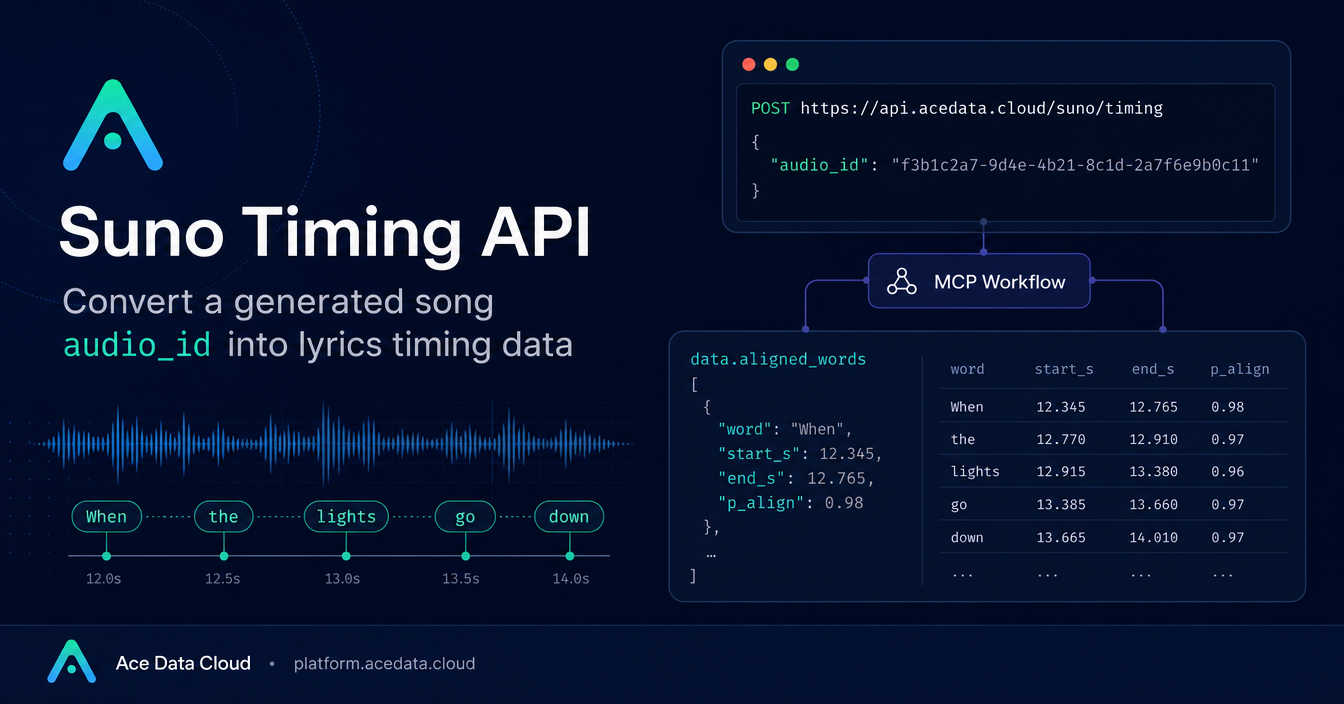
If you have ever tried to turn an AI-generated song into a lyric video, karaoke view, subtitle track, or visualizer, the hard part is not just getting the audio. It is knowing exactly when each word appears.
The Suno Timing API on Ace Data Cloud is a small but useful endpoint for that job. You give it a generated song ID, and it returns timing information for the lyrics, including word-level start and end timestamps. That makes it possible to build interfaces where the text, waveform, and playback position stay in sync.
What you can do
The API is designed for secondary creation around generated music. In practical terms, the returned timing data can help you build:
- lyric videos that highlight words as the track plays,
- karaoke-style readers for generated songs,
- subtitle timelines for short videos,
- waveform-based editors that align text to audio,
- quality checks that inspect whether individual lyric segments aligned successfully.
The important point is that the API does not require a long configuration object. According to the documentation, it has one input parameter: audio_id. That value is the official generated song ID.
How it works
The endpoint is:
POST https://api.acedata.cloud/suno/timingThe request body contains the generated song ID:
{
  "audio_id": "ec13e502-d043-4eb2-92ee-e900c6da69d1"
}
The response includes a top-level success flag, a task_id, a trace_id, and a data object. Inside data, the main field to work with is aligned_words.
Each item in data.aligned_words represents a word or phrase with timing information:
word: the actual lyric word or phrase,success: whether alignment for that word succeeded,start_s: the word start time in seconds,end_s: the word end time in seconds,p_align: the alignment confidence score, from0to1.
The response may also include waveform_data, hoot_cer, and is_streamed under data, as shown in the documentation example.
Call the endpoint from Python
Here is the Python example based directly on the documented request shape. Replace {token} with your own Ace Data Cloud API token and use the audio_id for the generated song you want to align.
import requests

url = "https://api.acedata.cloud/suno/timing"

headers = {
    "accept": "application/json",
    "authorization": "Bearer {token}",
    "content-type": "application/json"
}

payload = {
    "audio_id": "ec13e502-d043-4eb2-92ee-e900c6da69d1"
}

response = requests.post(url, json=payload, headers=headers)
print(response.text)
Turn aligned words into a lyric timeline
Once you have data.aligned_words, you can treat it as a timeline. The simplest renderer checks the current playback time, then marks the active word when start_s <= current_time < end_s.
def active_words(aligned_words, current_time):
    return [
        item for item in aligned_words
        if item.get("success")
        and item.get("start_s", 0) <= current_time
        and current_time < item.get("end_s", 0)
    ]
This is enough for a first pass at a lyric highlighter. For a production editor, I would also keep the raw word text, preserve line breaks such as
, and expose timing handles so a human can correct segments if needed.
Use confidence as a product signal
The p_align field is useful because not every alignment should be treated equally. A high-confidence word can be highlighted automatically. A lower-confidence segment might still be displayed, but you may want to mark it for review in an editor.
A practical pattern is to filter successful alignments first, then branch based on confidence:
def split_by_confidence(aligned_words, threshold=0.75):
    strong = []
    needs_review = []

    for item in aligned_words:
        if not item.get("success"):
            needs_review.append(item)
        elif item.get("p_align", 0) >= threshold:
            strong.append(item)
        else:
            needs_review.append(item)

    return strong, needs_review
This keeps the user experience honest: the app can automate the boring part while still giving creators a way to inspect uncertain lyric timing.
Build around the returned shape
Because the API returns seconds in start_s and end_s, it maps naturally to browser audio and video elements, which also expose playback time in seconds. That means your frontend does not need a special time format conversion layer for the core lyric sync loop.
A minimal data flow looks like this:
- Generate or select a Suno song and keep its official
audio_id. - Send
audio_idtohttps://api.acedata.cloud/suno/timing. - Read
data.aligned_wordsfrom the response. - During playback, compare the media current time with each item’s
start_sandend_s. - Use
successandp_alignto decide what can be automated and what should be reviewed.
That is the whole integration surface, which is why this API is a good fit for small builder workflows: lyric overlays, short-form music visuals, internal review tools, or any app where generated music needs a usable text timeline.
You can read the original Ace Data Cloud documentation here: Suno Timing API Integration Guide.


Comments
Post a Comment